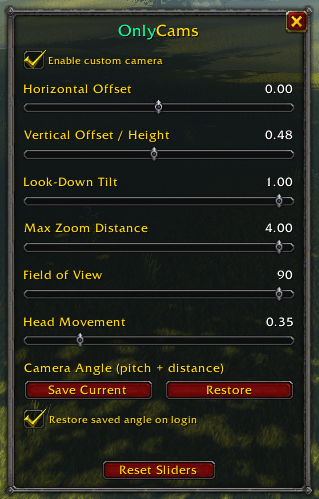
OnlyCams_Gallery1.PNG
Description
OnlyCams
Camera addon that let's you adjust the camera position (offset). Change the horizontal and vertical offsets.
OnlyCams gives you a small menu with sliders so you can set it up the way you like.
What you can adjust
Horizontal Offset: Moves the camera left or right so your character sits off-center, over-the-shoulder style.
Vertical Offset Height: Adjust the height of the camera on screen so the camera feels like it sits higher. Most noticeable when zoomed out.
Look-Down Tilt: How much of that vertical offset is kept when you look down at your character.
Max Zoom Distance: How far out you can zoom with the mouse wheel.
Field of View: How wide the view is.
Head Movement: The camera follows your character's head as you run, ride or emote. Leave it at 0 for a steady camera. This is not the same as the game's Head Bob option, which only affects first person.
You can also save your current camera angle and zoom with one button, restore it with another, and have it restored automatically when you log in.
Hover over any slider for a short description of what it does. Changes apply instantly, so just drag and watch.
How To Use
Type /oc or /onlycams to open the menu.
Check the box at the top Enable Custom Camera
Change the settings
Click Save Current at the bottom
Commands
/oc or /onlycams - open or close the menu/oc on - turn the custom camera on/oc off - turn it off and put your old camera settings back/oc debug - prints the current camera settings, handy if something isn't working
Only Cams Team