OmniumObservator
- By
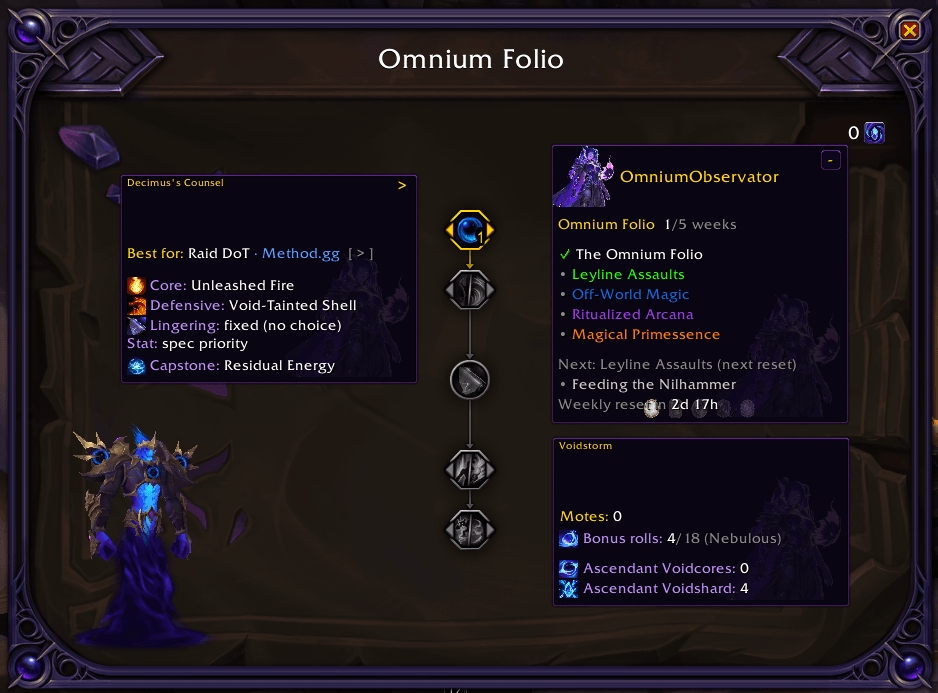
OmniumObservator embeds **inside the Omnium Folio frame** — the patch 12.0.7 weekly rune system — and tracks everything around it.
Description
OmniumObservator
Omnium Folio companion for World of Warcraft: Midnight 12.0.7+.
OmniumObservator embeds inside the Omnium Folio frame — the patch 12.0.7 weekly rune system — and tracks everything around it: your weekly rune unlocks, the Decimus Voidstorm economy (Motes, bonus rolls, Ascendant Voidcores/Voidshard), recommended rune builds, and the weekly reset. It also brings Decimus himself into the frame as an interactive, fully voiced 3D model. A standalone panel is available too, for an at-a-glance view without opening the folio.
Features
- In-folio embed — when you open the Omnium Folio, OmniumObservator anchors draggable panels inside it, flanking the rune tree:
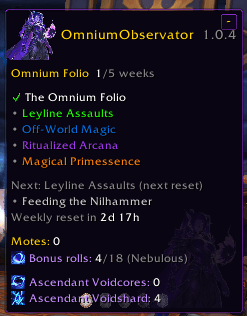
- This week — folio progress, the 5 weekly runes (colored by loot rarity), the current/next Seeking Knowledge quest, Feeding the Nilhammer, and the weekly reset countdown
- Voidstorm — Motes of Omnial Inquiry, Nebulous bonus rolls (held/weekly cap), Ascendant Voidcores + Voidshard, and your live Void-Touched Orbs (shown when you're specced into that rune)
- Decimus's Counsel (optional) — recommended rune builds with real rune icons
- Rarity-colored weeks — the 5 weekly runes light up white → green → blue → purple → orange (common → legendary) as the ladder fills
- Decimus, in person — an interactive 3D Decimus model you can summon into the folio: left-drag to rotate, scroll to zoom, right-drag to move him. He speaks his real in-game voice lines (with a text bubble) on open and when clicked
- Rune advisor — "Decimus's Counsel" cycles 8 recommended builds from two sources: the Omnium Folio guide (M+ / Raid ST / Raid DoT / PvP / Casual) and Method.gg (DPS / M+ / Raid DoT). They agree on most rows and differ on the core rune, so you can compare
- Standalone panel — the same info in a movable, lockable window for a quick glance without opening the folio
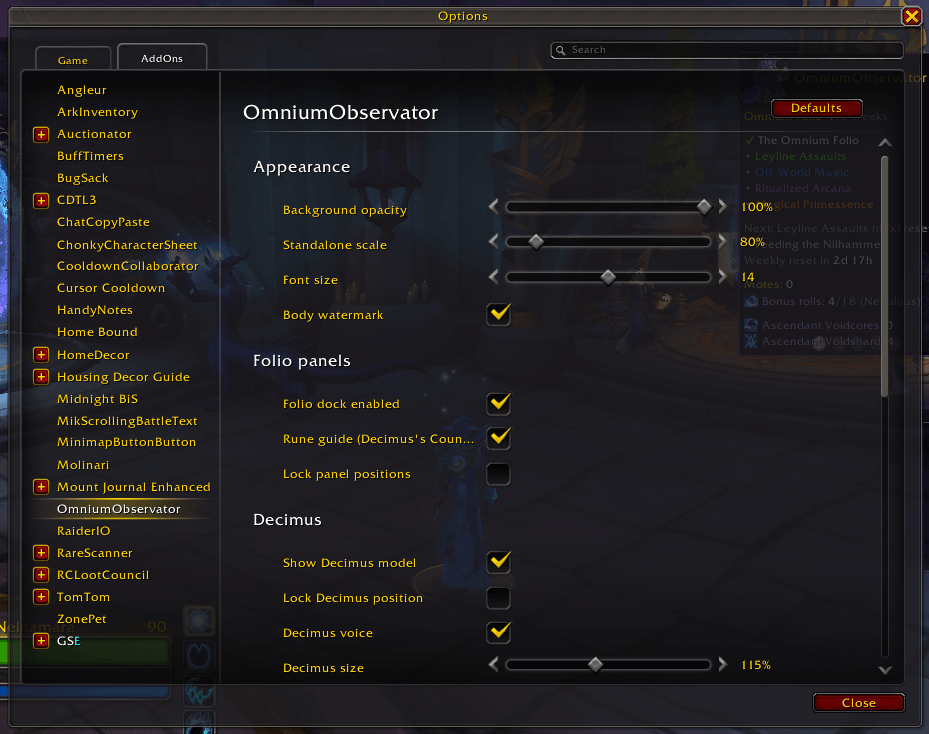
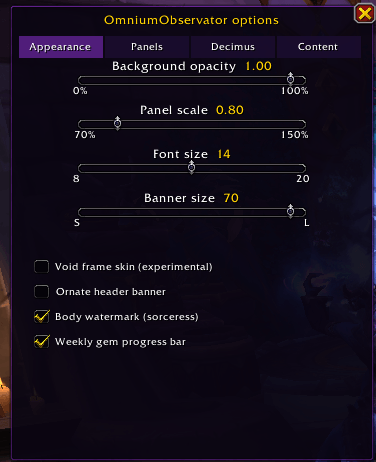
- Options panel — opacity, scale, font size, Decimus size, and a stack of toggles, all in one place
- Minimap button — left-click toggles the panel, right-click opens options
Setup
None. OmniumObservator auto-detects which of the five "Seeking Knowledge" weeks is current (the weeks are permanent one-time unlocks, so it infers progress from completed quests). Just log in, open the Omnium Folio, and the panels appear. /oo toggles the standalone panel.
Slash Commands
| Command | Effect |
|---|---|
/oo |
Toggle the standalone panel |
/oo config |
Open the options panel |
/oo dock |
Toggle the in-folio dock |
/oo build [role] |
Cycle the recommended rune build, or set one (m+, raid, dot, pvp, casual, method) |
/oo font <8-20> |
Set the panel font size |
/oo model |
Toggle the Decimus 3D model |
/oo voice |
Toggle Decimus's voice lines |
/oo lock / /oo unlock |
Lock or unlock frame dragging |
/oo reset |
Reset the standalone panel position |
Most appearance and behavior controls live in /oo config (or right-click the minimap button): background opacity (0–100%, independent of text/icons), scale, font size, Decimus model size + a position reset, and toggles for the dock, model, voice, rune guide, body watermark, and minimap button.
Compatibility
- WoW Midnight 12.0.7+
- No library dependencies
- Reads the folio via
C_Traits(tree 1186), currencies viaC_CurrencyInfo, items viaC_Item, and never modifies the Blizzard folio frame (the panels overlay it, parented toUIParent)
Changelog
v1.0.4
In-folio embed
- The tracker now embeds inside the Omnium Folio frame as draggable panels flanking the rune tree — "This week" (left) and "Voidstorm" (right), plus an optional "Decimus's Counsel" rune-guide panel. Each panel remembers where you drag it; the standalone panel hides while the folio is open.
Decimus Voidstorm economy
- The Voidstorm panel tracks the full economy: Motes of Omnial Inquiry, Nebulous bonus rolls (held / weekly cap), Ascendant Voidcores and Ascendant Voidshard counts, and the Void-Touched Orbs counter (shown only when you're specced into that rune).
- Feeding the Nilhammer weekly status added to the This-week panel.
Decimus, your void mentor
- An interactive 3D Decimus model can be summoned into the folio (
/oo model): left-drag to rotate, scroll to zoom, right-drag to move him anywhere; size slider + position reset in options. - He speaks his real in-game voice lines — a text bubble plus voice-over — when the folio opens and when you click him (
/oo voiceto toggle).
Decimus's Counsel — rune advisor
- A recommended-build panel with real rune icons, cycling 8 builds across two sources: the Omnium Folio guide and Method.gg (the raiding/DPS authority).
[>]header button or/oo buildto cycle.
Appearance & controls
- Weekly runes now light up in WoW loot-rarity colors (white → green → blue → purple → orange).
- New options panel (
/oo config/ right-click minimap): background opacity (0–100%, separate from text and icons so they stay crisp), scale, font size, Decimus model size + reset, and toggles for the dock, model, voice, rune guide, watermark, and minimap button. - Real game-icon chips on every resource row; a larger mascot portrait + a faint body watermark; void-purple borders; wider panels.
- Collapsible weekly list (
[+]/[-]header button). - Fixed an options-panel freeze (Escape now reliably closes it).
v1.0.3
- Omnium Folio dock — companion panel anchored to the in-game folio frame showing Motes, Void-Touched Orbs, the weekly reset countdown, and week progress
- Motes of Omnial Inquiry — live count from the folio trait tree (
C_Traits, tree 1186 / currency 4230) - Weekly reset timer; suite restyle; week-progress check/bullet visuals; orb counter hardened against a secret value
v1.0.2
- Live Void-Touched Orbs counter; minimap button and AddOns-list icon
v1.0.1
- Auto-detect the current "Seeking Knowledge" week; Interface 120007
v1.0.0
- Initial release: weekly unlock tracker, achievement display, weekly quest tracking
Roadmap
- <input type="checkbox" disabled style="margin: 0px 0.35em 0.25em -1.6em; vertical-align: middle;"> Curved corners + void background — custom border and panel-body artwork
- <input type="checkbox" disabled style="margin: 0px 0.35em 0.25em -1.6em; vertical-align: middle;"> Per-class stat-rune picks — pull Method.gg's spec-specific stat rune instead of the generic "spec priority" line
- <input type="checkbox" disabled style="margin: 0px 0.35em 0.25em -1.6em; vertical-align: middle;"> Fully voiced Decimus — pair each voice line to its bubble text (and add his full line set)
- <input type="checkbox" disabled style="margin: 0px 0.35em 0.25em -1.6em; vertical-align: middle;"> More weekly data — Nightmare Prey Hunts, a Voidhammer forge-progress bar (Voidshards → next Ascendant Voidcore), Spark cooldown, catalyst charges
- <input type="checkbox" disabled style="margin: 0px 0.35em 0.25em -1.6em; vertical-align: middle;"> Slotted-rune readout — show which runes you've actually picked via
C_Traitsnode info
Author
Nelnamara — CurseForge · GitHub
OmniumObservator Team