Description
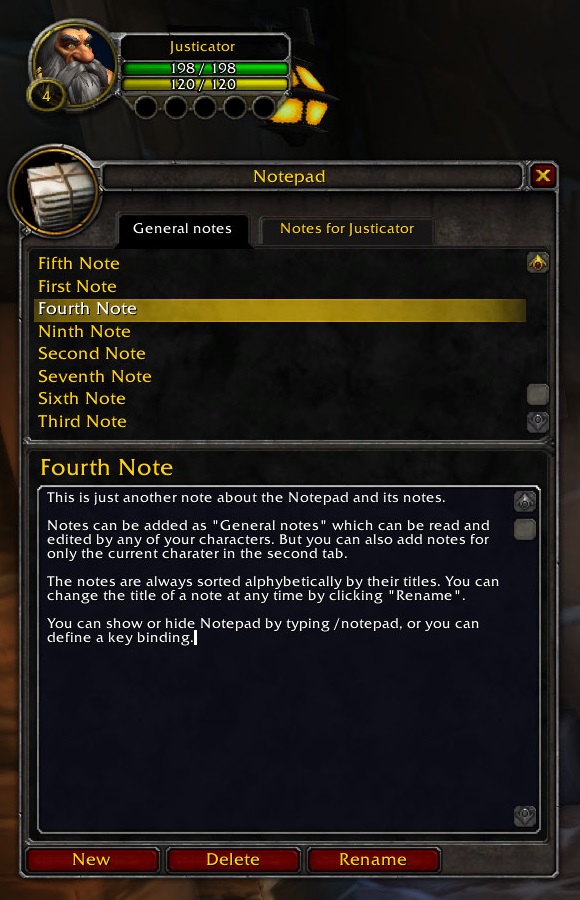
Notepad is a simple tool to manage your personal ingame notes without having to use text files in your file system.
There are both global and character-specific notes.
Links (items, spells, etc.) are supported.
Show or hide Notepad via
- command: /notepad
- key binding
- minimap button
- broker addon (Titan Panel, etc.)
FAQ:
Q: Pressing the Save button always reloads the UI. Is that necessary?
A: Yes and no. There are two ways for addons to save their data: reloading the UI and logging out. So, I recommend using the Save button only after changing lots of text to make sure it's not lost in case of a game crash. Oh, and of course don't Alt+F4 which also does not save.
Reporting errors:
You are welcome to report bugs in the comments. Please support me in finding the encountered errors by providing the following information:
- WoW version (like Retail, Classic, TBC, ...)
- Notepad version (e.g. from CurseForge client)
- Wow client language (like English, Russian, ...)
- Error log if possible. If you do not have an addon like Bugsack for copying errors and you do not see the WoW error window popping up, you can enable it by typing
/run SetCVar("scriptErrors", 1)in the chat input and later disable it again with/run SetCVar("scriptErrors", 0). You might have to relog or/console reloaduito get the error again.
The Notepad Team


Owner