Note Bag Forever
- By
Note Bag Forever turns personal notes into virtual World of Warcraft inventory items.
Description
Note Bag Forever
Turn your notes into items you carry.
Note Bag Forever is a WoW: Forever note-taking addon built around the World of Warcraft inventory metaphor. Instead of organizing information in a conventional desktop-style notebook, your notes live inside a Blizzard-style bag as virtual items.
Create notes, assign them item-quality colors, drag them between slots, stack related notes together like folders, float important notes around your minimap or anywhere on screen, and even send copies to other Note Bag Forever users.
The goal is to make note-taking feel like it belongs inside World of Warcraft rather than like a text editor pasted on top of it.
Notes as Inventory Items
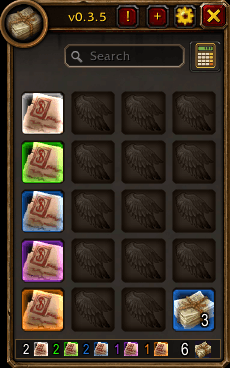
Every note occupies a slot in your Note Bag.
You can:
- Create new notes with the + button
- Left-click a note to open it
- Right-click for note actions
- Drag notes between slots
- Swap or reorganize notes
- Drag a note outside the bag to delete it
- Search your entire bag
- Keep several notes open at once
- Resize and reposition note windows
- Edit notes directly with automatic saving
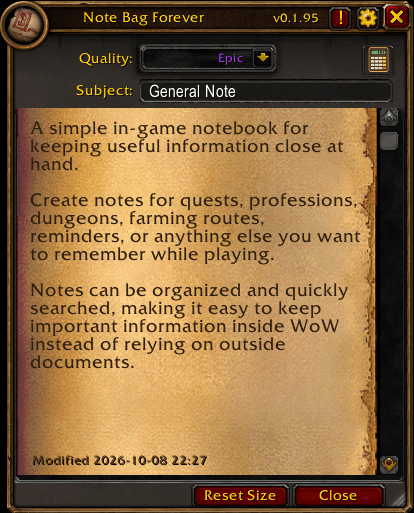
Notes use a mail-inspired parchment reader and Blizzard-native controls to stay visually consistent with the WoW interface.
Note Stacks
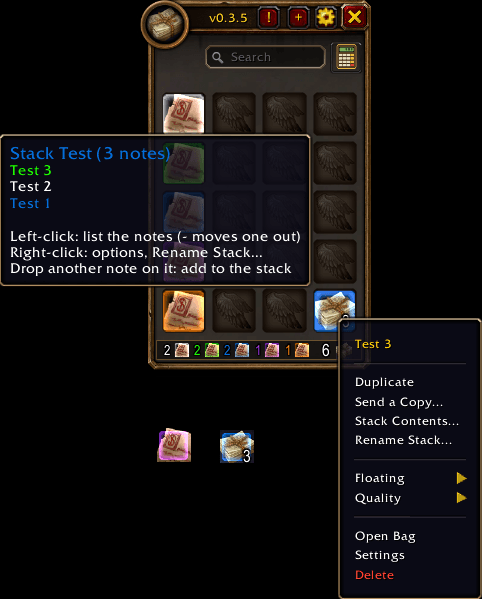
Related notes can be stacked together, giving Note Bag its own WoW-style alternative to conventional folders.
Simply drag one note onto another.
A stack:
- Occupies only one bag slot
- Displays a bundled-note icon
- Shows the number of notes inside like an item stack count
- Uses the highest note quality in the stack for its border color
- Can contain notes of different qualities
- Can be searched just like normal notes
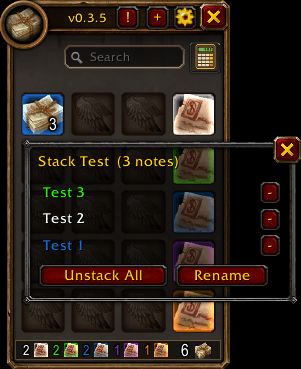
Left-click a stack to open its contents.
From the Stack window you can:
- Open any note in the stack
- Remove individual notes from the stack
- Unstack all notes
- Rename the stack
Rename Your Stacks
Right-click any stack and choose Rename Stack...
Examples:
- Priest Leveling
- Raid Strategies
- Profession Notes
- Dungeon Routes
- Guild Information
The custom name appears in the stack tooltip and Stack window.
Leaving the name empty restores the default stack name.
Stack names remain attached to the stack even when its contents change.
Dropping another note onto an existing stack adds it to that stack.
Hold Ctrl while dropping when you want normal slot movement instead of stacking behavior.
Note Quality
Notes can be assigned familiar World of Warcraft item qualities:
- Common
- Uncommon
- Rare
- Epic
- Legendary
Quality changes the note's visual importance using familiar WoW colors.
Stacks display the highest quality represented by the notes contained inside them.
This makes important notes easy to recognize at a glance while preserving the inventory-item concept.
Floating Notes and Stacks
Important notes do not have to stay hidden inside the bag.
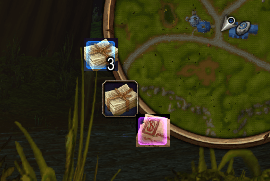
Notes can be displayed as small floating buttons:
- Around the minimap
- Or detached anywhere on your UI
The actual note remains safely stored in its Note Bag slot.
For floating notes:
- Left-click opens or closes the note
- Right-click opens note options
- Middle-click opens or closes the Note Bag
Stacks can float too.
A floating stack displays the stack icon, note count, and quality coloring.
Left-clicking it opens the stack contents so you can quickly access the notes inside.
Search
Use the search field at the top of the bag to quickly find information.
Search includes normal notes as well as notes contained inside stacks, so organizing your notes does not make them harder to find.
Live Note Editing
Notes are always editable.
There is no separate Edit or Save mode. Changes are saved automatically while you type.
The editor supports normal WoW text-editing behavior including:
- Click to position the cursor
- Mouse-drag text selection
- Shift + arrow selection
- Keyboard navigation
- Multiline text
- Scrolling
- Resizable note windows
The note body uses Blizzard's native scrolling EditBox system together with a mail-style parchment appearance.
Multiple Open Notes
You can have multiple notes open at the same time.
Opening another note creates another reader instead of replacing the one you are currently viewing.
Opening a note that is already open simply brings its existing reader back to the front.
This makes it possible to compare guides, lists, strategies, leveling information, or other notes side by side.
Send Notes to Other Players
Note Bag Forever includes player-to-player note sharing.
Right-click a note and choose Send a Copy...
You can:
- Enter a player name
- Use your current target
- Select a party member
- Select a raid member
The receiving player gets an Accept / Decline request.
Your original note remains in your bag. The other player receives a copy.
For safety, the full note text is transferred only after the receiving player accepts the offer.
Note sharing includes safeguards such as:
- Transfer size limits
- Chunked message transfer
- Flood protection
- Incoming text sanitization
- Controlled active transfers
- Optional disabling of incoming note trading
Both players must have Note Bag Forever installed, be online, and be able to communicate through WoW addon messages.
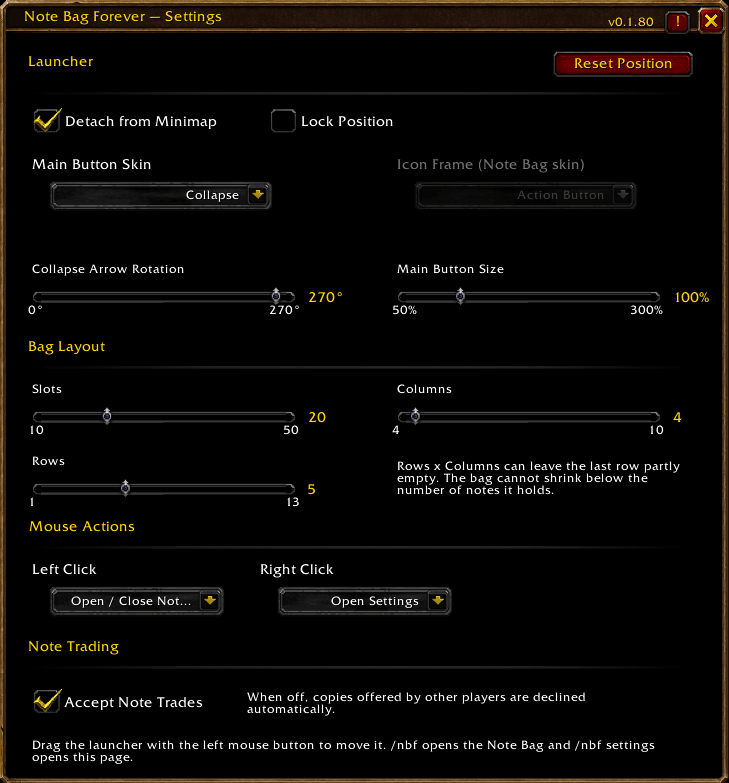
Note trading can be disabled from Settings.
Configurable Note Bag
The Note Bag itself can be customized.
Choose the number of available slots and the number of columns used to display them.
The Blizzard-style bag frame automatically adjusts its layout to match your configuration.
When reducing the number of available slots, Note Bag protects existing notes and prevents them from being silently lost.
A stack counts as one occupied bag slot regardless of how many notes it contains, allowing stacks to function as real inventory-style organization.
Minimap Launcher
Note Bag Forever includes a configurable launcher.
Default controls:
- Left-click: Open or close Note Bag
- Right-click: Settings
- Drag: Move the launcher
The launcher can remain attached to the minimap or be detached and positioned elsewhere on the screen.
Its position is remembered between sessions.
Launcher mouse actions can also be customized.
Launcher Skins
Several Forever-style launcher appearances are available.
Depending on the selected style, you can customize the launcher appearance, frame treatment, scale, and positioning.
The launcher is designed to stay visually consistent with the rest of the Forever addon collection and the World of Warcraft interface.
Scientific Calculator
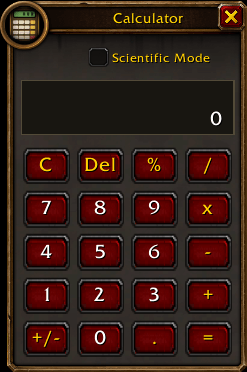
Note Bag Forever also contains an integrated calculator accessible directly from the addon interface.
The standard calculator supports normal arithmetic and both mouse and keyboard input.
Keyboard support includes:
- Number keys
- Numpad
+-*/.- Enter
- Backspace
- Delete
It also supports repeated = calculations.
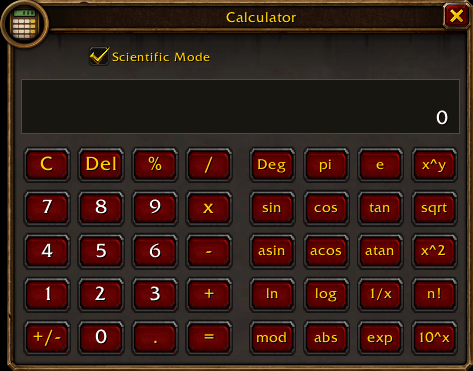
Scientific Mode adds functions such as:
- Degrees and radians
- sin
- cos
- tan
- asin
- acos
- atan
- √x
- x²
- xʸ
- mod
- ln
- log
- 1/x
- n!
- abs
- exp
- 10ˣ
- π
- e
The calculator is movable and remembers its position.
Blizzard-Style Interface
Note Bag Forever is intentionally designed to look at home inside World of Warcraft.
It uses Blizzard-style:
- Bag slots
- Item-quality coloring
- Parchment
- Frames
- Buttons
- Search controls
- Dropdown menus
- Scrollbars
- Tooltips
- Fonts
- Context menus
The addon is intended to feel less like a separate productivity application and more like a feature that could naturally exist inside WoW.
Forever Addon Catalogue
The ! button opens the embedded Darkspore Forever Catalogue, providing quick access to information about other addons in the Forever collection.
Commands
/nbf
Open or close the Note Bag.
/nbf settings
Open Note Bag Forever settings.
WoW: Forever
Note Bag Forever is built specifically for World of Warcraft: Forever.
It is not intended as a generic notebook addon transplanted between every WoW client. Its interface and behavior are designed around the Forever experience.
The Idea Behind Note Bag Forever
Most note addons treat WoW like a place to display a conventional notebook.
Note Bag Forever takes the opposite approach.
Notes are items.
The notebook is a bag.
Folders are stacks.
Important notes can float beside your minimap.
And notes can be handed to another player.
Your information becomes another part of your World of Warcraft interface.
Carry your notes. Stack your notes. Share your notes.
Note Bag Forever Team