Mount Pilot — Take control of your mount rotation.
- By
Take control of your mount rotation with custom lists, bans, filters, and smarter no-repeat summoning.
Mountpilot new.png
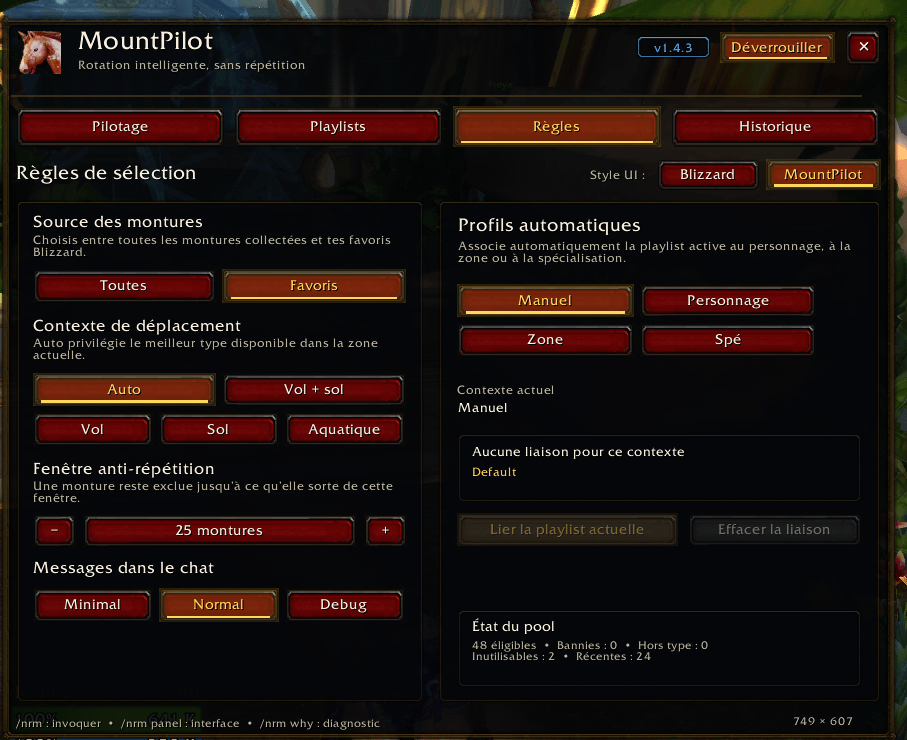
Mountpilot new-Parametres.png
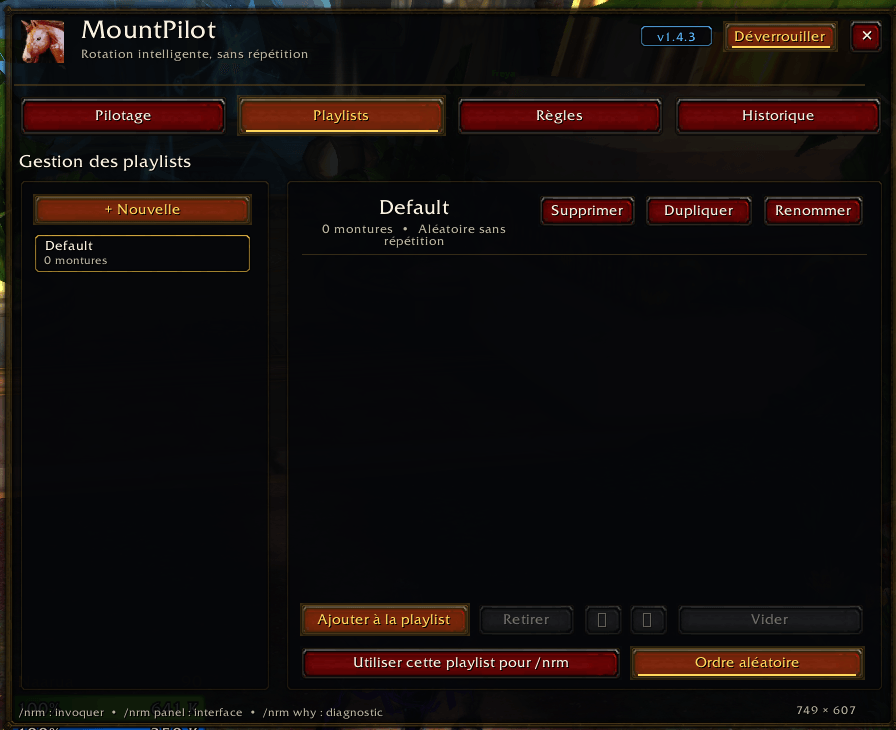
Mountpilot new-Playlist.png

NRM image 4.png
Description
Mount Pilot — Smart mount rotation, playlists, profiles, and no-repeat summoning.
Mount Pilot is a World of Warcraft addon designed for players who want more control over their mount collection.
If you own a lot of mounts but feel like the same ones keep appearing again and again, Mount Pilot gives you a smarter way to summon them. It can reduce repetition, skip mounts you do not want, use your Blizzard favorites, filter by mount type, follow custom rotations, and now manage multiple playlists and profiles directly from the Mount Journal.
Mount Pilot does not replace player input. You still summon mounts manually with a macro, button, or keybind, following World of Warcraft addon restrictions.
Features
- Smart mount rotation with reduced repetition
- Custom mount rotation list
- Multiple mount playlists
- Character, zone, and specialization profile support
- Drag & drop support to reorder your custom rotation
- Ban or unban mounts directly from the Mount Journal
- Optional “favorites only” mode
- Optional “all usable mounts” mode
- Mount type filters:
- Auto
- Flying and ground
- Flying only
- Ground only
- Aquatic
- Smart auto mode that tries to choose a better mount depending on your situation
- Automatically skips banned or currently unusable mounts
- “Why?” diagnostic tool to explain why mounts are skipped
- Quiet mode to reduce chat messages
- Adjustable chat output:
- Minimal
- Normal
- Debug
- Side panel integrated next to the Mount Journal
- Options panel opened from a gear icon
- Clickable option buttons so users do not need to remember every command
- Persistent settings between sessions
- Simple macro support for your action bar
Mount Journal Integration
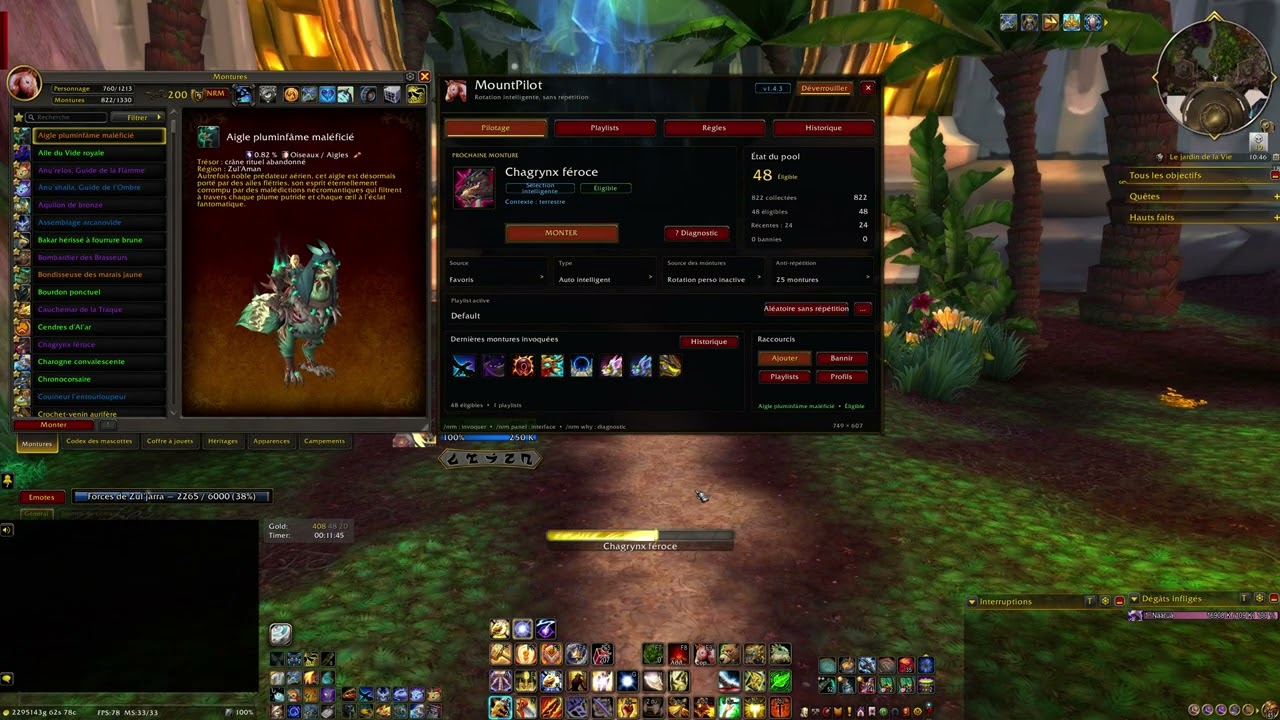
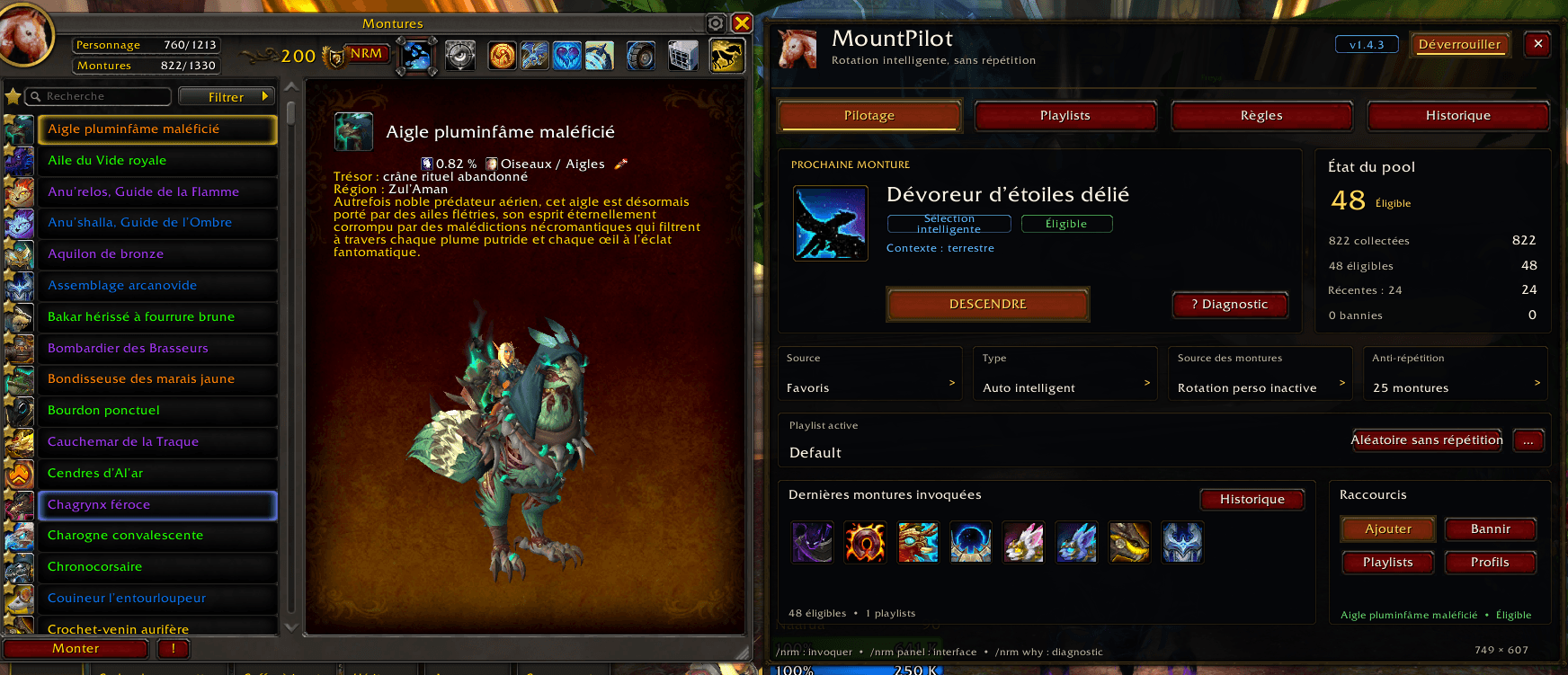
Mount Pilot adds a dedicated side panel next to the Mount Journal.
From this panel, you can manage your rotation, ban mounts, add selected mounts to your custom list, reorder mounts, switch options, open the settings panel, and control most features without typing commands.
The options menu opens from a gear icon near the top-right of the addon panel, keeping the main interface cleaner while still making the important settings easy to access.
Custom Rotation
Mount Pilot allows you to create your own personal mount rotation.
Open the Mount Journal, select a mount, and add it to your custom list. You can reorder the list, remove mounts, clear the rotation, and enable or disable custom rotation mode whenever you want.
When custom rotation is enabled, Mount Pilot follows your list instead of using a random pool. Banned or currently unusable mounts are automatically skipped.
Drag & Drop Rotation
You can reorder your custom rotation with drag & drop directly inside the Mount Pilot panel.
This makes it easier to build the exact mount order you want without relying only on up and down buttons.
Playlists
Mount Pilot supports multiple playlists, allowing you to create different mount collections for different moods, characters, themes, or activities.
For example, you can create playlists such as:
- Dragons
- Mechanical mounts
- Roleplay mounts
- Rare mounts
- Dark mounts
- Favorite ground mounts
You can switch between playlists and keep your mount setups more organized.
Profiles
Mount Pilot includes profile support so your setup can adapt to how you play.
Profiles can be used manually or linked to:
- Character
- Zone
- Specialization
This allows different characters, areas, or specs to use different mount preferences and rotations.
Mount Banning
Do you keep getting mounts you do not want to use?
Simply select a mount in the Mount Journal and ban it. Banned mounts are excluded from Mount Pilot rotation modes, including random rotation, favorites mode, custom rotations, and playlists.
You can unban mounts at any time.
Mount Type Filters
Mount Pilot lets you decide what kind of mounts should be used:
- Auto
- Flying and ground mounts
- Flying mounts only
- Ground mounts only
- Aquatic mounts
The auto mode tries to choose a more appropriate mount depending on the situation, such as favoring aquatic mounts while swimming or flying-capable mounts when flying is available.
Diagnostic Tool
Mount Pilot includes a “Why?” diagnostic feature.
This helps explain why a mount may not be selected. For example, a mount may be skipped because it is banned, not usable in the current area, outside the selected filter, not part of the current playlist, or recently used.
This is useful when you want to understand exactly how the addon is choosing mounts.
Chat Message Control
Mount Pilot includes several chat output modes:
- Minimal
- Normal
- Debug
You can also enable quiet mode if you want fewer messages in chat.
This keeps the addon clean during normal gameplay while still allowing debug information when needed.
Action Bar Macro
Create a macro with:
#showtooltip
/nrm
Place it on your action bar and use it like a normal mount button.
When you are not mounted, it summons the next eligible mount from your Mount Pilot rotation.
When you are already mounted, it dismounts you.
Slash Commands
Main command
/nrm
Summons the next mount or dismounts if already mounted.
Panel
/nrm panel
Shows or hides the Mount Pilot side panel.
Modes
/nrm mode all
Uses all collected and usable mounts.
/nrm mode fav
Uses only Blizzard favorite mounts.
Mount type filters
/nrm type auto
Uses smart automatic mount selection.
/nrm type both
Uses both flying and ground mounts.
/nrm type flying
Uses flying mounts only.
/nrm type ground
Uses ground mounts only.
/nrm type aquatic
Uses aquatic mounts only.
Bans
/nrm ban
Bans the currently selected, active, or last summoned mount.
/nrm unban MountName
Unbans a mount.
Custom rotation
/nrm custom on
/nrm custom off
/nrm custom list
/nrm custom clear
Manages the custom rotation mode.
Playlists
/nrm playlist create Name
Creates a new playlist.
/nrm playlist use Name
Switches to a playlist.
/nrm playlist next
Switches to the next playlist.
/nrm playlist delete Name
Deletes a playlist.
/nrm playlist list
Lists available playlists.
Profiles
/nrm profile mode manual
Uses manual profile selection.
/nrm profile mode character
Uses character-based profiles.
/nrm profile mode zone
Uses zone-based profiles.
/nrm profile mode spec
Uses specialization-based profiles.
/nrm profile apply
Applies the current profile.
Diagnostics and chat output
/nrm why
Explains why mounts may be skipped or why no mount is available.
/nrm quiet
Enables quiet mode.
/nrm announce minimal
Uses minimal chat output.
/nrm announce normal
Uses normal chat output.
/nrm announce debug
Uses debug chat output.
Notes
Mount Pilot does not automatically summon mounts without player input. You still need to click a button, press a keybind, or use the /nrm macro. This follows World of Warcraft addon restrictions.
Mount Pilot only controls mounts summoned through the addon. It cannot prevent Blizzard’s native mount buttons from summoning a mount outside of Mount Pilot’s rotation rules.
Why Use Mount Pilot?
If you own hundreds of mounts but feel like you always see the same few, Mount Pilot gives you full control over your collection.
Build custom rotations, create playlists, use different profiles, exclude mounts you dislike, filter by mount type, reduce repetition, and make your mount collection feel fresh again.
Mount Pilot — Take control of your mount rotation. Team