NKThreat – Threat Meter & Threat Nameplates, Enemy List, Aggro Alerts [Forever/TBC/Classic/MoP/Retail]
- By
Threat meter for WoW Forever, TBC Anniversary, Classic Era, Hardcore & more. Warns DPS and healers before they pull aggro, shows tanks which enemies are slipping. Optional: TPS, threat on nameplates and unit frames, taunt alerts, fight analyzer, themes.
NKThreat – Threat Meter & Threat Analysis
NKThreat is a threat meter addon for World of Warcraft. It warns damage dealers (DPS) and healers before they pull aggro, and shows tanks which enemies they are holding and which are slipping.
- Clients: WoW Forever, TBC Anniversary (the main development client), Classic Era incl. Season of Discovery and Hardcore, MoP Classic, Titan Reforged and Retail. One download for all.
- After install: a setup assistant asks for your role and turns on the threat window and a flash and sound warning. Damage dealers also get a target bar, tanks a few more modules; the rest stays off until you switch it on.
- Nothing else required: no dependencies, and nobody else in your group needs the addon.
- WoW Forever and Retail: the game hides some threat numbers from addons, mainly against dungeon and raid bosses. NKThreat shows what is still readable and says where something is missing.
Getting started
The setup assistant opens on your first login. On top of the threat window and warning, damage dealers and tanks get the Target Bar, and tanks also the Enemy List, Threat Grid, nameplate overlays, taunt alerts and aggro messages. It also lets you pick a theme and places the windows for you.
If you skip the assistant, only the threat window is on and the warnings stay silent until you pick an output for them (/nkt setup reopens the assistant). /nkt opens the options, and /nkt test shows sample data so you can arrange things out of combat.
Threat window and warnings
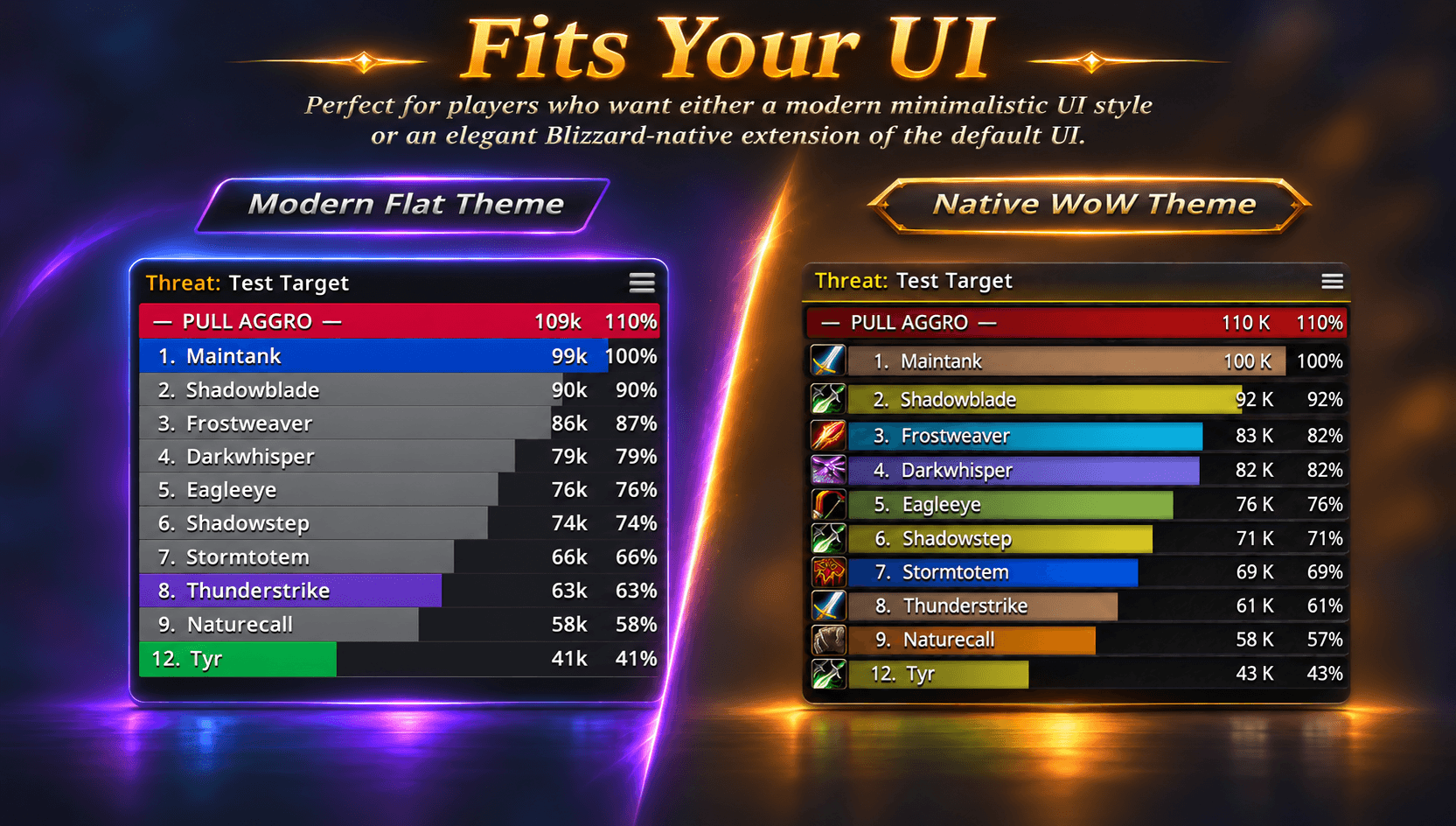
Threat window
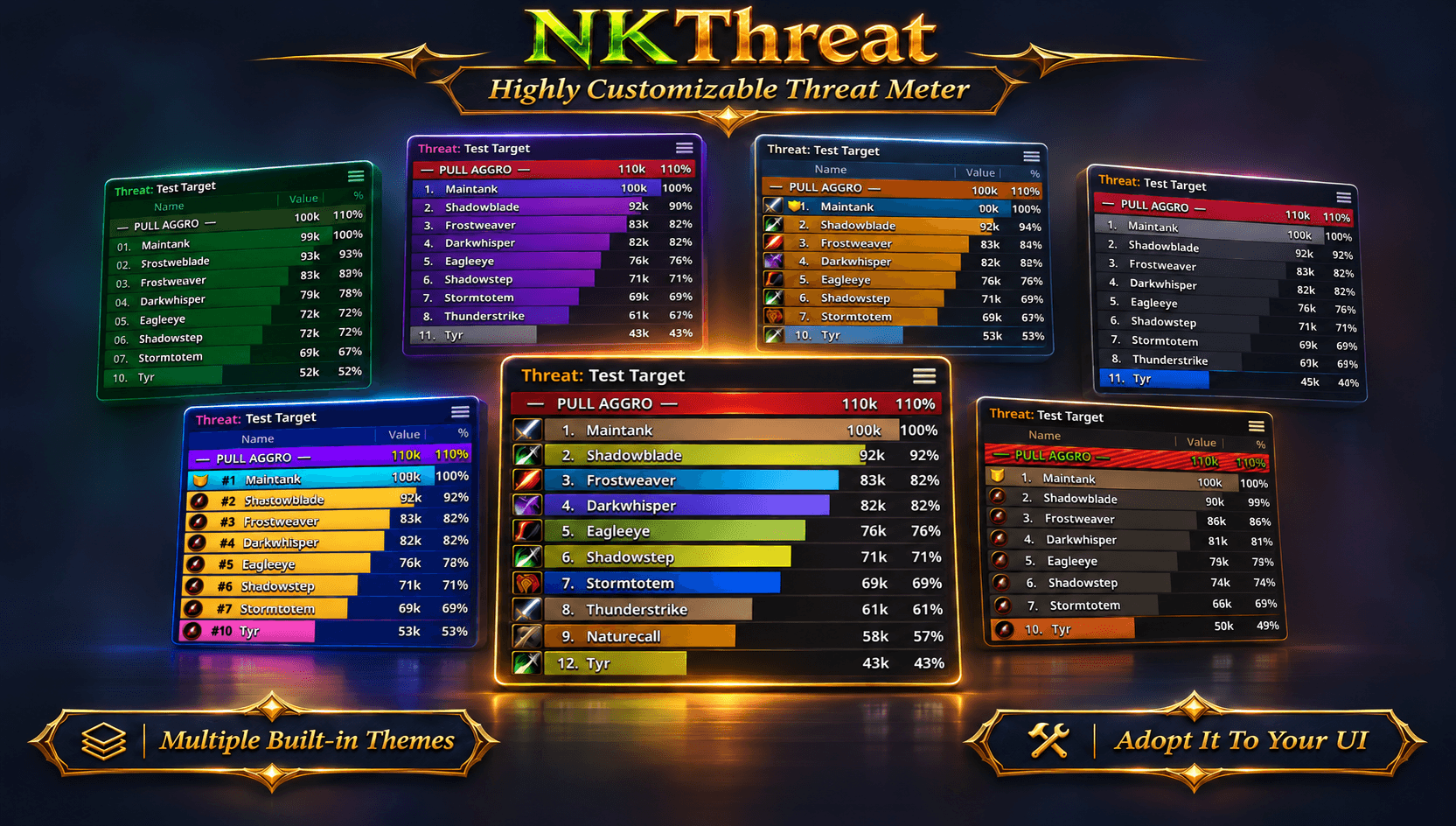
- Every group member and pet with rank, threat and percentage: who has aggro and who is close.
- A pull-aggro bar at 110% (melee) or 130% (ranged) shows where you would actually pull, not just the tank's threat.
- Optional columns for threat per second (TPS) and time to aggro (ETA).
- Compact List for raids: the top three, the tanks, yourself, your target and your target's target.
Warnings and alerts
- By role, with screen flash, sound and text: damage dealers and healers are warned before they pull aggro, tanks when the closest player reaches 95% of their threat (adjustable).
- No aggro warning while a pet holds the enemy, or for tanks while another tank holds it.
- "X took aggro from Y" messages, failed taunt alerts, and optional chat announcements for failed taunts and the hunter's Misdirection (Misdirection not on Classic Era and WoW Forever).
- Salvation check (Classic Era / TBC): warns when you tank with the paladin buff Blessing of Salvation, or play another role without it while a paladin is in the group.
Optional modules
Enemy List
- One row per enemy your group is fighting. Tanks see which enemies they hold, which are slipping, and which they lost and to whom. Damage dealers and healers see safe, warning, danger and pulled.
- Enemy health, raid marker, the enemy's target, taunt and crowd control icons, sorting with role presets, and filters.
Nameplates
- Threat difference, percentage or rank on enemy nameplates, health bar coloring by threat state, and a separate color for enemies another tank holds.
- With a replacement nameplate addon the threat text stays; bar styling is left to that addon unless you override it.
Unit Frames
- A small threat badge beside your target, focus, pet and party frames (not raid frames): your threat on that enemy, or each party member's threat on your target.
- Works with the game's own frames and with ElvUI, Tukui, Shadowed Unit Frames, Z-Perl, X-Perl, Luna Unit Frames, PitBull and others, and can match their look.
More windows
- Target Bar and Focus Bar: your threat on your target or focus as one bar, with a tank mode that shows how safe your lead is.
- Threat Analyzer: records pulls in groups and raids with a threat graph and a timeline of taunts, Misdirection, aggro switches, deaths and Bloodlust.
- Mini Graph: a live graph of your threat, the aggro holder and the pull line.
- Threat Grid: every player's threat on every enemy your group is fighting (up to 20).
Themes, profiles and tools
- Eleven built-in themes, a theme editor, a colorblind-safe palette, and your own fonts, bar textures and sounds through LibSharedMedia.
- Profiles with automatic switch by talent spec, export and import as text.
- Minimap button, toolbar, key bindings, visibility rules, and a version check for your guild or group.
Supported clients

- WoW Forever: supported, within the game's addon restrictions (next section). Starts with the Native theme, which matches the game's own damage meter.
- TBC Anniversary (Burning Crusade Classic): main client. Every feature and default is tuned and tested here first.
- Classic Era, Season of Discovery, Hardcore: supported, including the SoD rune taunts. Era has no focus, so the focus features are hidden there.
- MoP Classic (Mists of Pandaria): supported. Death Knight and Monk taunt data still needs in-game verification.
- Titan Reforged (Wrath) and Retail: not yet tested in-game. Retail has the same addon restrictions as WoW Forever.
WoW Forever and Retail: what works
Short version: against bosses in dungeons and raids the game hides threat numbers from every addon. You still get the threat window with percentages, the threat state of every enemy, and the aggro warning for damage dealers and healers, which then fires once your threat passes the aggro holder's. Ranks, TPS, ETA, the pull-aggro bar and the tank warning are not available against those bosses. Everywhere else the threat window works as usual.
- Enemy List: threat difference and value only for your current target, and not against those bosses.
- Nameplates: where the game hides the numbers, the overlay shows your threat percentage or a state label instead of a difference. Inside dungeons and raids nameplates can be unreadable for addons; the overlays then stay hidden.
- Unit Frames: badges can show the threat state instead of a number, or stay empty in combat.
- No combat log for addons: taunts are detected from spell casts instead. The Threat Analyzer still records threat, taunts and deaths, but no damage details.
- In combat inside instances: addon chat is locked, so announcements are usually not sent. On WoW Forever buffs are unreadable there, so the Salvation check stays silent.
The other clients are not affected.
Questions
Does my group need NKThreat too? No. It shows the threat values the game provides for every group member. If others run it too, roles are shared and chat announcements are posted only once.
Why is the threat window empty at the start of a fight? It shows the threat on your current target (with a friendly target, on the enemy that player is targeting). The game only reports a player once they have threat on that enemy, so the list fills as your group engages. Until then the window reads "No threat yet".
Why does a threat change take a moment to show? On the Classic clients the game hands threat values to addons at irregular intervals, up to about a second apart. That is how the game works, not an addon delay.
Slash commands
/nkt (options), /nkt setup, /nkt test, /nkt toggle (show or hide the threat window), /nkt theme, /nkt help (all commands).
Languages
English, German, French, Spanish, Brazilian Portuguese, Russian, Korean, Traditional and Simplified Chinese. NKThreat follows your client language. Some translations are machine-drafted, so corrections from native speakers are welcome.
About
NKThreat started in 2019 as DKPThreat and has been rebuilt since.
Feedback
Bug reports and ideas are welcome in the comments, especially from WoW Forever, Titan Reforged and Retail players. /nkt errors collects the errors NKThreat runs into: paste its text (Copy button) and name your client.
NKThreat – Threat Meter & Threat Nameplates, Enemy List, Aggro Alerts [Forever/TBC/Classic/MoP/Retail] Team

Owner