NextDing
- By
Kills and time to your next level and reputation standing, right on your XP and rep bars, plus a preview of finished quests.
NextDing-logo-1200x400.png

basic xp bar.png

hand ins.png

Ready for Level up pulse.png

Ready for Level up smoke.png
menu options.png
Description
Know exactly how far you are from your next ding.
Next Ding adds a short estimate to your experience and reputation bars: how many kills until you level up or reach your next reputation standing, and roughly how long that will take at your current pace.
~12 kills · 6m
Features
Kills to level. Worked out from your last 10 mob kills (adjustable), so it follows whatever you're grinding right now. Rested XP is taken into account.
Kills to your next standing. For the faction you're watching, using only the reputation you get from kills. Pick the next standing or Exalted as the goal.
Time estimate. Based on how quickly you've been killing. Breaks are left out, so a trip to the vendor doesn't throw it off.
Finished-quest preview. Hover your XP or reputation bar to see what's waiting in quests you've finished but not turned in, shown on the bar like incoming heals on a health bar. If it's enough to reach the next level, the preview carries on from the start of the bar to show where you'll land.
Only the quests you're tracking By default only finished quests on your quest tracker count, so a quest you're saving for later won't set off the ding effect. Untrack it to leave it out, or turn the option off to count everything. Works with Questie's tracker too.
Ding effect. When your finished quests are enough to level up, the bar starts to pulse so you know it's time to head back to town. Prefer something louder? Switch to Magic smoke, or use both, with a strength setting from Subtle to Max.
Detail on hover. XP or reputation still needed, average per kill, rested XP, your pace and the quests ready to turn in.
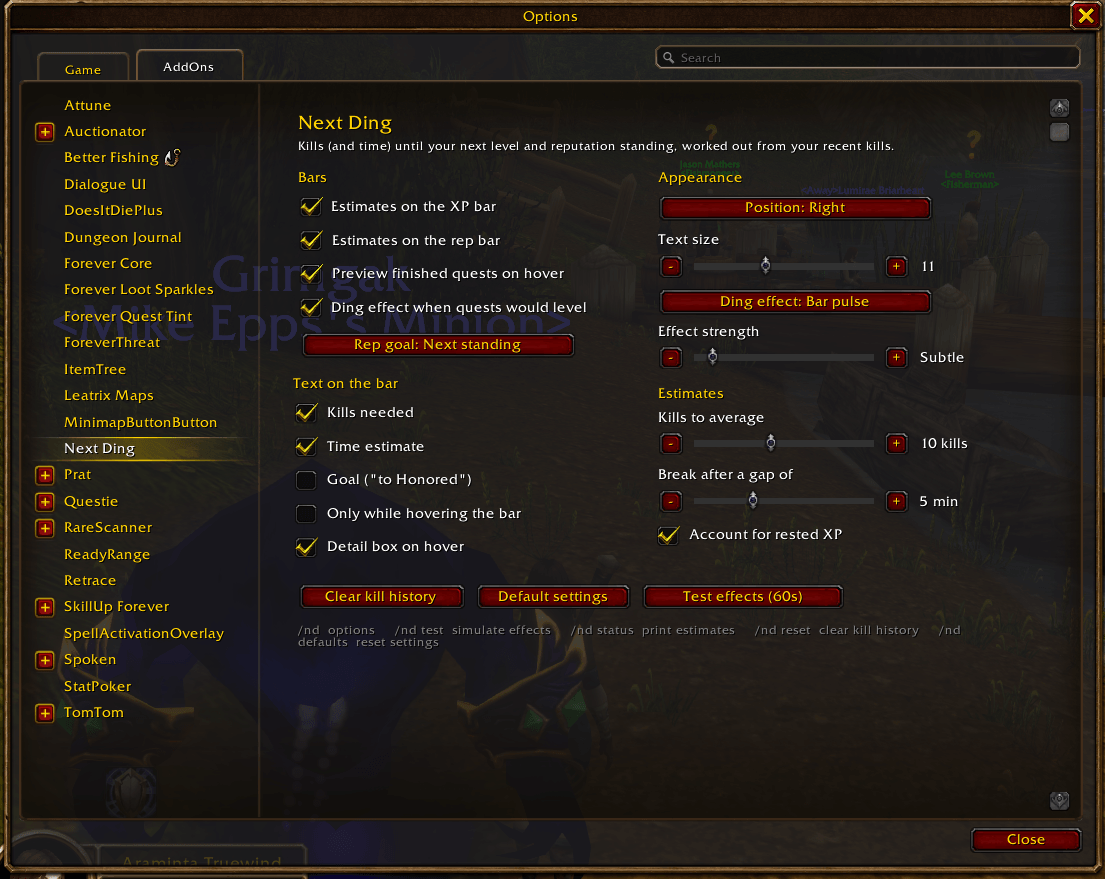
Fits your UI. The text sits inside the bar and is shrunk to fit if needed, or you can move it above the bar. Everything can be turned on or off.
Commands
/nd: options (also Esc > Options > AddOns > Next Ding)/nd test: preview every effect for 60 seconds/nd status: print your estimates in chat/nd reset: clear this character's kill history, for example after moving to a new grinding spot
Works with
- World of Warcraft: Forever and WoW Classic Era.
- Questie (optional): the reputation part of the finished-quest preview reads quest rewards from Questie's database. Everything else works without it. Next Ding isn't affiliated with Questie.
Good to know
- Estimates appear after your first kill; the time estimate needs a couple of kills close together.
- Kill history is saved per character; settings are shared across your characters.
- XP carried past a level in the preview is measured against your current level, so it's a close approximation.
Released under the MIT License. Feedback and bug reports are welcome in the comments.
NextDing Team