NetherQuester - Quest Tracking & Navigation
- By
Quest smarter, level faster. NetherQuester points one arrow at every objective, puts kill and item counts on nameplates, maps out quest chains and party progress, and ships its own quest database. Fully themeable, standalone or with the Nether family.
Banner
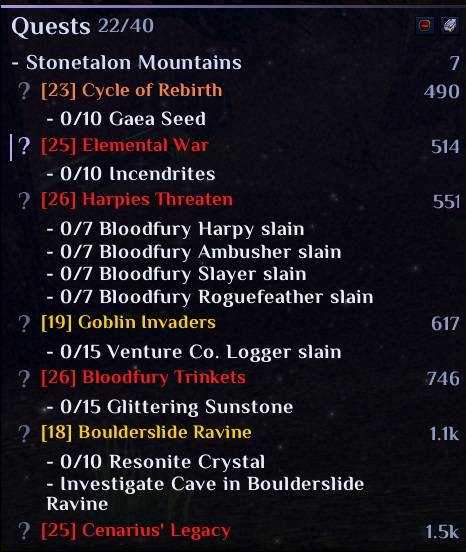
NetherQuester Tracker (Fully customizable - color/size/style etc)
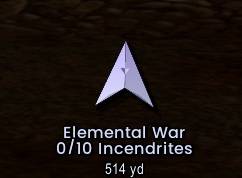
NetherQuester Navigation Arrow (Fully customizable - color/size/style etc)
Description
⚔️ NetherQuester - Your Questing Companion ⚔️
Stop alt-tabbing to quest sites. Stop wandering in circles looking for that last kodo. NetherQuester puts everything you need to finish a quest right on your screen, in a tracker that looks as good as it works.
━━━━━━━━━━━━━━━━━━━━━━
🧭 ONE ARROW, EVERY QUEST
Click the ? next to any quest and an arrow leads you straight to it: the creatures to kill, the objects to loot, the giver to turn in to. With NetherMaps installed, NetherMaps' own arrow takes over and quest objectives appear right on the map.
━━━━━━━━━━━━━━━━━━━━━━
🎯 PROGRESS WHERE YOU'RE LOOKING
- Kill and item counts on nameplates, so you can see which mobs you still need at a glance
- Quest lines in creature tooltips showing the objective and your count
- A soft glow at your cursor over creatures and objects your quests need: spot that quest chest in a crowded camp
- A quest count beside your target frame
━━━━━━━━━━━━━━━━━━━━━━
📜 MORE THAN A TRACKER
- Quest chains: see where a quest leads and what comes before it
- Quests to pick up near you
- Party progress: who in your group still needs what
- Quest item buttons, ready to click
- Your own notes and your own objectives on any quest
- Quest history and a session summary of what you got done
- A built-in quest database (NetherQuester_Data), no web lookups needed
- Optional automation, off until you turn it on
━━━━━━━━━━━━━━━━━━━━━━
🎨 MAKE IT YOURS
- Resize the tracker by dragging its corner, and keep it at exactly that size
- Set a text size and colour for every part of the tracker
- Pick any font you have installed, each one previewed in its own style (Philosopher Bold by default)
- Decorative window titles, star chart or plain backgrounds, fantasy ornaments
- Every setting is searchable: type "font" and there it is
- Share your setup with /nq export
━━━━━━━━━━━━━━━━━━━━━━
✨ BETTER TOGETHER: THE NETHER FAMILY
NetherQuester runs perfectly on its own, and it gets even better with its family:
- NetherUI: takes on your theme's background, animated layers, window border and Light effects, follows its animation speed and intensity, turns its accents with the Spectrum colour wheel, adds questing numbers to the Session stats box, and has its own section in NetherUI's settings
- NetherMaps: its arrow, quest objectives on the map, and creature markers that list the quests that creature has for you
- NetherBars: shares fonts both ways and puts the quest count on NetherBars' target frame
- NetherSuite: NetherQuester's settings, searchable alongside the rest of the family
━━━━━━━━━━━━━━━━━━━━━━
⚙️ GETTING STARTED
Install NetherQuester and NetherQuester_Data, then fully restart the game. Type /nq to open the settings.
All Rights Reserved. Plugins are welcome.
NetherQuester - Quest Tracking & Navigation Team