NetEaseUI
- By
An advanced in-game addon control center, which combines Categoring, Searching, Loading and Setting of wow addons all together.
ex3
U1RegisterAddon("Recount", {
    title
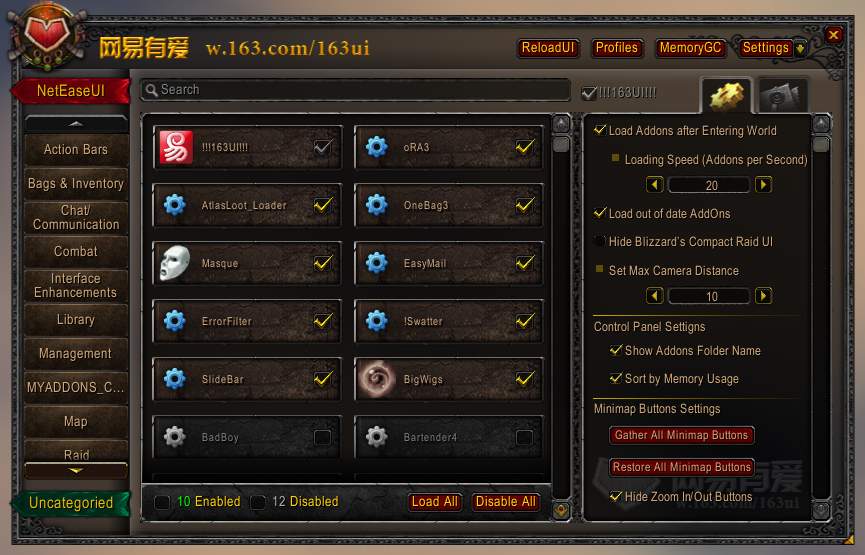
NetEaseUI Main Panel
ex4
ex2
Description
Introduction
NetEaseUI is an advanced in-game addon control center, which combines Categoring, Searching, Loading and Setting of wow addons all together.
The most advanced feature is that ANY addons can be loaded immediately at ANYTIME, even those are not load-on-demands.
And it provides a complete solution for registering addons options to the control panel. It provides a series option widgets like AceGUI does, and saves and loads variables automatically. You can easily add commonly used slash commands or toggle options to the addon page by add some lua codes in CfgCustom.lua. The detailed development guide is on the website.
Development
ONLY read the following, if you are about to custom the addons:
By default, NetEaseUI will read the X-Category tag from "toc" file to categorize addons. You can comment the following line in the RunFirst.lua
UI163_USE_X_CATEGORIES = 1
to disable this feature and REGISTER your own configs by write lua codes in Configs/CfgCustom.lua (or any file includes by Configs.xml).
The registration grammer is:
U1RegisterAddon(AddonId, AddonConfigInfo)
Let's start with some simple example:
Step 1
Add the following code in CfgCustom.lua
U1RegisterAddon("Recount", {
    title = "Damage Meters",
    tags = {"My Favorites"},
    icon = "Interface\\ICONS\\ACHIEVEMENT_GUILDPERK_FASTTRACK_RANK2",
    desc = "Hahaha",
})
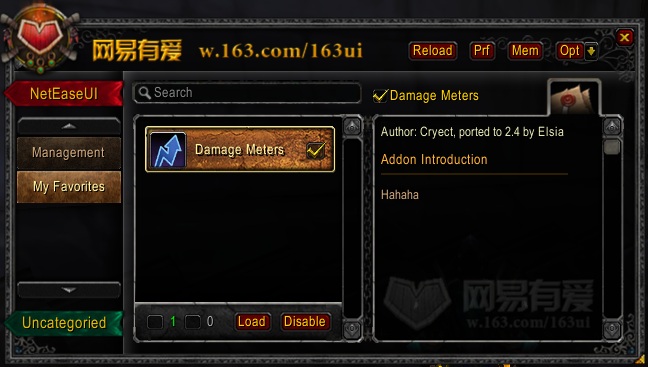
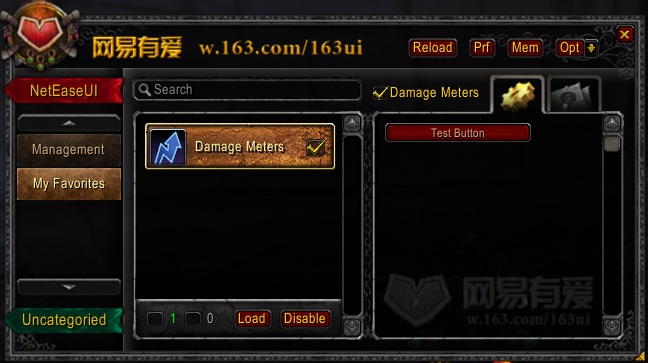
You will see this: (that Recount is now in "My Favorites" tags, and with a customized introduction. )

Step 2
Modify the code:
U1RegisterAddon("Recount", {
    title = "Damage Meters",
    tags = {"My Favorites"},
    icon = "Interface\\ICONS\\ACHIEVEMENT_GUILDPERK_FASTTRACK_RANK2",
    desc = "Hahaha",

    {
        type = "button",
        text = "Test Button",
        callback = function() print("Hello World") end
    },
})
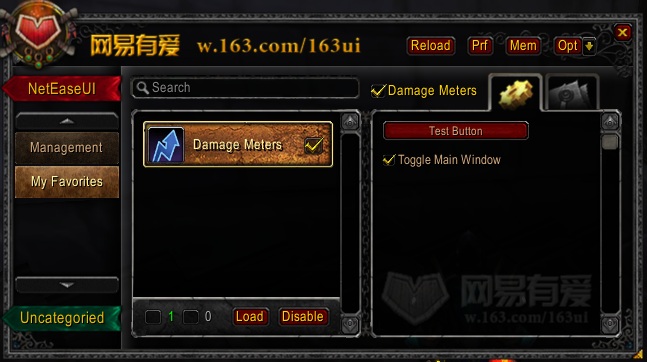
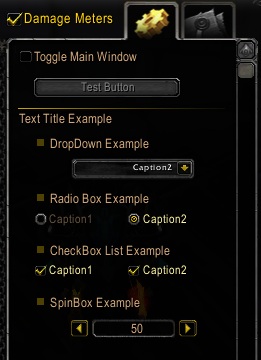
The result is: (There is an Option Page and a button to print "Hello World".)

Step 3
Continue modifying the code:
U1RegisterAddon("Recount", {
    title = "Damage Meters",
    tags = {"My Favorites"},
    icon = "Interface\\ICONS\\ACHIEVEMENT_GUILDPERK_FASTTRACK_RANK2",
    desc = "Hahaha",

    {
        type = "button",
        text = "Test Button",
        callback = function() print("Hello World") end
    },

    {
        type = "checkbox",
        var = "show",
        text = "Toggle Main Window",
        default = true,
        callback = function(cfg, v, loading)
            if(v) then
                Recount.MainWindow:Show();
                Recount:RefreshMainWindow();
            else
                Recount.MainWindow:Hide();
            end
        end,
    },
})
Now there is an toggle option to show/hide the Recount window, and the option will be kept between game session.

Step 4
And let's put something together:
U1RegisterAddon("Recount", {
    title = "Damage Meters",
    tags = {"My Favorites"},
    icon = "Interface\\ICONS\\ACHIEVEMENT_GUILDPERK_FASTTRACK_RANK2",
    desc = "Hahaha",

    {
        type = "checkbox",
        var = "show",
        text = "Toggle Main Window",
        default = true,
        callback = function(cfg, v, loading)
            if(v) then
                Recount.MainWindow:Show();
                Recount:RefreshMainWindow();
            else
                Recount.MainWindow:Hide();
            end
        end,

        {
            type = "button",
            text = "Test Button",
            callback = function() print("Hello World") end
        },
    },

    {
        type = "text",
        text = "Text Title Example",

        {
            type = "drop",
            var = "var1", --only save the option if a var is specified.
            text = "DropDown Example",
            options = {"Caption1", "value1", "Caption2", "value2", },
            callback = function(cfg, v, loading) print(cfg.text, v) end,
        },

        {
            type = "radio",
            text = "Radio Box Example",
            cols = 2,
            options = {"Caption1", "value1", "Caption2", "value2", },
            callback = function(cfg, v, loading) print(cfg.text, v) end,
        },

        {
            type = "checklist",
            text = "CheckBox List Example",
            options = {"Caption1", "value1", "Caption2", "value2", },
            callback = function(cfg, v, loading) print(cfg.text, v) end,
        },

        {
            type = "spin",
            text = "SpinBox Example",
            range = {1, 100, 5},
            default = 50,
            callback = function(cfg, v, loading) print(cfg.text, v) end,
        },

    },

})

Referrence
The complete addon and option attributes are list here:
addon-info-attributes
option-controls-attributes
Quick Menu
Just edit the QuickMenu.lua and add the full path of the option.
see the var attribute in the option-controls-attributes page.
Videos (Only in Chinese)
Minimap Gathering (Need to uncomment Minimap.lua in toc to enable this feature)
http://v.game.163.com/video/2011/12/6/6/V7JTG1O66.html
Profiles Manager
http://v.game.163.com/video/2011/12/8/I/V7JTFQM8I.html
Homepage (Chinese)
The NetEaseUI Team


Owner