Screenshot 2026-06-05 135252.png
Description
The Smart Dispel & Crowd Control Grid for WoW Classic Era & TBC Anniversary
Necurse is a lightweight, highly efficient unit frame addon designed to make dispelling debuffs and managing Mind Controlled (MC) players effortless. Rather than relying on bulky raid frames, Necurse creates a compact, clickable grid that automatically displays when your party or raid members are afflicted by a dispellable debuff or turn hostile due to a Mind Control.
Whether you are a Priest cleansing magic, a Druid cycloning a mind-controlled teammate, or a Hunter trapping a hostile rogue, Necurse puts the right spell on your mouse automatically.
Key Features
-
Smart Visual Grid: Generates a minimal grid of 20x20 boxes containing the initials of your party/raid members. The grid includes a dedicated top section for up to 4 Main Tanks so you can prioritise them instantly.
-
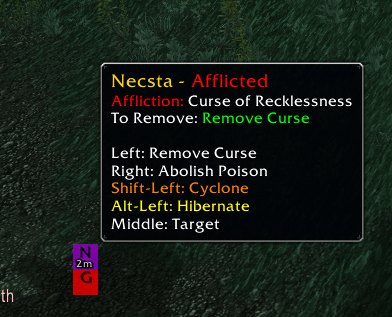
Intuitive Colour Coding: Player boxes automatically change colour based on the type of affliction (e.g., Purple for Curses, Yellow for Poisons, Blue for Magic, Brown for Disease).
-
Mind Control (MC) Alerts: If a player becomes hostile, their box instantly turns bright red and triggers a screen warning. This allows CC-capable classes (including melee and physical ranged) to instantly lock them down.
-
Smart Screen Warnings: Displays an on-screen warning listing the names of afflicted players, the required action (e.g., "Remove Curse (Left-Click)"), or a critical "MC ALERT".
-
Drag & Drop Positioning: The main grid and the warning text are fully movable to suit your customisable UI layout.
NEW: Accessibility & Quality of Life Updates
-
Colour-Blind Friendly Blinking: When a player requires a dispel or crowd control, their unit box will pulse with a blinking animation, ensuring you never miss a critical action even if you have difficulty distinguishing the box colours.
-
Real-Time Countdown Timers: An exact countdown (in minutes or seconds) is overlaid on the afflicted player's box, letting you know exactly how long a debuff or Mind Control has left before it expires.
-
Enhanced Information Tooltips: Hovering over a blinking unit box will now explicitly state the exact name of the affliction and highlight the specific spell you need to cast to remove it.
-
Paladin Blessing of Freedom Integration: Paladins now automatically have Blessing of Freedom mapped to Right-Click, making quick movement-impairment dispels seamless.
-
Massive Movement Impairment Database: Added built-in tracking for dozens of physical and untyped roots, snares, and slows that standard magic dispels miss. Afflicted players automatically highlight in Orange with an alert to cast Freedom.
-
PvP & World Spells: Frost Nova, Frostbite, Entangling Roots, Hamstring, Crippling Poison, Chains of Ice, Mind Flay, Curse of Exhaustion, and more.
-
Classic & Naxxramas Raids: Web Wrap, Web Spray, Cripple (Noth), Locust Swarm (Anub'Rekhan), and Frost Blast.
-
TBC Tier 5 & Tier 6 Raids: Lady Vashj's Entangle, Hydross's Water Tomb, Tempest Keep's Crystal Chains & Botanica roots, Rage Winterchill's Freeze, Black Temple nets, Zul'jin's Creeping Paralysis, and Kil'jaeden's Fire Blossom/Flame Dart.
-
-
Cooldown-Aware Warning Banner: If a team member gets rooted while your Blessing of Freedom (or other removal spell) is on cooldown, the top warning frame will automatically adapt—graying out the text and displaying the exact remaining cooldown timer so you know when it's ready.
-
Live Dynamic Tooltips: Hovering over a unit frame now dynamically updates the tooltip every 0.2 seconds, showing live real-time countdowns for spell cooldowns as you hover over an afflicted target.
Supported Classes & Automatic Bindings
Necurse automatically detects your class and binds the correct abilities to your mouse clicks. No setup required!
-
Druid: Remove Curse (Left-Click), Abolish Poison (Right-Click) | CC: Cyclone (Shift-Left), Hibernate (Alt-Left)
-
Hunter: CC: Freezing Trap (Shift-Left), Scatter Shot (Alt-Left), Wyvern Sting (Ctrl-Left)
-
Mage: Remove Lesser Curse (Left-Click) | CC: Polymorph (Shift-Left)
-
Paladin: Cleanse (Left-Click), Blessing of Freedom (Right-Click) | CC: Hammer of Justice (Shift-Left), Repentance (Alt-Left)
-
Priest: Dispel Magic (Left-Click), Cure Disease (Right-Click) | CC: Psychic Scream (Shift-Left)
-
Rogue: CC: Blind (Shift-Left), Gouge (Alt-Left)
-
Shaman: Cure Poison (Left-Click), Cure Disease (Right-Click)
-
Warlock: CC: Fear (Shift-Left), Death Coil (Alt-Left)
-
Warrior: CC: Intimidating Shout (Shift-Left), Intercept (Alt-Left)
(Note: Middle-Click is uniformly bound to target the player for all classes).
Slash Commands & Setup
-
Type
/necin the game chat to unlock the Warning Frame. -
A test warning will appear, allowing you to drag it to your preferred location on the screen.
-
Type
/necagain to lock the frame and hide the test warning. The main grid features a small, purple drag-handle at the top left that appears when you hover over it, allowing you to easily reposition your unit boxes.
Compatibility
Fully tested and fully functional on WoW Classic Era and The Burning Crusade Classic (TBC). Perfectly optimized for solo play, 5-man dungeons, and full 40-man raid groups.
Necurse Team