Nameplate ToT
- By
Shows who each mob or player is targeting, right on their nameplate and in tooltips.
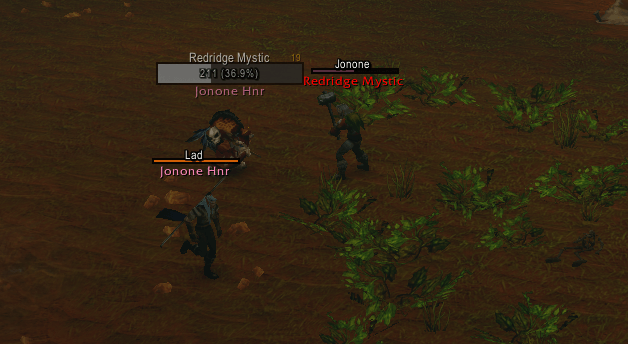
image.png
Description
Nameplate ToT
See who every mob and player is targeting, right on their nameplate. Turn on threat mode and enemy health bars also show, at a glance, whether you're holding aggro.
Features
- Target of target on nameplates: the name of whoever each unit is targeting, in class or reaction color. If it's you, it says >> YOU << (or your name, if you prefer).
- Tooltips: a Target: line, plus Targeted by:, a list of everyone targeting the unit you hover. Hover a friendly player to see which mobs are on them.
- Threat mode (optional): in combat, enemy health bars turn a color showing your threat.
- Tank: green secure, orange at risk, blue another tank or pet has it, red lost.
- DPS / healer: green safe, yellow close, orange above the tank, red on you.
- Your role is detected automatically (Defensive Stance, Bear Form, Righteous Fury, tank runes or your group role), or pick it yourself.
- Optional threat % or threat value beside the bar, with its own position and size.
- Mobs tagged by someone else stay grey.
- Pet types: show "Voidwalker" or "Wolf" instead of a pet's given name.
- Full or first names for two-word WoW Forever character names.
- Works with Blizzard's nameplates, Plater, Threat Plates and EUI (EllesmereUI) Nameplates. Nothing to set up.
Options
Open with /ntot or Game Menu > Options > AddOns > Nameplate ToT. Threat mode has its own page listed under it. Changes save when you click Apply, and the preview shows how they'll look.
Slash commands
| Command | What it does |
|---|---|
/ntot |
Opens the options |
/nameplatetot |
Same as /ntot |
/ntot threat |
Shows what threat info the game is giving addons for your target |
Notes
- Two "Target:" lines in tooltips? That's Leatrix Plus. Turn off its "Show the unit's target" option:
/ltp> Interface > Enhance tooltip (cog). - Text missing or uncolored in combat? WoW Forever hides some unit info from addons during combat. That's the game, not a bug.
- Threat numbers: the game hides exact threat numbers during combat, so a tank's lead over second place can't be shown.
- Using Plater? A mob's cast bar can cover text placed below its health bar. Move the text Above, Left or Right in the options.
- Upgrading from TooltipTarget? It's the same addon, renamed. Delete the old TooltipTarget folder, or you'll see everything twice.
- Made for the WoW Forever client.
Found a bug or have an idea? Leave a comment on this page.
Nameplate ToT Team