Nameplate Buffs
- By
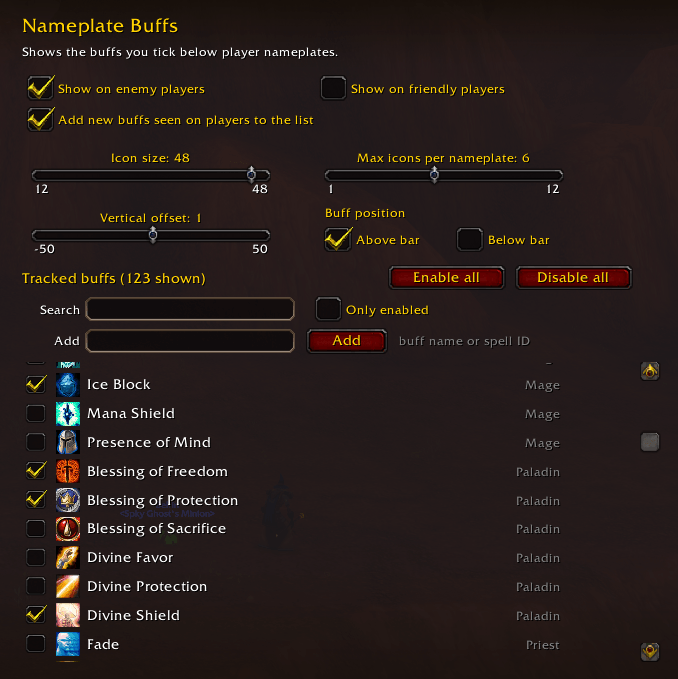
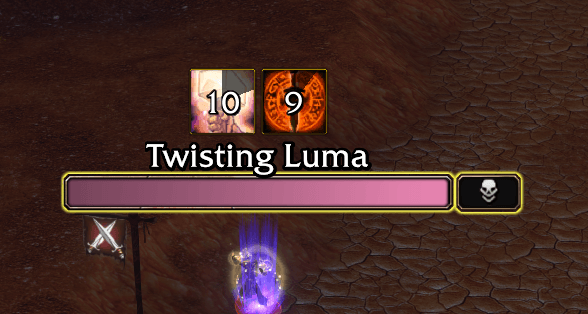
Shows the buffs you choose above player nameplates, like Divine Shield, Ice Block and Blessing of Freedom, with timers.
Screenshot 2026-11-16 184131.png
Screenshot 2026-11-17 001431.png
Description
Nameplate Buffs
See enemy defensives and cooldowns before you waste your burst. Nameplate Buffs shows the buffs you choose right on enemy player nameplates, with a countdown, so you know when to hold your stun or switch targets.
Built for PvP: battlegrounds, world PvP, and duels.
Features
- Buff icons on nameplates. Chosen buffs appear above (or below) enemy player nameplates.
- Countdown timers. Each icon shows its remaining time, following your own Show Numbers for Cooldowns setting.
- Tooltips. Hover an icon to see the full buff tooltip. Clicks still go through to the nameplate, so targeting works as usual.
- Built-in PvP list. Abass, such as Divine Shield,Ice Block, Blessing of Freedom, Evasion, Barkskin, Innervate and Will of the Forsaken.
- Learns new buffs. Any buff seen on a player is added to your list automatically, so you can track things the built-in list doesn't cover.
- Adjustable. Icon size, maximum icons per nameplate, position above or below the bar, and vertical offset.
Getting started
- Type
/npbor open Options → AddOns → Nameplate Buffs. - Search the list for a class or buff (e.g.
paladin) and click Enable all, or tick buffs one by one. - Make sure enemy nameplates are on (default key: V).
Settings
| Setting | What it does |
|---|---|
| Show on enemy / friendly players | Choose whose nameplates show buffs |
| Add new buffs seen on players | Learn buffs automatically (added switched off) |
| Icon size | Size of the b |
| Max icons per nameplate | Limit how many buffs show at once |
| Buff position | Above or |
| Vertical offset | Fine-tune the position |
| Search / Only enabled | F |
| Enable all / Disable all | Toggle every buff the list currently shows |
| Add | Add any buff by name or spell ID |
Commands
| Command | What it does |
|---|---|
/npb |
Open the settings |
/npb debug |
Show the be (for troubleshooting) |
FAQ
I don't see any buffs. All buffs start switched of ones you want. Also checkthat enemy nameplates are turned on.
Why are there no buffs on my group in dungeons? Blizzard blocks addons from inside dungeons and raids.Enemy players in battlegrounds and the open world are not affected.
Sometimes a buff doesn't show right after a reload in combat. The game can briefly hide bplate Buffs then looks upeach enabled buff by its spell ID instead, so built-in buffs and buffs it has already seen keep working.
Does it work on non-English clients? The built-in list uses English buff names. Learned buffs and buffs you add work in any language.
The countdown numbers don't show. Turn on Options → Action owns. Buffs without aduration have no timer.
Nameplate Buffs Team