Class Icon Nameplates
- By
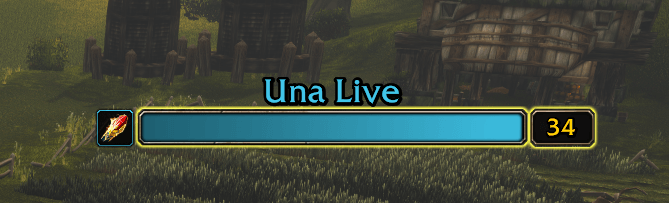
Shows class icons next to enemy player nameplates so you can identify classes in PvP at a glance, no class colors to memorize.
Screenshot 2026-11-13 143351.png
Screenshot 2026-11-13 144746.png
Description
Class Icon Nameplates
Know who you're fighting at a glance. Class Icon Nameplates puts a class icon next to every enemy player's nameplate, so you can tell a Rogue from a Druid instantly, with no class colors to memorize.
Built for PvP: battlegrounds, world PvP, and duels.
Features
- Class icons on enemy players. Every enemy player's nameplate gets a clear class icon. NPCs are ignored, so your screen stays clean.
- Works on unflagged enemies. You see the icons on enemy-faction players even when they aren't PvP flagged, so you know what you're up against before the fight starts.
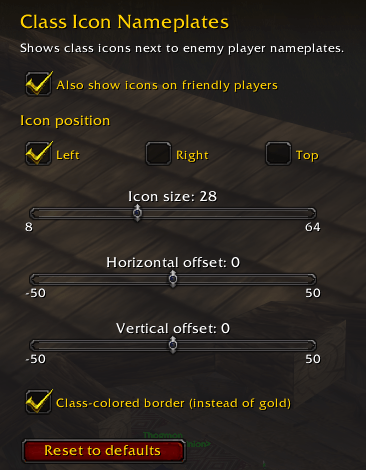
- Matches the default UI. A gold border that fits the standard Blizzard nameplates, or switch to class-colored borders.
- Friendly players (optional). Turn on icons for your own faction too.
- Fully adjustable. Place the icon left, right, or above the nameplate, and change its size and position.
- Lightweight. No libraries and no dependencies. It only updates when a nameplate appears.
Settings
Open Options → AddOns → Class Icon Nameplates, or type /cin.
| Command | What it does |
|---|---|
/cin |
Open the settings panel |
/cin size <8-64> |
|
/cin side left/right/top |
Set where the icon appears |
/cin friendly |
ers |
/cin offset <x> <y> |
Nudge the icon position |
/cin reset |
Res |
/cin debug |
Show info about visible nameplates (for troubleshooting) |
FAQ
I don't see any icons. Make sure enemy nameplates are turned on. The default key is V, or go to Options → Inte
Does it work with nameplate addons?
It's designed for the default Blizzard nameplates. With other nameplate addons thely, so use /cinoffset or the offset sliders to adjust it.
Class Icon Nameplates Team