NalWatch
- By
NalWatch is a lightweight companion for the rotating Void worlds introduced in patch 12.0.7 — Naigtal and Val. A single minimap orb opens a clean, at-a-glance summary of everything happening in the world that is currently active.
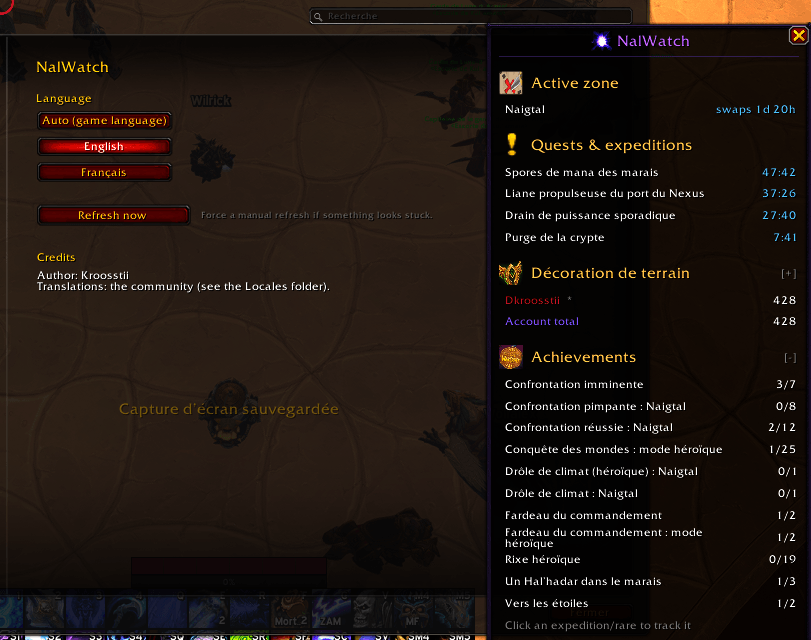
image_2026-06-22_095319255.png
Description
English
NalWatch is a lightweight companion for the rotating Void worlds introduced in patch 12.0.7 — Naigtal and Val. A single minimap orb opens a clean, at-a-glance summary of everything happening in the world that is currently active.
Features
- Active world & swap timer — see which Void world is live right now, with a live countdown to the next rotation.
- Quests & expeditions — every active objective with a live countdown, sorted by time remaining (longest at the top). Click one to track it on screen.
- Rares — which rares are up or already dead. Click one to drop a map waypoint to it.
- Currency — your Field Accolade on the current character, plus an account-wide total. The per-character breakdown is collapsible, so alt-heavy players keep a clean panel by default.
- Achievements — the zone achievements you still need, only the unfinished ones, sorted alphabetically. Left-click to track an achievement, right-click to open it in the achievement panel. Collapsible.
- Out-of-zone tracking — quests and expeditions stay visible with correct countdowns even after you leave the world, thanks to a persistent server-time cache (survives reloads and sessions).
- Localization — English and French built in, fully community-translatable, and working on any game client whatever its language.
Usage
- Left-click the minimap orb: open / close the summary panel.
- Right-click the orb: open the options.
- In the panel, click an expedition to track it, click a rare to set a waypoint, left-click an achievement to track it and right-click it to open its details.
- Type /nw help in game for the full list of commands.
Commands
- /nw — open the options panel.
- /nw help — list every command.
- /nw refresh — force a manual refresh if anything looks stuck.
- /nw welcome — show the welcome window again.
- /nw lang <code> — switch language, for example /nw lang enUS.
- /nw default — go back to your game client's language. Handy if you picked a language you cannot read: it confirms in the language it switches back to.
- /nw version — show the addon version.
Options
Found under Game Menu → Options → AddOns → NalWatch:
- Language — a dropdown listing Auto (game language) and every installed translation. Applies immediately, no reload needed.
- Refresh now — force a manual refresh if anything looks stuck.
- Credits, and the list of everyone who contributed a translation.
> Note: rares rely on in-zone vignettes, so they only appear while you are physically in the world. Everything else (active world, swap timer, quests, expeditions, currency, achievements) is tracked from anywhere.
Translations welcome
NalWatch ships in English and French. Any key a translation leaves out falls back to English automatically, key by key, so a partial translation never breaks anything — send what you have and finish later. Contributors are credited in-game, in the options panel.
The easiest way: translate in your browser, phrase by phrase, with nothing to download and no file to edit:
> Important: use the website for this, not the CurseForge desktop app — the app does not offer the localization page.
Prefer working on the file itself? Fork the repository and open a pull request, attach your file to an issue, or post it on Discord. A step-by-step guide ships inside the addon, in
lang/README.md.FAQ
The panel is empty and shows no zone.
Only one Void world is live at a time. If neither is currently active, or the game has not sent the data yet after logging in, there is nothing to show. Try /nw refresh.
Only one Void world is live at a time. If neither is currently active, or the game has not sent the data yet after logging in, there is nothing to show. Try /nw refresh.
I never see any rares.
Rares are read from in-zone vignettes, which the game only provides while you are physically in the world. Everything else — active world, swap timer, quests, expeditions, currency, achievements — is tracked from anywhere.
Rares are read from in-zone vignettes, which the game only provides while you are physically in the world. Everything else — active world, swap timer, quests, expeditions, currency, achievements — is tracked from anywhere.
Does it work on a German, Korean, Russian or Chinese client?
Yes. The interface itself is English, French, or any community translation you install; but everything the game names — zones, currency, quests, rares, achievements — is read from your own client, so it always appears in your language.
Yes. The interface itself is English, French, or any community translation you install; but everything the game names — zones, currency, quests, rares, achievements — is read from your own client, so it always appears in your language.
My alts' currency is missing.
The per-character list is built from the characters that have logged in at least once with NalWatch installed, plus whatever your account-wide currency data returns. Log in once on an alt and it shows up from then on.
The per-character list is built from the characters that have logged in at least once with NalWatch installed, plus whatever your account-wide currency data returns. Log in once on an alt and it shows up from then on.
The welcome window opened again.
It appears once per version, to show what changed. /nw welcome brings it back any time.
It appears once per version, to show what changed. /nw welcome brings it back any time.
Can I move things?
The minimap orb is draggable and its position is remembered. The summary panel can be dragged too, though it returns to the centre of the screen after a reload — saving its position is on the list.
The minimap orb is draggable and its position is remembered. The summary panel can be dragged too, though it returns to the centre of the screen after a reload — saving its position is on the list.
Does it slow the game down?
It subscribes only to the handful of events it actually needs, and refreshes are throttled so a burst of events triggers one update rather than dozens.
It subscribes only to the handful of events it actually needs, and refreshes are throttled so a burst of events triggers one update rather than dozens.
Support
Bug reports, questions and suggestions: open an issue on GitHub or come to the Discord. If you are reporting an error, the message from BugSack or !BugGrabber helps enormously.
Development. NalWatch's Lua code is written with AI assistance (Claude Opus 5, by Anthropic). Every change is reviewed and tested in game by the author before it is released.
NalWatch is free and open source under the GPLv3 — the full source is on GitHub.
---
Français
NalWatch est un compagnon léger pour les mondes Void rotatifs introduits au patch 12.0.7 — Naigtal et Val. Une simple orbe sur la minimap ouvre un récapitulatif clair et instantané de tout ce qui se passe dans le monde actuellement actif.
Fonctionnalités
- Monde actif & timer de bascule — voyez quel monde Void est actif, avec un compte à rebours en temps réel avant la prochaine rotation.
- Quêtes & expéditions — chaque objectif actif avec son compte à rebours, trié par temps restant (le plus long en haut). Cliquez pour suivre.
- Rares — quels rares sont vivants ou déjà tués. Cliquez pour poser un point de carte.
- Monnaie — votre Décoration de terrain sur le personnage courant, plus un total sur tout le compte. La liste par personnage est repliable, pour garder un panneau propre quand on a beaucoup de persos.
- Hauts faits — les hauts faits de zone qu'il vous reste, uniquement les non terminés, triés par ordre alphabétique. Clic gauche pour suivre, clic droit pour ouvrir le détail. Repliable.
- Suivi hors zone — les quêtes et expéditions restent affichées avec des compteurs corrects même après avoir quitté le monde, grâce à un cache persistant basé sur l'heure serveur (survit aux rechargements et aux sessions).
- Localisation — anglais et français inclus, entièrement traduisible par la communauté, et fonctionnel sur n'importe quel client de jeu quelle que soit sa langue.
Utilisation
- Clic gauche sur l'orbe minimap : ouvrir / fermer le panneau récapitulatif.
- Clic droit sur l'orbe : ouvrir les options.
- Dans le panneau, cliquez une expédition pour la suivre, cliquez un rare pour poser un point de carte, clic gauche sur un haut fait pour le suivre et clic droit pour l'ouvrir.
- Tapez /nw help en jeu pour la liste complète des commandes.
Commandes
- /nw — ouvrir le panneau d'options.
- /nw help — lister toutes les commandes.
- /nw refresh — forcer un rafraîchissement manuel si quelque chose semble bloqué.
- /nw welcome — réafficher la fenêtre de bienvenue.
- /nw lang <code> — changer de langue, par exemple /nw lang frFR.
- /nw default — revenir à la langue de votre client de jeu. Pratique si vous avez choisi une langue que vous ne savez pas lire : la confirmation s'affiche dans la langue vers laquelle on rebascule.
- /nw version — afficher la version de l'addon.
Options
Dans Menu → Options → AddOns → NalWatch :
- Langue — un menu déroulant listant Auto (langue du jeu) et toutes les traductions installées. Appliqué immédiatement, sans rechargement.
- Rafraîchir maintenant — force un rafraîchissement manuel si quelque chose semble bloqué.
- Crédits, et la liste de toutes les personnes ayant contribué une traduction.
> Note : les rares reposent sur les vignettes de proximité, ils n'apparaissent donc que lorsque vous êtes physiquement dans le monde. Tout le reste est suivi de n'importe où.
Traductions bienvenues
NalWatch est fourni en anglais et en français. Toute clé qu'une traduction laisse de côté retombe automatiquement sur l'anglais, clé par clé : une traduction partielle ne casse jamais rien — envoyez ce que vous avez et terminez plus tard. Les contributeurs sont crédités en jeu, dans le panneau d'options.
Le plus simple : traduire depuis votre navigateur, phrase par phrase, sans rien télécharger ni modifier de fichier :
> Important : passez par le site web pour cela, pas par l'application CurseForge — l'application ne propose pas la page de localisation.
Vous préférez travailler sur le fichier lui-même ? Forkez le dépôt et ouvrez une pull request, joignez votre fichier à une issue, ou déposez-le sur Discord. Un guide pas à pas est fourni dans l'addon, dans
lang/README.md.FAQ
Le panneau est vide et n'affiche aucune zone.
Un seul monde Void est actif à la fois. Si aucun ne l'est actuellement, ou si le jeu n'a pas encore envoyé les données après la connexion, il n'y a rien à afficher. Essayez /nw refresh.
Un seul monde Void est actif à la fois. Si aucun ne l'est actuellement, ou si le jeu n'a pas encore envoyé les données après la connexion, il n'y a rien à afficher. Essayez /nw refresh.
Je ne vois jamais de rares.
Les rares sont lus depuis les vignettes de proximité, que le jeu ne fournit que lorsque vous êtes physiquement dans le monde. Tout le reste — monde actif, timer de bascule, quêtes, expéditions, monnaie, hauts faits — est suivi de n'importe où.
Les rares sont lus depuis les vignettes de proximité, que le jeu ne fournit que lorsque vous êtes physiquement dans le monde. Tout le reste — monde actif, timer de bascule, quêtes, expéditions, monnaie, hauts faits — est suivi de n'importe où.
Est-ce que ça marche sur un client allemand, coréen, russe ou chinois ?
Oui. L'interface est en anglais, en français, ou dans la traduction communautaire que vous installez ; mais tout ce que le jeu sait nommer — zones, monnaie, quêtes, rares, hauts faits — est lu depuis votre propre client, et s'affiche donc toujours dans votre langue.
Oui. L'interface est en anglais, en français, ou dans la traduction communautaire que vous installez ; mais tout ce que le jeu sait nommer — zones, monnaie, quêtes, rares, hauts faits — est lu depuis votre propre client, et s'affiche donc toujours dans votre langue.
La monnaie de mes rerolls n'apparaît pas.
La liste par personnage est construite à partir des personnages qui se sont connectés au moins une fois avec NalWatch installé, complétée par les données de monnaie à l'échelle du compte. Connectez-vous une fois sur un reroll et il apparaîtra ensuite.
La liste par personnage est construite à partir des personnages qui se sont connectés au moins une fois avec NalWatch installé, complétée par les données de monnaie à l'échelle du compte. Connectez-vous une fois sur un reroll et il apparaîtra ensuite.
La fenêtre de bienvenue s'est rouverte.
Elle s'affiche une fois par version, pour montrer ce qui a changé. /nw welcome la rappelle à tout moment.
Elle s'affiche une fois par version, pour montrer ce qui a changé. /nw welcome la rappelle à tout moment.
Puis-je déplacer les éléments ?
L'orbe minimap se déplace par glisser-déposer et sa position est mémorisée. Le panneau récapitulatif se déplace aussi, mais il revient au centre de l'écran après un rechargement — la sauvegarde de sa position est prévue.
L'orbe minimap se déplace par glisser-déposer et sa position est mémorisée. Le panneau récapitulatif se déplace aussi, mais il revient au centre de l'écran après un rechargement — la sauvegarde de sa position est prévue.
Est-ce que ça ralentit le jeu ?
L'addon ne s'abonne qu'à la poignée d'événements dont il a réellement besoin, et les rafraîchissements sont throttlés : une rafale d'événements déclenche une seule mise à jour, pas des dizaines.
L'addon ne s'abonne qu'à la poignée d'événements dont il a réellement besoin, et les rafraîchissements sont throttlés : une rafale d'événements déclenche une seule mise à jour, pas des dizaines.
Support
Bugs, questions et suggestions : ouvrez une issue sur GitHub ou passez sur le Discord. Si vous signalez une erreur, le message renvoyé par BugSack ou !BugGrabber aide énormément.
Développement. Le code Lua de NalWatch est écrit avec une assistance IA (Claude Opus 5, d'Anthropic). Chaque modification est relue et testée en jeu par l'auteur avant publication.
NalWatch est libre et open source sous licence GPLv3 — le code complet est sur GitHub.
The NalWatch Team