MyTotems
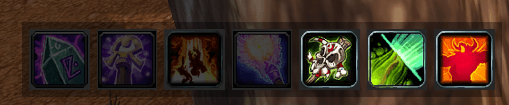
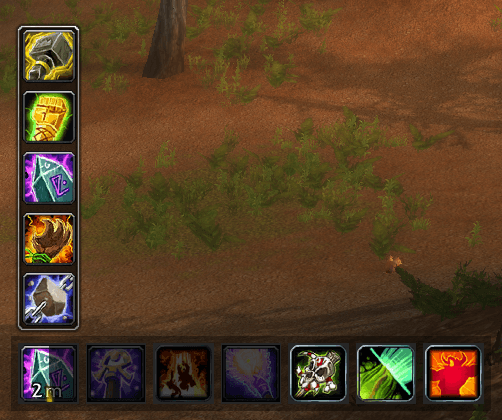
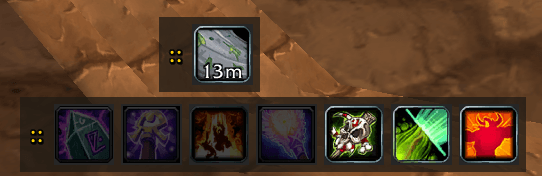
Give you a totem bar like in Wrath of the Lich King.
2026-07-20_21-24-11.PNG
2026-07-20_21-26-19.PNG
2026-07-21_08-16-49.PNG
Description
🌟 What is MyTotems?
In base World of Warcraft Classic, managing four individual totem elements across bloated action bars can be frustrating, clunky, and slow. MyTotems completely replaces static action bar clutter with a sleek, interactive, and modern Totem Bar—giving you instant one-click casting, intuitive flyout menus, drag-and-drop slot reordering, and smart macro generation!
Whether you are leveling through Classic Era, conquering Season of Discovery, or adventuring in TBC/WotLK Classic, MyTotems brings modern quality-of-life enhancements to the elemental calling.
✨ Key Features & How They Transform Your Experience
🎯 1. Direct Click-to-Cast Totem Slots (In & Out of Combat)
- What it does: Every element slot on your MyTotems bar acts as a standalone secure action button. Left-clicking any totem slot instantly casts your selected totem spell.
- How it affects your experience: No more hunting through multiple action bars or shift-paging for specific totems during intense dungeon fights or PvP encounters. One click directly on the totem bar drops your desired totem instantly—even mid-combat!
⬆️ 2. Upward Flyout Selector Menus
- What it does: Right-clicking any element slot (out of combat) smoothly slides open an upward menu listing all totems you've learned for that specific element (Earth, Fire, Water, Air).
- How it affects your experience: You can swap from Tremor Totem to Stoneskin Totem, or Poison Cleansing Totem to Healing Stream Totem in a split second. Your selected totem's icon automatically skins onto the main bar slot for quick reference!
🖐️ 3. Drag-and-Drop Slot Rearranging
- What it does: When the totem bar is unlocked (
/mytotems), you can click, hold, and drag any element slot to swap its position with another slot on the bar. - How it affects your experience: Prefer having your Fire Totem first and Earth Totem second? Want Water on the far left? Simply drag and drop them into your preferred visual order! The addon saves your layout permanently across logins.
🧠 4. Smart Dynamic Cast Sequence Macro (MyCall)
- What it does: Automatically creates and updates a unified character macro named
MyCall. Out of combat, the macro dynamically checks active totems on the battlefield and skips any totems that are already active with time remaining. - How it affects your experience: You only waste mana on what you actually need! Pressing your keybound
MyCallmacro drops only your missing totems in sequence. If all totems are active or expired, it resets so you can drop a full fresh set!
🚀 5. Built-in End-Bar Utility Buttons
- Cast Sequence Button (Fire Totem Icon 🗿): A dedicated button built directly onto the right side of the totem bar that triggers your smart
MyCallcast sequence. No action bar setup required! - Totemic Call / Recall Button (Totemic Call Icon 🌊): A dedicated utility button on the bar that executes
/cast Totemic Callto immediately recall and destroy all active totems to refund 25% of their mana cost.
🎨 6. Movable & Scalable WotLK-Styled Customization
- What it does: Includes a custom draggable options dialog (
/mytotems). Lock or unlock the frame, adjust scale sliders (from 50% to 200%), and toggle hidden inactive slots. - How it affects your experience: Tailor the bar to fit your exact UI layout—whether you want a compact 80% scale bar above your player frame or a large centered bar for easy clicking!
🛠️ 7. Smart Action Bar Auto-Placement
- What it does: Features Place on Bar 1 and Place on Bar 2 helper buttons in the settings window that scan your action bars for empty slots and safely place the
MyCallmacro without overwriting your existing spells.
🎮 A Day in the Life with MyTotems (Gameplay Example)
- Before Combat: You right-click your Earth slot to pick Stoneskin Totem, Fire for Searing Totem, and Water for Healing Stream Totem.
- Engaging the Enemy: You tap your
MyCallmacro key (or click the Cast Sequence button on the bar). It drops Stoneskin, Searing, and Healing Stream totems back-to-back. - Mid-Fight Adaptation: An enemy caster pulls out a fear spell! You mid-combat left-click your Earth Totem slot directly on the bar to drop Tremor Totem instantly.
- Wrapping Up: Fighting finishes with 45 seconds left on your totems. You press the Totemic Call button on the right end of the bar to instantly destroy your active totems and reclaim 25% of your mana back before running to the next pull!
⚙️ Quick Commands & Setup
| Command | Action |
|---|---|
/mytotems or /totems |
Opens the standalone WotLK-styled settings window |
| Left-Click Slot | Casts the currently assigned totem for that element |
| Right-Click Slot | Opens flyout menu (out of combat) to choose a totem |
| Left-Click Drag | Rearranges slot layout order when the bar is unlocked |
MyTotems Team