MySack
One bag to rule them all — auto-sells the junk, sorts the rest, and drops the greys before they weigh you down.
2026-07-01_22-25-40.PNG
2026-07-01_22-25-55.PNG
Description
MySack: The Ultimate Unified Inventory & Categorization Addon
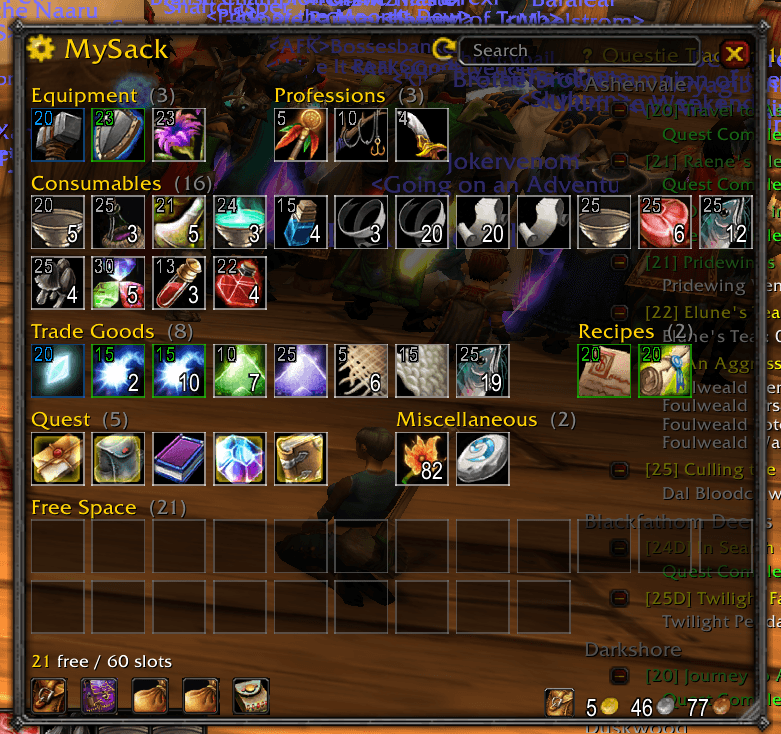
Tired of opening five separate bag windows, hunting through cluttered grid slots, or making frequent trips to the banker just to check if you stored a specific reagent? MySack transforms the classic World of Warcraft bag interface into a single, unified, and highly organized inventory window.
By automatically grouping your items into clean visual sections, providing powerful keyword search filters, caching your bank for offline access, and tracking items across all your characters, MySack eliminates inventory management frustration so you can spend less time cleaning your bags and more time playing the game.
🌟 Key Features & How They Improve Your Game
🎒 One Window to Rule Them All
- What it does: Merges your backpack, all four bag slots, and your keyring into one unified, resizable, and scalable window. The bank receives a matching unified window when you visit a banker.
- How it affects your experience: No more cluttered screen space or overlapping panels. Pressing
Bopens a single, clean interface where you can see your entire inventory at a glance. You can scale the window size (from tiny to large) and adjust how many columns are shown to fit your screen resolution.
🗂️ Auto-Categorization & Custom Overrides
- What it does: Items are automatically classified and grouped into visual compartments (e.g., Equipment, Consumables, Trade Goods, Quests, Junk, etc.) using their item class, quality, and profession tags.
- How it affects your experience: Your bags stay organized automatically. You can also customize your layout by creating new custom categories, reordering them via the settings panel, hiding sections you don't need, or manually dragging items onto category headers (or using Alt + Right-click) to assign overrides.
- Example: You can create a custom category called "Fire Resist Gear," drag your resistance pieces into it, and drag the category to the top of your window. When you get new gear, it automatically drops into the main Equipment section without messing up your custom resistance set.
🔍 Smart Search & Keyword Filtering
- What it does: A search bar at the top of the window lets you filter your bags dynamically. Unmatching items fade out, highlighting exactly what you searched for.
- How it affects your experience: You don't have to search by item name alone. MySack supports smart query terms:
- By item type: Type
potion,gem,armor,weapon, orquest. - By rarity: Type
epic,rare,uncommon, orgrey. - By item level: Type
>60or70-80to instantly filter gear by power level.
- By item type: Type
🏦 Offline Cached Bank View
- What it does: Caches and remembers the contents of your bank when you visit a banker. You can open and view your bank window anywhere in the world.
- How it affects your experience: No more running back to a major city just to check if you have enough materials stored. When a guildmate asks if you have spare herbs or gear in your bank, you can open
/msk bankright in the middle of a dungeon to see your cached layout and check exact quantities.
👥 Account-Wide Alt Tooltip Counts
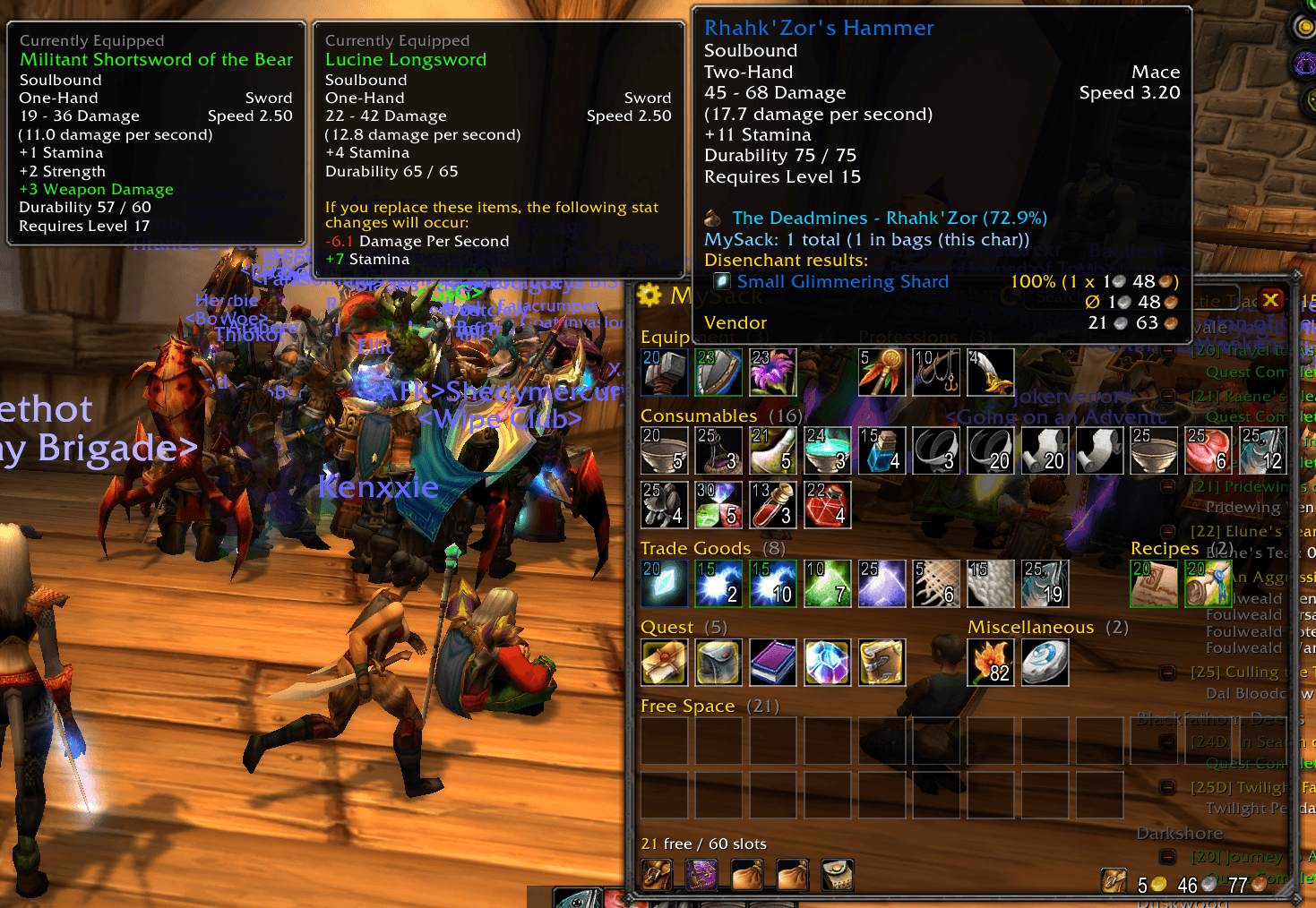
- What it does: Tracks item counts across all your characters on the realm and displays them directly on item tooltips.
- How it affects your experience: You will never have to log out and check three different characters to find out who is holding your raid consumables or trade reagents. Simply hover over an item to see a breakdown of how many are in your current bags/bank, how many your alts are holding, and the overall realm total.
⚙️ Integrated Merchant Automation
- What it does: Adds dedicated automatic utility buttons next to the merchant frame to auto-sell grey junk items and auto-repair your gear (with an option to use Guild Bank funds).
- How it affects your experience: Speeds up your vendor visits. When you open a shop, junk is cleared and repairs are handled instantly, while safety features ensure recipes, formulas, and user-protected items (marked with Ctrl + Right-click) are never accidentally sold.
🛡️ Clean Visual Badges & Highlighting
- What it does: Overlay badges show Item Levels (iLvls) on equippable gear, apply a pulsing glow to newly looted items, and color-code borders for quest items.
- How it affects your experience: Allows you to quickly evaluate loot without opening character sheets or external databases. You can instantly distinguish between upgrade gear and junk, spot newly acquired items in a crowded bag, and keep track of quest items.
MySack Team