MyQuestLog
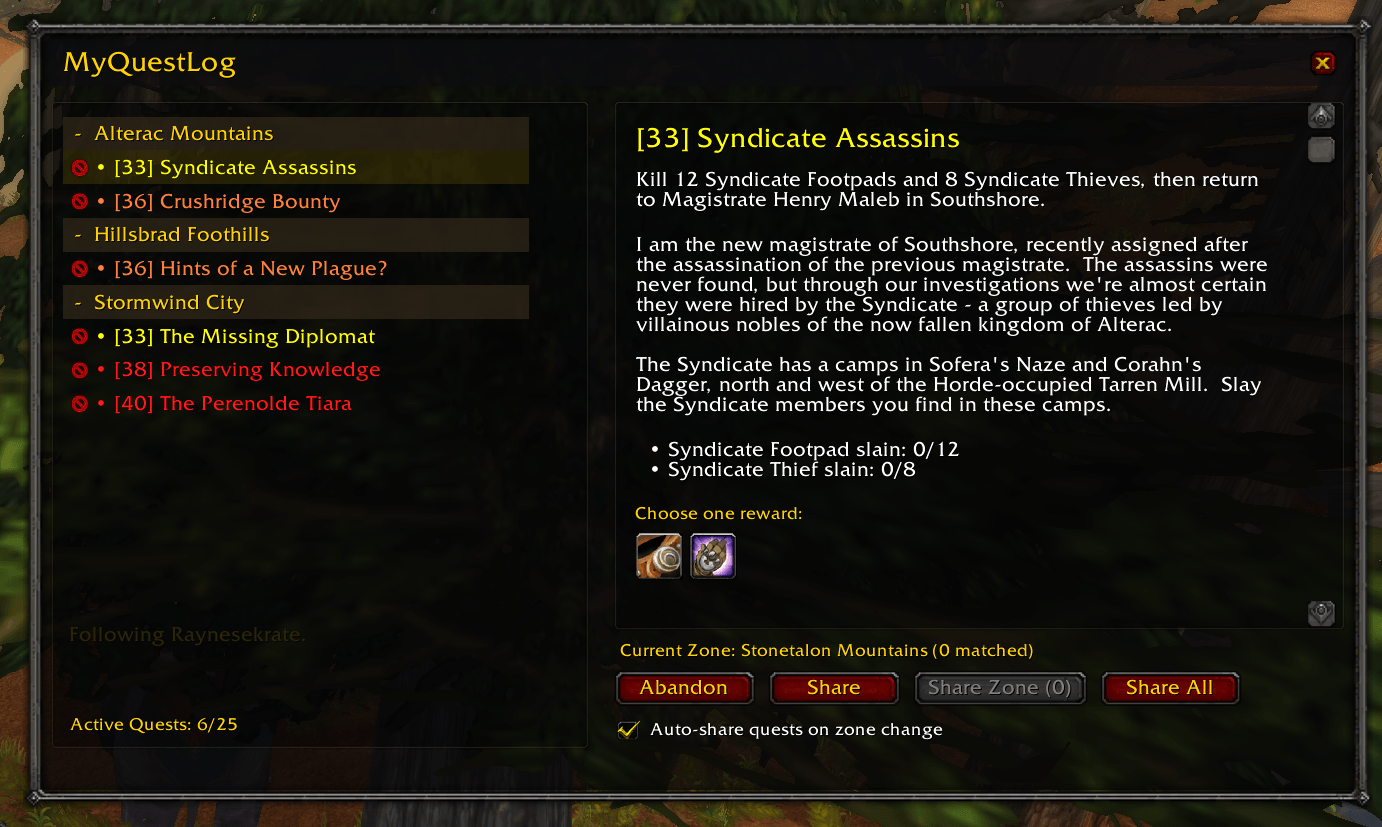
Replaces your quest log with a more enhanced version.
2026-07-20_21-26-54.PNG
Description
📜 MyQuestLog - Modern Quest Sharing & Quest Log Redesign for WoW Classic
Are you tired of the clunky, single-pane default WoW Classic Quest Log? Do you waste time asking party members which quests they have, searching through your bags for quest items, or manually clicking "Share" on 10 different quests one by one?
MyQuestLog is a complete, modern overhaul of the World of Warcraft Classic quest log interface. It combines a sleek Dual-Pane Quest Browser, 1-Click Zone & Dungeon Sharing, Click-to-Use Quest Items, and Real-Time Addon Syncing between group members! 🚀
🌟 Key Features & What You Will Experience
📜 1. Modern Dual-Pane Quest Log Interface
- What it offers: Replaces the legacy quest window with a clean, dual-pane interface matching modern WoW design standards.
- Left Pane: Displays zone category headers (Tanaris, Stranglethorn Vale, Hellfire Ramparts), quest levels in difficulty colors, completion tags
(Complete), and an active quest counter (22/25). - Right Pane: Full quest story description, choice/fixed rewards preview with tooltips, and an inline Objectives Progress Tracker showing exactly what items/kills you still need.
- Left Pane: Displays zone category headers (Tanaris, Stranglethorn Vale, Hellfire Ramparts), quest levels in difficulty colors, completion tags
- How it affects your experience: No more toggling back and forth or scrolling endlessly through standard lists. You get an instant, elegant overview of your entire quest log at a glance! ✨
🎒 2. Click-to-Use Quest Special Item Button
- What it offers: When selecting a quest that requires a special quest item (like a quest horn, key, or summoning stone), a dedicated Action Button appears in the top-right of the details pane.
- Features live item stack counts, cooldown clock overlays, and hover tooltips.
- How it affects your experience: Never dig through 50 bag slots searching for that quest item again! Simply open your quest log (L) and click the item button right inside the details window. 🎯
🤝 3. Smart 1-Click Group & Zone Quest Sharing
- What it offers:
- Share Zone: Automatically matches all active quests for your current zone or dungeon and queues them up for your party with one click.
- Share All: Shares every shareable quest in your entire log.
- Dungeon & Raid Mapping: Intelligently maps dungeon instances to their parent zone headers (e.g. entering Hellfire Ramparts automatically shares Hellfire Peninsula dungeon quests!).
- How it affects your experience: Grouping up for dungeons or questing zones takes seconds. You click Share Zone, and your entire party receives all relevant quests automatically! ⚔️
⚡ 4. Dynamic Queue Engine with Safety Timeout
- What it offers:
- Monitors game system feedback (
accepted quest,already on quest,declined quest,log full,too far away). - As soon as party members answer a quest prompt, the queue immediately fires the next quest (no static waiting delays!).
- Includes an automatic 10-Second Safety Timeout so AFK group members never stall your queue.
- Built-in ~40 Yard Proximity Range Check prevents spamming errors when members are out of range.
- Monitors game system feedback (
- How it affects your experience: Sharing quests is lightning-fast, smooth, and failsafe. You don't have to wait around or worry about the queue getting stuck! 💨
🌐 5. Real-Time Inter-Addon Communication & Quest Sync
- What it offers: When other group members also run MyQuestLog, the addon communicates via hidden addon messages (
SendAddonMessage).- Under Group Status, you see live color-coded progress for every party member:
• Rayneecakes (In Progress)🟡• Rayneecakes (Complete)🟢• Rayneecakes (Missing Quest)🔴
- Under Group Status, you see live color-coded progress for every party member:
- How it affects your experience: You instantly know who needs what quest without having to ask in party chat! If someone is missing a quest, you'll see
(Missing Quest)in red next to their name. 🧠
⚡ 6. Handy Productivity Shortcuts
- Fast Quest Abandonment (❌): Each quest title in the left list features a quick pass button for 1-click abandonment without multi-menu navigation.
- Shift-Click Linking & Tracking:
- Chat Open: Shift-clicking a quest inserts a clickable hyperlink into chat.
- Chat Closed: Shift-clicking toggles the quest on your screen's objective tracker.
⚙️ 7. Customizable Settings & Auto-Share Mode
- Auto-Share on Zone Change: Automatically shares matching zone quests when entering a new zone or dungeon (after a smooth 3-second delay).
- Silent Share Mode: Suppresses chat output for a clean, distraction-free log.
- Adjustable Share Delay: Custom slider to control queue intervals (1s to 5s).
🎮 Slash Commands
/mqlor/myquestlog- Open command help/mql share- Share matching quests for your current zone/dungeon/mql all- Share all shareable quests in your log/mql auto- Toggle automatic zone sharing/mql show//mql hide- Toggle the UI window/mql status- Display current settings
🚀 Why Download MyQuestLog?
MyQuestLog turns questing in WoW Classic from a tedious chore into a seamless, modern group experience. Whether you're running dungeons with friends, leveling through open-world zones, or managing a full quest log, MyQuestLog saves you time, eliminates chat confusion, and keeps your group synced effortlessly! 👑
MyQuestLog Team