


MyCrafting
MyCrafting upgrades World of Warcraft's default crafting window directly in-place—giving you the power of a crafting queue, smart shopping lists, vendor auto-buying,
2026-11-12_15-24-31.PNG
2026-11-12_15-24-39.PNG
2026-11-12_15-24-54.PNG
Description
# ⚒️ MyCrafting — Smarter In-Place Professions, Queues & Gathering Tooltips
**MyCrafting** upgrades World of Warcraft's default crafting window directly **in-place**—giving you the power of a crafting queue, smart shopping lists, vendor auto-buying, Skillet-style skill progression bars, and gathering node tooltips **without replacing or hiding Blizzard's familiar Professions UI**. ✨
Whether you are leveling a profession from `1` to `300+`, batch-crafting consumables for raid night, or farming ore and herbs in the open world, **MyCrafting** eliminates guesswork, tab-switching, and tedious reagent math.
---
## 🎯 How MyCrafting Changes Your Experience
In the base game, crafting multiple different items means clicking one recipe at a time, manually checking your bags and bank for missing materials, flipping back and forth to make intermediate parts (like bars or bolts), and guessing when a recipe or mining node will turn green or gray.
**MyCrafting** turns that into a fast, streamlined workflow:
* 📋 **Plan ahead with a Craft Queue** instead of babysitting one recipe at a time.
* 🛒 **See every missing reagent at a glance** across your bags and cached bank—and buy vendor items in **one click** (or automatically).
* 📊 **Know your exact skill-up odds** on both crafting recipes and open-world Mining/Herbalism nodes before you spend materials or swing your pick.
* 🔗 **Jump straight to sub-recipes** by clicking any craftable reagent right inside the recipe panel.
---
## ✨ Key Features
### 📊 1. Skillet-Style Skill Progression Bar
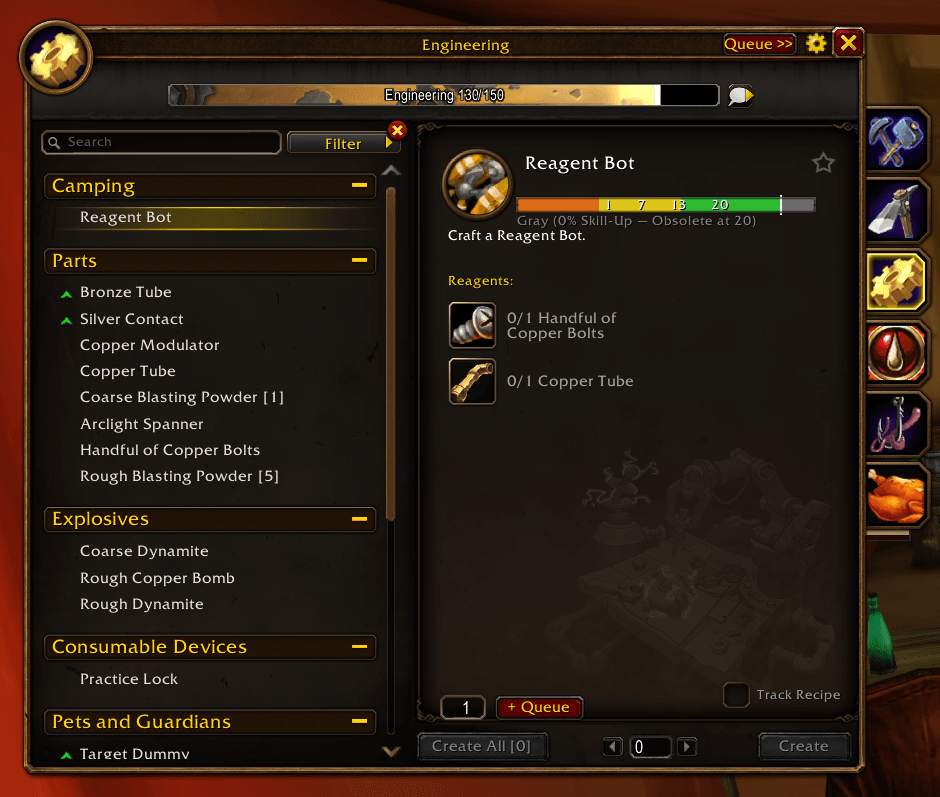
* Adds a **4-segment color-coded skill bar** (**Orange → Yellow → Green → Gray**) directly inside every recipe's details view, complete with a live marker showing your current skill level.
* Displays exact threshold numbers and clear status text—for example, seeing `Orange (100% Skill-Up) — Turns Gray at 185` on *Iron Shield Spike* or `Gray (0% Skill-Up — Obsolete at 135)` on *Golden Rod*—so you never waste expensive mats on zero-skill crafts.
### 📥 2. Docked Craft Queue & Batch Crafting
* Adds an inline **quantity box** and **`[+ Queue]`** button right above `Create All` in the default profession window.
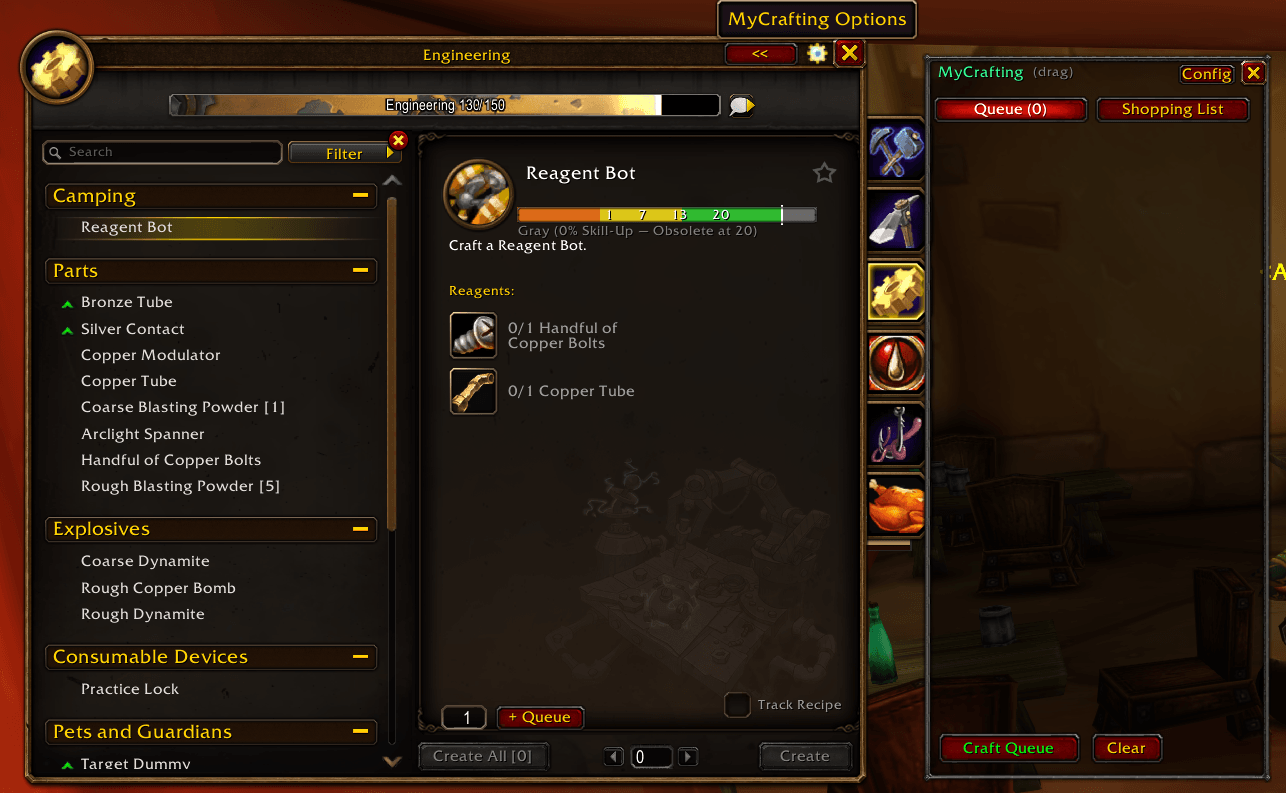
* Toggle the **MyCrafting Side Panel** anytime using the **`Queue >>` / `<<`** button on the window's title bar (or `/mc queue`).
* Adjust queued amounts on the fly with **`+`**, **`-`**, and **`X`** buttons per row, and drag-and-drop or smart-dock the panel cleanly beside your profession frame.
* Hit **`Craft Queue`** to craft your top queued recipe batch, with clear prompts to continue cleanly between different recipes and an optional completion sound when your queue finishes. 🔔
### 🛒 3. Smart Shopping List, Bank Tracking & Vendor Auto-Buy
* Automatically aggregates all materials required for every item in your Craft Queue and subtracts what you already carry in your **bags** and **cached bank** (updated automatically whenever you visit a banker 🏦).
* **Reagent Tooltips**: Hover over any reagent in the recipe window to see **Bag count**, **Bank count**, and **NPC Vendor price** right in the tooltip.
* **1-Click & Auto Vendor Buying**:
* Click **`Buy Vendor`** inside the Shopping List tab when talking to any merchant to automatically purchase only the missing reagents that vendor sells.
* Or enable **Auto-Buy Missing Vendor Reagents** in the options menu so items like *Strong Flux*, *Coarse Thread*, or *Crystal Vial* are bought for you the moment you open a vendor window! 💰
* **Share to Chat**: Click **`Share Chat`** to post your missing shopping list directly to Party, Guild, Whisper, or Say when asking friends or guildmates for mats. 💬
### 🔗 4. Click-to-Jump Sub-Recipe Navigation
* When a recipe requires a crafted component you also know how to make (such as **Bronze Bar**, **Handful of Copper Bolts**, or **Copper Tube**), hovering the reagent shows **`Click to jump to recipe`**.
* Clicking the reagent immediately switches the profession window to that sub-recipe so you can craft or queue it in one click—no searching required! ⚡
### ⛏️ 5. Mining & Herbalism Node Level Tooltips
* Hover over any **Mining vein** or **Herbalism node** in the world (e.g., *Copper Vein*, *Iron Deposit*, *Rich Thorium Vein*, *Peacebloom*, *Kingsblood*, *Black Lotus*) to see:
* Required skill level to gather it.
* Exact skill levels where the node turns **Yellow**, **Green**, and **Gray**.
* Whether your current character can gather it right now and what color difficulty it is for you! 🌿
### ⚙️ 6. Movable Window, Clean Title Bar Controls & Graphical Config
* **Movable Profession Frame**: Drag your Professions window anywhere on screen—no longer locked in place!
* **Quick Title Bar Access**: A **Config Cog Wheel** (`⚙️`) and **`Queue >>`** toggle sit neatly to the left of the `[X]` close button on the profession title bar.
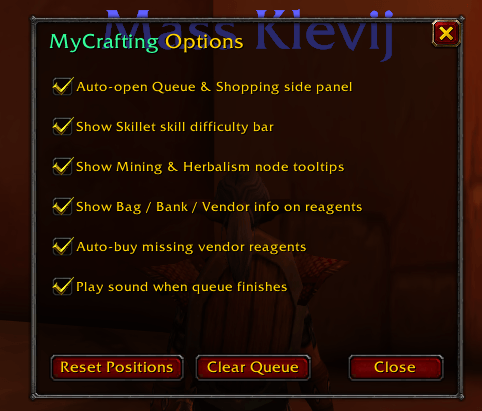
* **Full Settings Window**: Click the cog wheel, use `/mc config`, or open **Options → AddOns → MyCrafting** to toggle:
* Auto-open Queue & Shopping side panel
* Skillet skill difficulty bar
* Mining & Herbalism node tooltips
* Bag / Bank / Vendor info on reagent tooltips
* Auto-buy missing vendor reagents
* Queue completion sound
---
## ⌨️ Slash Commands
* `/mc` or `/mycrafting` — Toggle the MyCrafting Queue & Shopping side panel
* `/mc config` — Open the graphical MyCrafting Options window
* `/mc queue` — Print your current Craft Queue in chat
* `/mc shop` — Print your Shopping List of missing reagents in chat
* `/mc clear` — Clear all queued crafts
* `/mc autobuy [on|off]` — Toggle automatic vendor purchasing
* `/mc reset` — Reset window positions and saved layout
MyCrafting Team



