


MuteGuilds
- By
WowB_2026-10-11_11-08-31.png
WowB_2026-10-11_11-10-24.png

WowB_2026-10-13_08-47-21.png

WowB_2026-10-13_08-44-16.png
Description
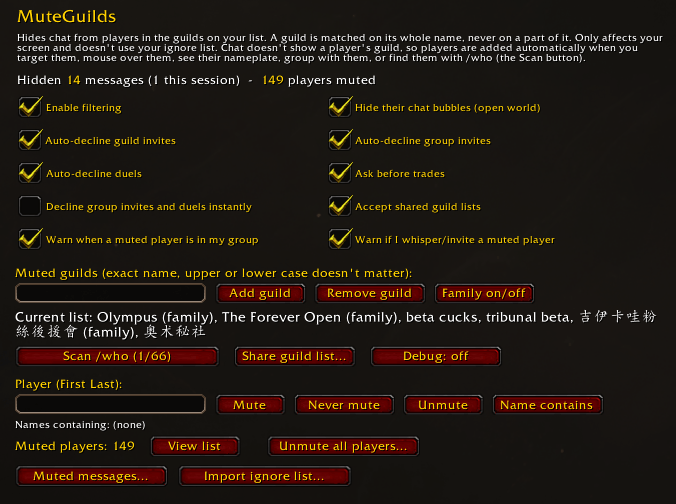
MuteGuilds hides chat and invites from players in the guilds on your list. It is made for the WoW Forever client (1.60.1).
A guild is muted only when its whole name matches an entry on your list. Upper and lower case don't matter. A guild whose name merely contains a listed name is left alone. Some guilds come as a numbered family, such as Guildname, Guildname 2 and Guildname III. Each guild on your list can be set to mute its guild family as well: the same name followed by a number (1, 2, 3 … or I, II, III …). Guildname Fans or Guildname Eviction Notice is still left alone.
Everything happens on your own screen. Nothing is added to your ignore list and the other player is not notified.
Why this addon exists
MuteGuilds is for muting influencer and streamer guilds: any of them, whichever ones you choose. It ships with an empty list, and you decide which guilds go on it.
The idea comes from OlympusMute, which mutes every guild whose name contains a keyword. That addon would not add exact guild-name matching, so MuteGuilds was written to provide it. It is not a fork: it was rewritten from scratch, shares no real code with OlympusMute, and adds features of its own.
Features
- Chat filtering for members of listed guilds in say, yell, whispers, channels, guild, party, raid and instance chat. Lines already on screen are removed when the player is identified.
- Chat bubbles of muted players are hidden in the open world.
- Guild learning. Chat doesn't say which guild a sender is in, so players are identified when you target them, mouse over them, see their nameplate, group with them, or find them with /who.
- /who scan that steps through your listed guilds by level range, to reach members beyond the 50-result limit.
- Auto-decline of guild invites, group invites and duels from muted players.
- Trade prompt that asks before you trade with a muted player.
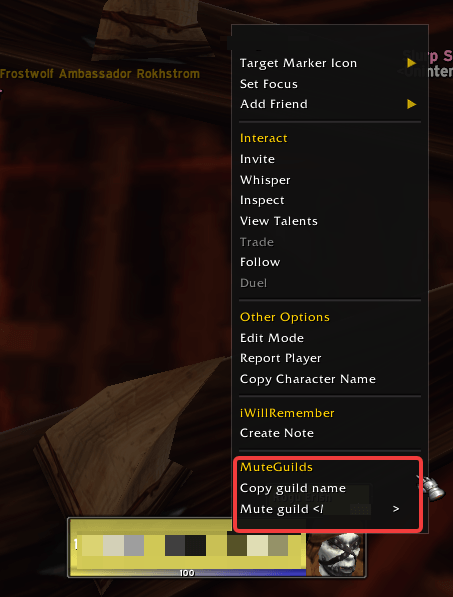
- Right-click menu on a player's unit frame, with "Copy guild name", "Mute guild" and "Mute guild family" (or "Unmute guild" / "Unmute guild family"). The quickest way to add a guild without typing its name.
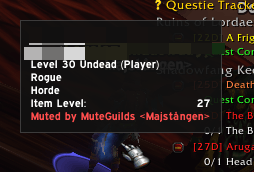
- Warnings when you whisper or invite a muted player, a tooltip line on muted players, and a window when one is in your group, with the option to unmute them while grouped.
- Former members. A player seen outside the guild they were muted for is unmuted, and their tooltip notes that they were in a muted guild before.
- Name filter for hiding chat from any player whose character name contains a given text.
- Manual lists: mute a player by hand, or mark a player as never muted.
- Muted-messages log of the last 15 minutes, from which you can report a message.
- Ignore-list import to move players from the game's ignore list onto your mute list.
- List sharing of your guild names wit receiver is always asked first.
- English and German. The addon follows the language of your game client.
- The guild you are in yourself can't be muted.
Debug modes
For testing your lists before you trust them or the Debug button on the options page.
- dry: a dry run. Nothing is hidden orted with what would have happened and why.
- live: normal operation, and every hit is reported as it happens.
- off: normal operation, no debug output.
Getting started
Open the options with /mg (or **/muteguidOns > MuteGuilds. Add a guild by its exactname, or right-click one of its members and choose "Mute guild".
- /mg guild add Exact Guild Name muteskes it off the list, together with its family if that option is on.
- /mg guild family Guild Name also mutes the guild's numbered guilds. Run it again to mute only the guild itself; guild remove removes the whole fas "Mute guild family" and "Unmute guildfamily" for the same.
- /mg add Name and /mg remove Name mute or unmute a player by hand.
- /mg allow Name never mutes this player (again to undo).
- /mg check Name says whether a player is muted.
- /mg name add text hides chat from players whose character name contains the text (name remove to undo).
- /mg scan runs the next /who search.
- /mg list and /mg log open the muted-players list and the muted-messages log.
- /mg share [Name|guild] shares your guild list with a player, your guild, or your group.
- /mg help lists every command. Several entries can be given at once, separaands are the same in every language.
Source and feedback
MuteGuilds is open source under the MIT license. Source code and issue tracker: github.com/oppahansi/MuteGuilds
MuteGuilds Team
