OlympusMute
- By
Description
OlympusMute
What's new in 1.0.8
- New: warns you when you're in a group with a muted player, with a note that their chat is hidden
- New: guild whitelist for exact guild names that should never be muted, e.g. "Anti Olympus"
- New: hides muted players' chat bubbles in the open world
- Changed: hidden-message stats now sit at the top of the options panel
- Fixed: duplicate /who result lines are collapsed into one
Full version history is in CHANGELOG.md inside the download.
Automatically hides chat and invites from members of guilds you choose. Out of the box it mutes any guild with "Olympus" in its name, and you can add or remove guild names at any time.
Filtering is client-side only: it changes what you see and nothing else. Nothing is added to your ignore list (so no 50-name cap), and the other player is never notified.
What it does
- Hides all player chat from muted players: Say, Yell, Emote, Whisper, General/Trade/custom channels, Guild, Party, Raid, Raid Warning, and Instance chat
- Hides their chat bubbles in the open world (dungeons and raids don't allow addons to touch bubbles)
- Auto-declines guild invites from muted guilds, and group invites, duels, and trades from muted players (each can be toggled separately)
- Adds a "Muted by OlympusMute" line to muted players' tooltips
- Warns you if you join a group with a muted player, since their party chat will be hidden
- Counts how many messages it has hidden, this session and all-time
How players are detected
Chat messages don't include the sender's guild, so OlympusMute learns guilds from players you encounter:
- Targeting or mousing over a player
- Seeing their nameplate
- Grouping with them
- Shift-clicking their name in chat
- Any /who results, including the built-in Scan button
When a player is identified, their earlier messages are also removed from your chat windows. Detected players are saved between sessions, so filtering gets more complete the more you play. If a /who or shift-click shows that a muted player has left the guild, they're unmuted automatically.
Options panel
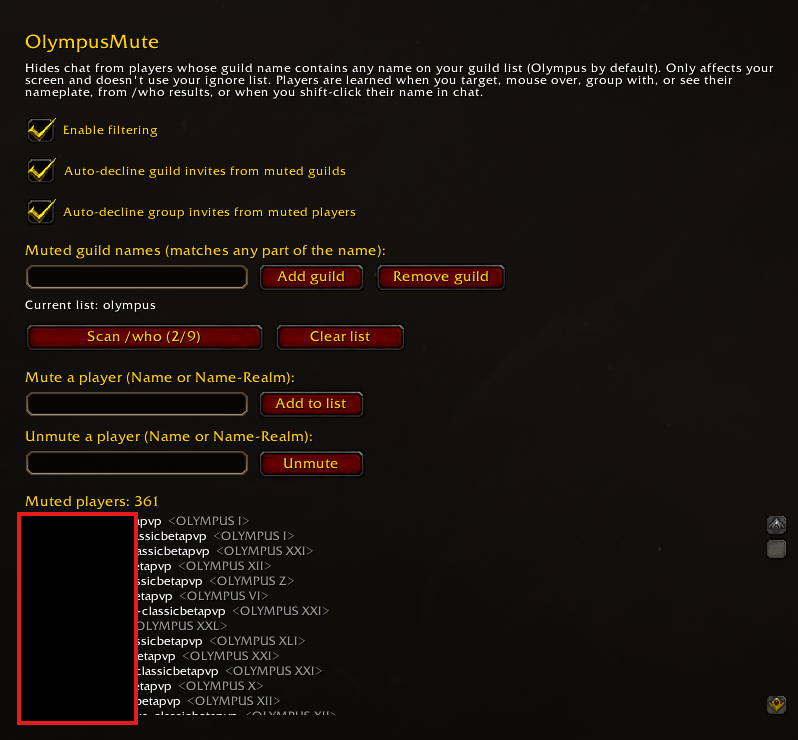
Find it under Options > AddOns > OlympusMute, or type /omute:
- Hidden-message and muted-player stats at the top
- Turn filtering, each auto-decline, the group warning, and bubble hiding on or off
- Muted guild names: add or remove any guild name (matches any part of the name)
- Guild whitelist: exact guild names that are never muted, even if they contain a muted name
- Scan /who: each click runs the next search in a rotation covering every guild on your list and level range, getting around /who's 50-result limit
- Mute a player by hand, mark a player as Never mute, or unmute a single player
- View the full muted list with guild names, or unmute everyone
Slash commands
/omute: open the options panel/omute on//omute off: toggle filtering/omute guild add Name//omute guild remove Name: edit the guild list/omute guild whitelist Name: add or remove an exact guild name from the whitelist/omute guildinvites on|off//omute groupinvites on|off: toggle invite auto-decline/omute duels on|off//omute trades on|off: toggle duel and trade auto-decline/omute groupwarn on|off: toggle the group warning/omute bubbles on|off: toggle chat bubble hiding/omute scan: run the next /who search (works great in a keybound macro)/omute add Name//omute remove Name: mute or unmute one player/omute allow Name: add or remove a player from the never-mute list/omute check Name: see whether a player is muted/omute stats: show how many messages have been hidden/omute list: print muted players to chat/omute clear: unmute everyone
Notes
- A player's first messages may appear before they've been identified. Use the Scan button to catch most members up front.
- Players you add by hand stay muted even if they change guilds.
- Built for WoW: Forever. If the game hides some instance chat from addons, those messages pass through unfiltered rather than causing errors.
The OlympusMute Team