Munin.VendorBuy
- By
Buy as many as you want from a vendor — type the number, see what it costs as you go, and let it work out what you can afford, carry, and the vendor actually has.
1 b.png
2 b.png
3 b.png
Description
VendorBuy
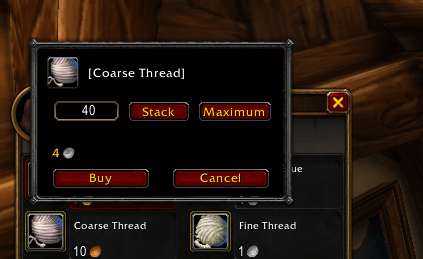
Buy as many as you actually want from a vendor. Type the number, see what it costs, and buy it in one go — no more clicking the same stack of thread eight times.
The game lets you split a stack when you shift-click a vendor item, but it caps you at a single stack and hides the prompt entirely on anything that doesn't stack. VendorBuy replaces that prompt with one that takes any number, shows you the running total as you type, and works out beforehand exactly how many you can afford, fit, and the vendor actually has.
Features
- Type any amount — ask for 500 and get 500, instead of buying a stack at a time and counting.
- Stack — fills up to the next whole stack, topping up the part-filled stacks already in your bags first. Click it again for another full stack, or right-click to step back down.
- Maximum — takes as many as you can possibly buy, and hovering it tells you what the limit is: your bags, your money, or the vendor's stock.
- A running total — the cost updates as you type, in gold or in whatever currency the item is priced in, so you know what you're spending before you commit.
- It works out what you can actually buy — the lowest of what your bags will hold, what you can pay, and what a limited-stock vendor has left. You can't type a number that won't work, and the Maximum button's tooltip tells you which of the three is holding you back.
- Knows your bags properly — counts the room left in part-filled stacks, and won't count a profession bag toward something it refuses to hold.
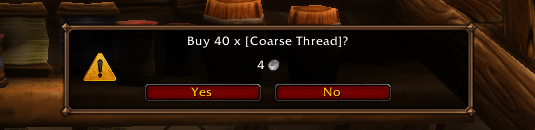
- Alternate currencies too — valor, marks, crafting reagents, anything a vendor prices in. Each is checked separately, and spending more than one lot of a currency asks first.
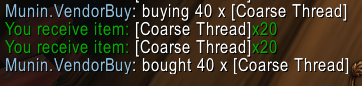
- Stops cleanly when something changes — bags full, out of money, the vendor sells out or runs short, you close the window or walk away. It reports what it actually bought when you're finished.
- Looks like the game UI — it sits against the merchant window, so by default it's drawn in the game's own colors. With Munin.StyleLib installed you can switch it to match the rest of your Munin interface instead.
- Pick your click — the game's own stack-split click by default, or set it to Shift, Ctrl, or Alt if that one's already spoken for.
- Retail and WoW Forever.
Usage
- Shift-click a vendor item to open the panel. Type a number, press Enter to buy, Escape to cancel.
- Stack fills to the next whole stack; right-click it to step back down. Maximum takes as many as you can buy — hover it to see why the limit is where it is.
- Options live in Esc → Options → AddOns → Munin.VendorBuy: which click opens the panel, whether large purchases ask first, and whether it talks in chat.
- Slash commands:
/vendorbuy— open the settings page/vendorbuy status— show the current settings/vendorbuy stop— cancel a purchase part way through
Notes
Every purchase is checked against your gold, your bag space and the vendor's stock before it starts, and again before each step. Please still look before you buy — Munin.VendorBuy is provided as is, and we can't take responsibility for gold or items lost.
VendorBuy only touches the merchant window. It does nothing at the auction house, and it never sells anything — only buying.
If you use an addon that replaces the merchant window with its own, VendorBuy stays out of its way and keeps working on the standard window.
Munin.VendorBuy Team