M4G
guild util
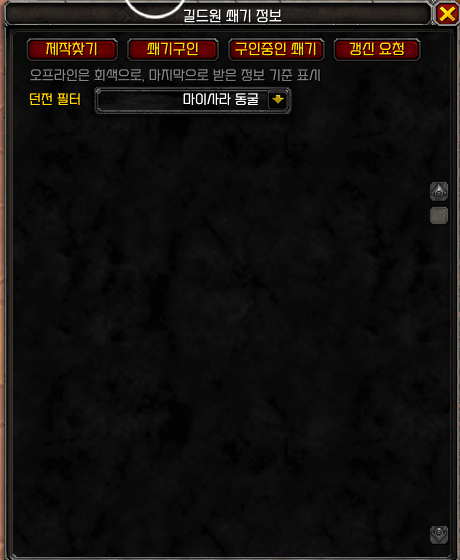
íë©´ ìº¡ì² 2026-07-23 181904.png
Description
Guild M+ Invite (GuildMPlusInvite)
A guild-first Mythic+ recruitment and guild-info toolkit — no more spamming guild chat, no more losing track of who's leveling what.
Guild M+ Invite turns the everyday chaos of forming Mythic+ groups — and answering "does anyone have X leveled?" for the hundredth time — into a couple of clicks. Everything runs entirely through guild-scoped addon messaging: nothing leaves your guild, nothing needs a web service, and there's no setup beyond installing the addon.
Why this addon exists
Most guilds run Mythic+ the same way every week: someone types "LFM +12, need heals" in guild chat, it scrolls past in seconds, five people whisper "me" at once, and the leader has to manually sort out who actually has the ilvl/experience for the key. Meanwhile, on the crafting side, "does anyone in the guild make X?" gets asked over and over because there's no shared memory of who can craft what.
Guild M+ Invite fixes both problems with a single hub window and a light peer-to-peer protocol between guildmates who have the addon installed.
Key Features
1. Mythic+ Recruitment, Done Right
- One-click keystone detection. Opening the recruit window auto-fills the dungeon and key level from the keystone currently in your bags — no typing dungeon names.
- Current-season dungeon dropdown. Dungeon selection is a dropdown built from the current season's 8-dungeon pool, so there's no ambiguity or typos in what you're advertising.
- Role-aware composition. The default comp is 1 tank / 1 healer / 3 DPS, and as the leader you pick your own role first — the addon subtracts your slot automatically so the guild announcement always shows the actual remaining need (e.g. "need Heal 1 / DPS 3" instead of the full comp).
- Custom message field. Add a short note like "beginners welcome" or "pushing timer, need experience" that shows up both in the guild chat announcement and in the applicant's popup.
- No blind auto-invites. This is the part that matters most: applicants land in a queue, not directly in your party. You see every applicant's name, class, and requested role, and you choose who to Invite or Reject — one at a time, at your own pace. Nobody gets auto-invited just because they clicked first.
- Role picker for applicants. When someone applies, they pick their role from an icon-based selector that defaults to their current spec but can be changed (handy for hybrid specs or off-spec applications).
- Multiple simultaneous recruitments. If your guild has several groups recruiting at once, applicants get a clean list of every open recruitment they've received, and can review and apply to each one individually instead of the newest one silently overwriting the others.
- Apply-to-many, join-one. Nothing stops you from applying to more than one group. The moment you're actually pulled into a party, the addon automatically withdraws your other pending applications so no leader is left waiting on someone who's already gone.
- "Currently Recruiting" board. Didn't see the announcement because you logged in five minutes late? Open the recruiting list, hit refresh, and every group currently recruiting in the guild (with live remaining-role counts) shows up with an Apply button — no need to have caught the original broadcast.
- In-chat guild announcement. A short, readable line still posts to guild chat for members who don't have the addon installed, so nobody's left completely out of the loop.
2. Guild Member Info Card — a living roster snapshot
A single hub window ("Guild M+ Info") shows, for every guildmate who has the addon:
- Equipped item level
- Current Mythic+ keystone (dungeon + level)
- Crafting quality for any recipes they've chosen to advertise
Information is shared automatically on login and whenever your keystone changes, and can be manually refreshed for everyone at once. Offline guildmates aren't dropped from the list — their last known info stays visible, grayed out, with a "last updated X ago" note, so the roster is still useful even when half the guild is asleep.
Multi-select dungeon filter: tick any combination of the season's 8 dungeons to instantly filter the roster down to "who currently has a key for one of these."
3. Crafting Finder — "does anyone make this?"
This is the reverse of a personal crafting list: you already know exactly what item you want, and you want to know if anyone in the guild can make it before deciding whether to post a guild order or a public one.
- Drag an item you own onto the search slot, or paste an item link (shift-click from the auction house, a crafting order, a vendor, a quest reward, or chat) to lock in the exact item — no guessing at names.
- Hit Ask Guild, and anyone whose addon has indexed that recipe (built up automatically every time they open a profession window) replies with their name and the quality they can produce.
- A separate personal "watch list" lets you choose which of your own recipes get advertised on your guild card, so you control what you're found for.
4. Quality-of-life
- Minimap button for one-click access to the hub, correctly anchored to the minimap's shape and size (works with round and square minimap styles), draggable to reposition.
- Single entry point.
/mplus4g(no arguments) opens the hub — no need to memorize a list of subcommands, though they all still work for power users. - Debug preview mode (
/mplus4g debug) lets a solo player see exactly what an applicant would see when testing changes, without a second account.
What the experience feels like
As a raid/group leader: you open your keystone, the recruit window is already filled in, you pick your own role, add a one-line note, hit start. From then on you get a live queue of applicants — you invite the ones who fit, decline the ones who don't, and the group fills itself out under your control.
As a guild member looking for a group: you get a clean popup the moment someone starts recruiting (or you check the "Currently Recruiting" board if you missed it), pick your role, and apply. If you're not accepted right away, you can apply elsewhere without worrying about double-booking yourself.
As anyone browsing the guild: open the hub any time to see who's geared for what, who's carrying which keystone this week, and who can craft the piece you need — all without a single guild-chat message.
Requirements & Notes
- Guild-only by design: all communication travels over addon messages on the guild channel (plus direct whispers for applications), so nothing is visible outside your guild and no external service or account is required.
- Every feature that involves "who has/can do X" only shows data from guildmates who also have the addon installed — this is a guild-wide tool, not a server-wide one, by design.
- The current-season dungeon list ships hardcoded and needs a small update at the start of each new Mythic+ season.
- Interface: 120007.
The M4G Team