MountSpeed
- By
A World of Warcraft: Burning Crusade Classic addon that automatically swaps your equipment when you mount or dismount. Configure mount speed items (Carrot on a Stick, Riding Crop, Mithril Spurs boots, etc.) and the addon handles the rest.
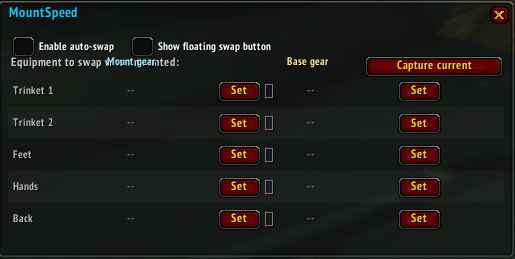
Capture d'écran 2026-05-03 103410.png
Description
A World of Warcraft: Burning Crusade Classic addon that automatically swaps your equipment when you mount or dismount. Configure mount speed items (Carrot on a Stick, Riding Crop, Mithril Spurs boots, etc.) and the addon handles the rest.
- Automatic equipment swap on mount/dismount
- Per-character configuration
- 5 configurable slots: Trinket 1, Trinket 2, Feet, Hands, Back
- Item selection via dropdown (bag scan) or drag & drop
- Saves your current gear before swapping, restores it on dismount
- Combat-safe: queues gear restore if dismounted in combat
- Minimap button (Carrot icon)
- No external dependencies (no Ace3, no LibStub)
Setup (takes 30 seconds):
1. Type /ms (or click the carrot icon on the minimap) to open the config window.
2. In the Mount gear column, click Set on each slot and pick the mount-speed item from your bags. The 5 configurable slots are Trinket 1, Trinket 2, Feet, Hands, and Back.
3. Equip your normal outfit, then click Capture current in the top-right of the window — this fills the Base gear column in one click.
4. Done. Mount up to verify the swap.
Daily use:
- Mount up → your Mount gear is equipped automatically.
- Dismount → your Base gear is restored automatically.
- Dismount in combat → the swap is queued and fires the moment combat ends.
- Manual swap → click the floating mount icon at the center of your screen (drag it anywhere you like), press your keybind (Esc → Key Bindings → MountSpeed → Toggle mount/base gear), or type /ms swap.
Visual feedback: the floating button shows a desaturated icon with a gold border when you're wearing Mount gear, and full color when you're wearing Base gear — so you always know which set is active.
Useful commands:
- /ms — toggle the config window
- /ms swap — manually toggle between Mount and Base gear
- /ms capture — save what you're currently wearing into the Base set
- /ms reset — wipe all configuration (with confirmation)
MountSpeed Team