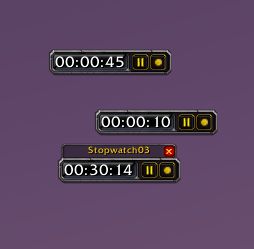
More Stopwatches in action.
Description
More Stopwatches
This addon lets you create multiple stopwatches with the default /timer, /sw and /stopwatch slash commands. It also adds a few new features for the timers:
All timers created with this addon are saved between sessions.
An example: If the stopwatch is at 30 minutes and you log off for 20 minutes, then the timer will be at 50 minutes when logging back in. This also works for disconnects, but may not for WoW crashes. Just close a timer if you don't want it to be saved anymore. If the timer is paused at the end of a session, then the timer is not updated in the next session: A paused timer saved at 20 minutes, will be restored to 20 minutes.
You can set a custom name for the new timer: /timer TimerName
Names are unique, so use Name1, Name2, etc.
You can update the time of a stopwatch (in minutes): /timer 30 TimerName
Just make sure that the TimerName is always the last in the command.
Right-clicking the timer fixes it in place, i.e. dragging and the close button are disabled.
Right-click the timer again to re-enable dragging.
If you have an open chat edit box and shift-click a timer it pastes the current timestamp to the edit box.
The time stamp is in the format hh:mm:ss.
Use the slash command /msw headers to permanently show timer headers.
The timer header is the label above the timer, displaying its name. The default behavior is to hide the header when not mousing over.
Use the slash command /msw close to close all stopwatches created by this addon.
Advanced usage:
- You can force the timer position, using the tag "position:x,y" in the slash command. X and y are pixels, starting at the left bottom corner of the screen. An example: /timer Test position:512,384 on a monitor with 1024x768 resolution will place the timer in the middle of the screen. The position tag can be anywhere in the command. This feature is indented for automation - usage in a macro, for example - you can always drag all timers to any position after creation.
- /timer false TimerName - The false tag indicates that the timer will not be saved between sessions.
More Stopwatches Team

Owner