ArmorDex
See estimated mob armor, physical damage reduction, and Sunder Armor effects in WoW Forever.
showcase-settings-2.png
showcase-settings-1.png
showcase-nameplates.png
Description
ArmorDex (formerly Armor Mob Forever): creature and player armor, what Sunder Armor really adds, and with its companion app a bestiary, a record of every player you fought and your own combat statistics.
The ArmorDex codex (new in 1.4.6)
A window in game, opened from the minimap button, the settings, /armormob dex or a keybinding. Five bookmarks:
- Target: the armor your hits face, a gauge of what it absorbs, and a Sunder Armor ladder from 0 to 5 stacks with the armor left and your extra damage at each one. Live, with your history against it.
- Bestiary: every creature you fought, searchable and sortable. Its record shows its armor at each level and what it absorbs of your hits, the armor left with 5 Sunder Armor, its dodge and parry rates, its attacks, your kills and time to kill.
- Players: every player you fought, with class icons and specs. Their record says who has the edge between you, the damage each way, their real armor and their most cast spells.
- Summary: your key figures, the creatures you kill most, why you die (killer in class color, killing blow), your attacks and those that hurt, and your last deaths unfolding hit by hit.
- Session: time played, XP and XP per hour, time to the next level, deaths and gold since you logged in.
Target and Session work on their own. Bestiary, Players and Summary are filled by the free companion app below, updated at each login or /reload.
Companion app for Windows (optional, separate download)
A separate app reads your combat log and gives the addon the exact armor of every creature and player you fight, learns Forever-only debuffs and buffs, and shows it all in its own window: you against your last target with a Sunder Armor ladder, your real character sheet, a Summary of your totals and records, every player and creature you met in detail (with the places you fought each creature on the zone's map), your battlegrounds player by player, and how close the addon's estimates are. It updates itself in one click.
The companion is not in this download: get it on GitHub.
github.com/AnTonnarr/armor-mob-forever-companion/releases/latest
On that page, click ArmorMobForever-Companion-Setup-x.y.z.exe under Assets, then run it (no administrator rights, nothing else needed). The addon works fully without it.
See every creature's armor on WoW: Forever, how much of your physical damage it absorbs, and exactly what each Sunder Armor stack adds. Works on any creature, even brand-new Forever ones and creatures hidden in dungeons.
Commands
| Command | What it does |
|---|---|
/armormob |
Opens the settings |
/armormob dex |
Opens or closes the ArmorDex codex (also the minimap button) |
/armormob on / /armormob off |
Turns the addon on or off |
/armormob appearance |
Sizes, spacing and opacity |
/armormob details |
Shows or hides the details (same as holding Alt) |
/armormob debug |
Shows what WoW lets the addon read on your target and how its armor was found |
/armormob measure <base damage> <damage dealt> |
Estimates a creature's armor from one of your hits |
/armormob measure forget |
Clears that estimate |
/armormob export |
Opens your measurements so you can copy them |
/armormob reset |
Restores the default settings (your measurements are kept) |
/armormob talents / /armormob probe |
For bug reports: what this client's talent and unit functions give |
Shortcuts: /armordex, /amf, /mobarmor and /modarmor work the same as /armormob.
Key binding: click Choose a key next to Keybinding in the addon's settings and press the key you want (or Options > Keybindings > ArmorDex). One press shows the details, another hides them.
Install
- Close WoW.
- Unzip and put the
ArmorMobForeverfolder inWorld of Warcraft\_forever_\Interface\AddOns. - Start the game and hover or target a creature. Nothing else is needed.
Coming from MobArmor, ArmureMobForever or ModArmorForever? Remove the old folder from AddOns. Your settings are kept when you update.
What it shows
Hover over or target a creature. Depending on your profile, you get up to six rows:
- Armor: the creature's armor and the share of your physical damage it absorbs.
- Damage bonus: extra physical damage from the debuffs already on the creature.
- +1 Sunder: what your next Sunder Armor stack will add.
- Sunder: 5-stack bar, then every other armor debuff on the creature with the armor it removes.
- Your armor: how much of this creature's damage your own armor stops (Defensive Stance included).
- Source (hold Alt): base armor, level, where the value comes from and how the creature was recognized.
Reading the values
- Armor: no armor debuff on the creature.
- Current armor: every armor debuff on the creature already subtracted.
- Armor for your hits: with Forever's Weaponmaster talent and a mace or a staff in your main hand, your attacks ignore 3 % of the target's armor per rank (15 % at 5/5). The addon reads your rank and your weapon and shows the armor your hits really face, with the damage bonus. What it keeps is always the target's own armor.
- Base armor: WoW hides the creature's debuffs, so this is the value before them.
- Guessed armor: nobody has measured this creature yet, so this is its likely armor (see below).
- ~ marks an estimate. Armor actually read on Forever has no ~.
- Colors: creature armor from green (low) to red (high), bonuses from white to bright green, the Sunder bar from yellow to red, your armor from red to green.
Where the armor comes from
On Forever, creature armor follows one rule:
armor = base armor of its level × class factor × creature multiplier
(class factor 1 for melee creatures, 0.81 for paladin-type, 0.51 for mage-type; the multiplier is usually 1).
The addon uses the best source it has, from most to least reliable:
- Forever readings: exact values read in the combat log. Yours first (through the companion), then the creatures already read by the author and built into the addon.
- Forever model: for every creature known to Classic-DB, the rule above with its real class and multiplier. It matches the large majority of Forever readings exactly.
- Your estimates from
/armormob measure, then the community database if you downloaded it. - Guessed armor for anything else, including creatures that only exist on Forever: worked out from its level, and from its class or mana when WoW lets the addon read them. It shows from the first moment you target or hover the creature.
It improves itself: on every kill, the companion compares the model and the guessed armor with the armor Forever showed. When several creatures of one level agree on a different base armor, it corrects that level for you, and your score shows in the companion window.
Built-in readings are tied to the game version they were read on. After a Forever patch they show with ~ until the addon is updated, so you never see an outdated value presented as exact.
Damage reduction uses the game's own formula when available, otherwise the Classic formula.
Every armor debuff, read and counted
The addon knows every debuff that lowers armor in Classic, with its real value and stacks, and subtracts them all:
- Sunder Armor (every rank), Faerie Fire (feral too) and Curse of Recklessness.
- Expose Armor: its exact value when WoW shows it (combo points and talent included), otherwise a 5-point finisher, marked ~.
- Weapon and item effects: Armor Shatter (Annihilator, up to 3 stacks), Puncture Armor, Crystal Yield, and every percent armor debuff.
- Unknown ranks and Forever variants are recognized by their name, in your game's language.
- Forever-only debuffs are learned by the companion: it measures the armor a new debuff removes, and the addon counts it once two kills agree.
Sunder Armor: what you really gain
- Readable auras: the addon reads the stacks, the Sunder Armor rank, Faerie Fire (feral included) and Curse of Recklessness. Expose Armor is flagged.
- Hidden auras: when WoW hides them, the addon counts your own casts on your target. It skips dodges, parries and lower ranks, caps at 5 stacks, and resets after 30 seconds or when you change targets.
- Before your first stack, in combat, the bar and "+1 Sunder" already show what you are about to gain.
How to read the gain
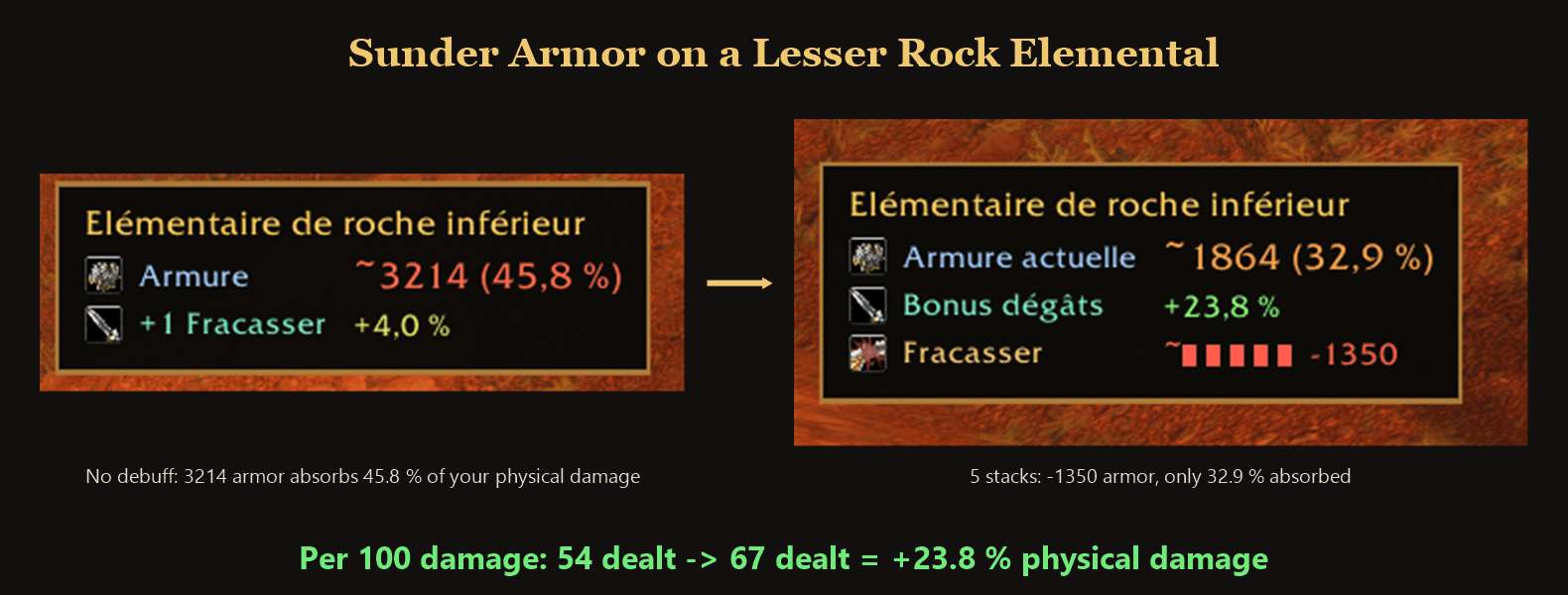
The gain is measured on the damage that gets through. Example: a creature absorbs 45.8 % of your damage, so 54.2 of every 100 damage reaches it. After 5 Sunders it absorbs 32.9 %, so 67.1 gets through: that is +23.8 % physical damage for the whole group.
- Every stack removes the same armor, so each new stack is worth a little more than the previous one on the same creature.
- On a creature with a lot of armor, the same stack is worth less in percent, because it removes a smaller share of a big total. The addon shows you the real number for each creature.
Dungeons: recognized even when WoW hides the creature
In dungeons, WoW: Forever can hide a creature's identifier, name, health and sometimes its level. The addon still recognizes it, in this order:
- By name, when it is readable.
- By level and max health.
- By level only, with the range of every possible creature, marked "several NPCs".
Dungeons already run by the author (such as Scarlet Monastery and the Sunken City) come built in, with their creature names in English, French, German, Spanish and Russian. Level and max health work in every language. The companion learns any other dungeon you run. A creature still unknown shows its guessed armor.
With the movable window, the title shows the creature's name even when it is hidden, when WoW allows it. Otherwise it shows "Level N creature".
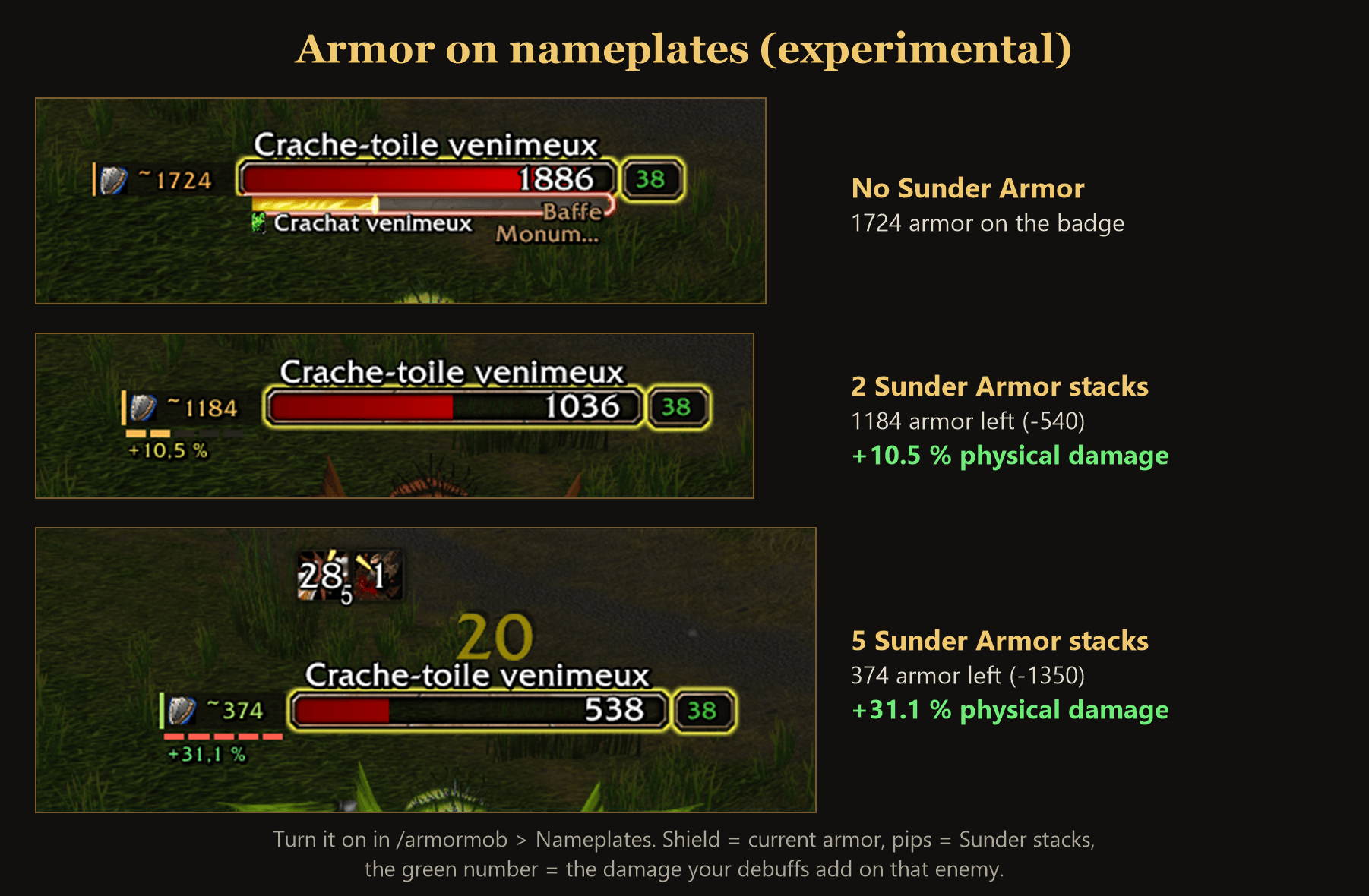
Armor on nameplates (experimental)
Off by default. Tick Armor on nameplates in the settings: a small badge appears left of each enemy's health bar, with a shield, its current armor colored from green (soft) to red (tough), ~ for an estimate, five Sunder Armor pips under it, and the damage bonus the armor removed gives you (+24 % = your hits deal 24 % more). Perfect to see which creature of a pack is the toughest. Its size is in Appearance.
Player armor (experimental)
Off by default. Tick Player armor in the settings: hover or target a player to see their estimated armor, the share of your physical damage it absorbs, the debuffs on them and your damage bonus, as on creatures.
- Gear: the armor real Forever players of that class have at that level (measured in combat logs, refined by your companion), or their real gear when WoW lets you inspect them.
- Buffs read in game: Inner Fire, Devotion Aura, Frost and Ice Armor, Demon Armor, Mark of the Wild, druid forms, elixirs, scrolls and potions. Each value is read in game, so Forever's changes and the caster's talents are counted.
- Spec and shield: spotted from the spells a player casts, their forms and their blocks, or read for sure from their talents when WoW lets you inspect them (Toughness, Thick Hide and Arcane Resilience counted exactly). The estimate then uses real players of the same spec (a protection warrior has far more armor than an arms one). The spec shows next to the player's name, in their class color with their level.
- Battlegrounds: enemy players are recognized by name even when WoW hides who they are, thanks to the companion's combat log reading.
- Remembered: the gear read is kept for 3 days, and with the companion a player you already fought shows the exact armor of that fight, plus the buffs carried now. Its live panel shows the exact armor of the last enemy player you hit.
Three display styles
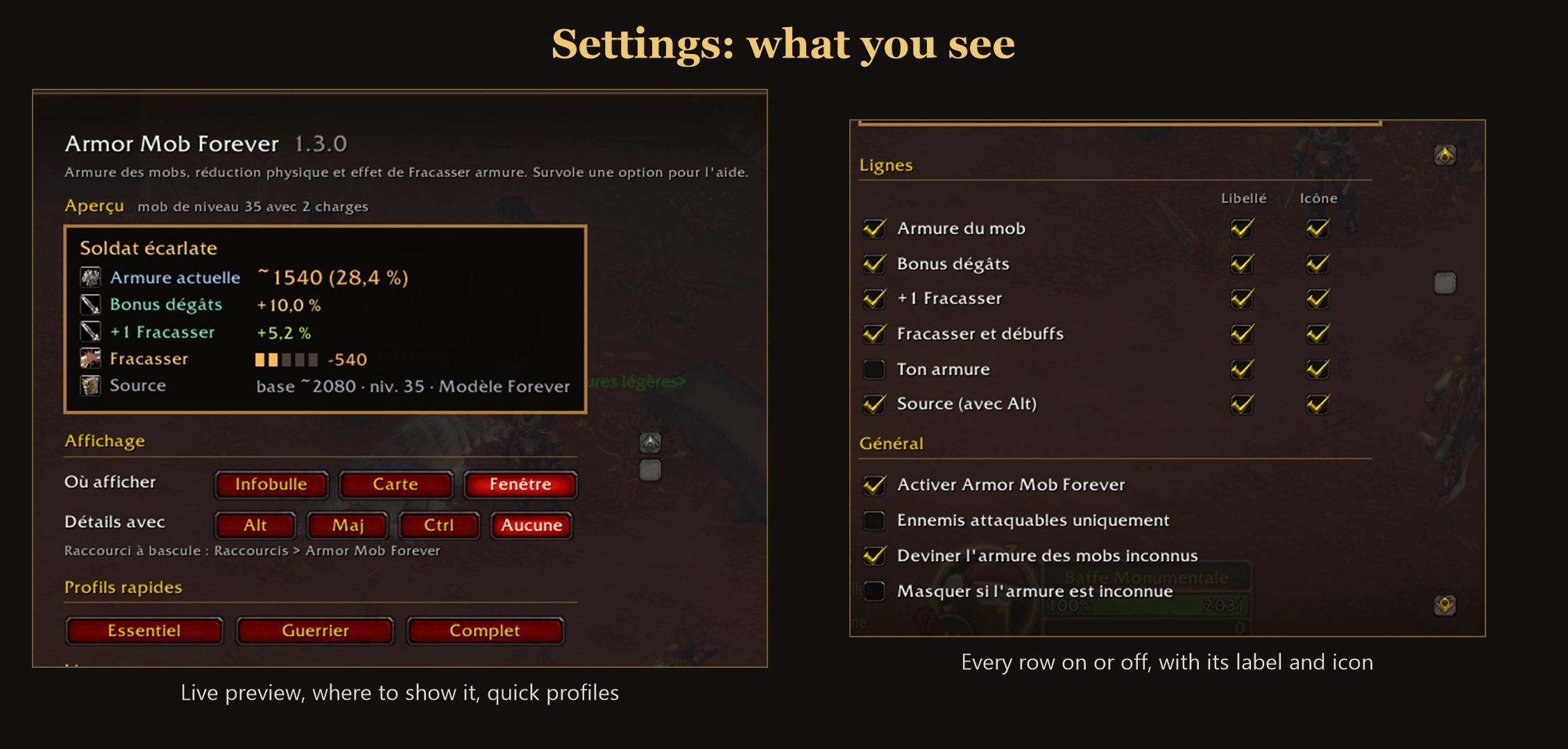
- Tooltip: rows added to WoW's tooltip.
- Card: a gold card inside the tooltip.
- Window: a movable window that follows your target. It can show only in combat and has a "Recenter the window" button.
Settings
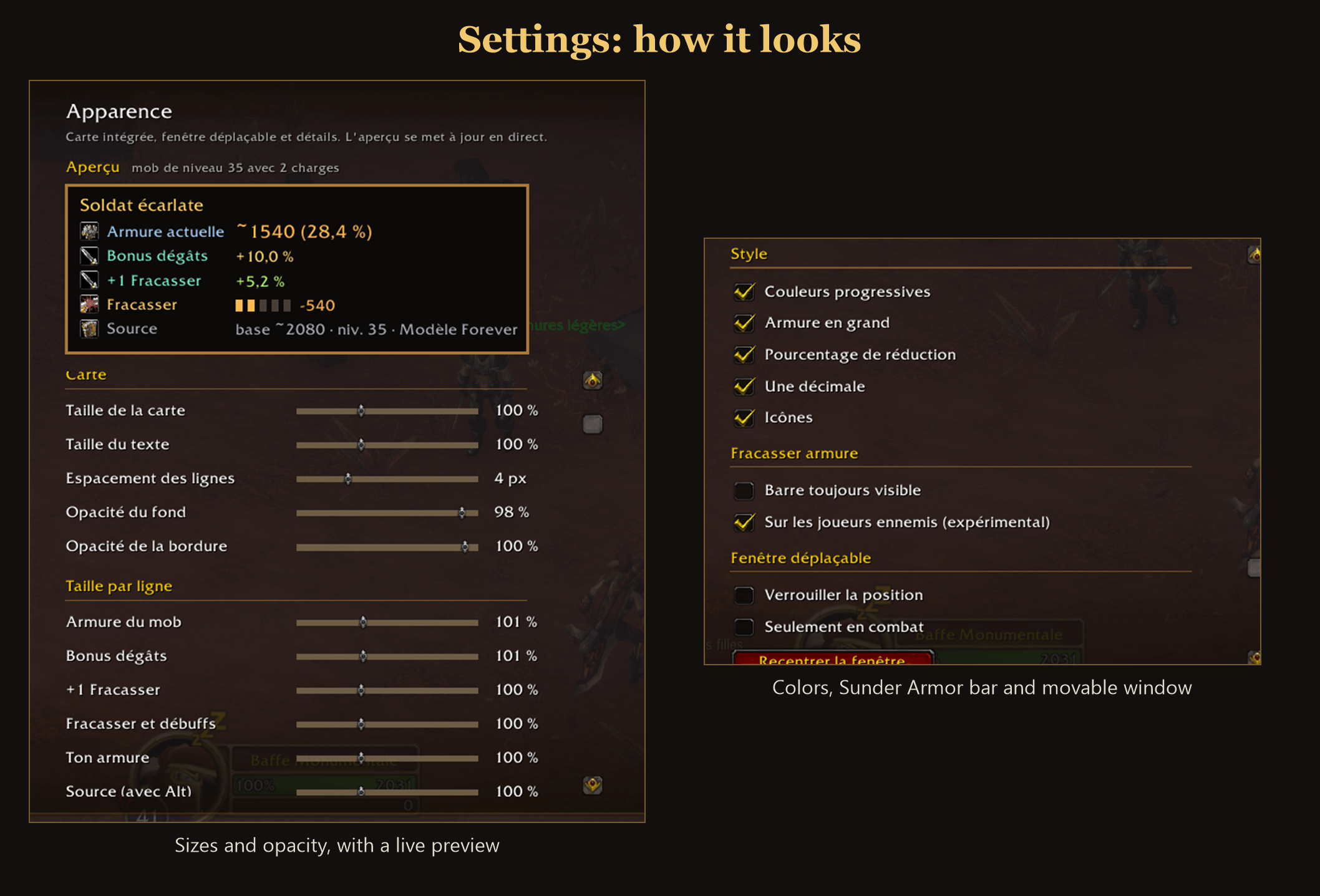
Open them in Options > AddOns > ArmorDex, or type /armormob. Every option has hover help, and a live preview shows each change.
- Quick profiles: Essential (armor and Sunder only), Warrior (everything for stacking Sunder, bar always visible), Full (every row).
- General: enable the addon, attackable enemies only, hide when armor is unknown, guess unknown creatures' armor, details key (Alt, Shift, Ctrl or none).
- Style: progressive colors, large armor value, reduction percentage, one decimal, icons.
- Rows: each row can be shown or hidden, with or without its label and icon, and has its own size.
- Sunder Armor: always show the bar.
- Players (experimental): player armor estimate, reading the gear when WoW allows it.
- Nameplates (experimental): armor badge on enemy nameplates, with or without the Sunder pips.
- Appearance: card and text size, row spacing, background and border opacity, nameplate badge size.
Windows companion (optional)
The addon works on its own. The companion is a separate Windows app: it reads WoW's advanced combat log and gives the addon the exact armor of every creature and player you fight.
Start it
- Download and run the installer (no administrator rights, nothing else needed). The app is not signed: if Windows SmartScreen warns, click More info, then Run anyway.
- In game:
/armormob, tick Advanced combat log, then/reload. - Start the companion (Start menu or desktop). It finds WoW Forever by itself, or asks for the folder once.
- New values reach the addon after a
/reloador when you log in again.
What it shows
- Combat: you (name in your class color, level, spec, your armor) against your last target, with its armor read in the combat log and a Sunder Armor ladder: the armor left, the reduction and the extra damage at 0 to 5 stacks for your rank. Below, your last fights and these last hours.
- My character: pick one of your characters; its real character sheet as the game gives it, what your armor stops against each level, your progress over time, your last deaths.
- Summary, in five tabs (Overview, Against creatures, Attacks, Against players, Your deaths): your totals and records, and every figure opens its detail. Creatures killed, the hardest hitters, the hardest to hit, the fastest and slowest kills, where you fight, your Sunder Armor stacks; every attack you dealt or took with its hits, damage, biggest hit, crits and crushing blows; your PvP record by class, your rivals, your nemeses; and every death told hit by hit, why you die most and where.
- Battleground: any of your past battlegrounds, the enemy team by class and spec, each player's real armor against what the addon showed, and your fights in it.
- Players and Bestiary: every player and creature the companion read, with a record for each: a unit frame like the game's, your encounters (who has the edge, each fight and its outcome, when they killed you, the battlegrounds you met them in), their spells, why a spec, dodge and parry rates, time to kill, how your hits fare, and where you fought a creature on the zone's map (zoom and drag).
- Learned: the Forever-only debuffs and buffs it measured, how exact the model and the guess are on your kills, the community's numbers and the coverage of each zone.
- Settings: mode (Local recommended, community download, or sharing with a token), live panel over the game (WoW windowed or windowed fullscreen), start with Windows, tools (open the data folder, archive old logs, export your history as CSV).
What it learns
- Exact armor, averaged over all your coherent kills across sessions. Readings skewed by a debuff are left out. One kill is enough, bosses included.
- New dungeons: name, level and max health of every creature, so the addon recognizes them next time.
- Forever-only debuffs and creature buffs, and corrections to the model where your kills disagree with it.
- It ignores players' totems, pets and summons.
Privacy
Your full combat logs and your character names stay on your PC. Players you fight are remembered on your PC only and never shared: their game ID, armor and spec, and their name only to recognize them in battlegrounds and list them in the companion window. Sharing is off by default. When it is on, it only sends creature IDs, levels, armor values and an anonymous fingerprint of each spawn. A value only enters the shared database once two installations have confirmed it on two different spawns.
Compatibility
- WoW: Forever. Interface in English and French; dungeon creatures recognized in English, French, German, Spanish and Russian.
- Every version's changes are listed in the Files tab and in
CHANGELOG.txt.
Something wrong?
Target the creature, type /armormob debug and attach a screenshot to your comment. It shows at once what WoW hides and how the armor was found.
ArmorDex Team