MinimapButtonScaler
- By
Minimap Button Scaler lets WoW Classic players resize addon and Blizzard minimap buttons, control the sun/moon dial, adjust Questie icons, and customize SexyMap coordinates and Nova layer text, with saved settings and conditional addon options.
Minimap Button Scaler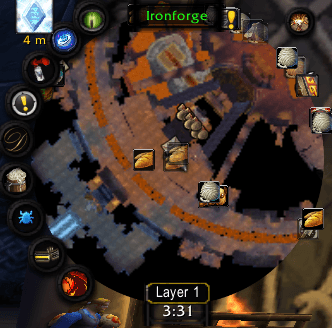
This is a sample of what can be acheived alongside the addon SexyMap.
Note: I am working to make this AddOn provide similar benfits to the stock Blizzard Minimap, but currently its been designed as a miniproject for myself to sit on top of SexyMap. Its not a dependency but I highly recommend it. Not all features may work properly on the default map.
Minimap Button Scaler is a lightweight World of Warcraft Classic addon that gives you detailed control over the buttons, labels, coordinates, and supporting elements around your minimap. Its main purpose is to allow you to scale up your minimap a whole bunch while giving independent scale control of the buttons around the map.
It is designed to work alongside popular minimap addons such as SexyMap, while keeping unrelated map elements—especially Questie pins—separate from general button scaling.
NOTE: As an added bonus you can also scale the Questie pins indepdentantly on the minimap, as well as on your world map of choice.
Features
Minimap Button Scaling
Resize addon launcher buttons around the minimap without changing their positions.
- Scale addon and Blizzard minimap buttons
- Adjust MoveAny and other D4Lib button distance from the minimap
- Resize and reposition the sun/moon dial
- Resize and rotate the Find Resources tracking icon
- Separate Questie icon scaling for minimap and world map
- Adjust Questie edge-pin radius
- Resize and reposition SexyMap coordinates
- Resize and reposition the Nova World Buffs layer label
- Settings save between reloads and sessions
- Integration options only appear when the related addon is installed
- Compatible with SexyMap, Questie, Nova World Buffs, MoveAny, and D4Lib-based buttons
Questie quest pins are intentionally excluded from this setting so their icon size and edge placement remain independent.
Sun and Moon Dial Controls
Customize Blizzard’s day/night dial with separate settings for:
- Dial scale
- Distance from the center of the minimap
- Position around the minimap
The position is controlled with an angle slider rather than dragging, avoiding alignment problems caused by combinations of Blizzard UI scale, minimap scale, and SexyMap settings.
Angle reference:
0°— right90°— top180°— left270°— bottom
The dial radius can be adjusted from 0 to 260 screen pixels.
Questie Integration
When Questie is installed, additional settings automatically appear for:
- Minimap quest-icon scale
- World-map quest-icon scale
- Optional minimap edge-pin radius
Minimap and world-map icon sizes can be adjusted independently.
The edge-radius option changes how far edge-clamped Questie pins sit from the minimap center without changing interior pin positions. The selected radius remains active while your character is moving.
SexyMap Integration
When SexyMap is installed, a dedicated coordinate-display section appears with controls for:
- Coordinate frame scale
- Font size
- Horizontal position
- Vertical position
The addon preserves SexyMap’s live coordinate display while allowing its presentation to be adjusted from the same options panel.
General button scaling remains compatible with SexyMap’s positioning and styling systems.
Nova World Buffs Integration
When Nova World Buffs is installed, settings are added for its minimap layer label:
- Overall scale
- Font size
- Horizontal position
- Vertical position
This allows the layer indicator to be repositioned and resized independently from the rest of the minimap.
Conditional Options
Integration-specific settings are only shown when the corresponding addon is installed:
- Questie options require Questie
- SexyMap coordinate options require SexyMap
- Layer-label options require Nova World Buffs
This keeps the configuration panel clean and avoids displaying controls that are not relevant to your setup.
Saved Settings
All configuration values are saved between sessions and UI reloads, including:
- Minimap button scale
- Sun/moon dial settings
- Questie minimap and world-map scales
- Questie edge radius
- SexyMap coordinate settings
- Nova World Buffs layer-label settings
Configuration
Open the addon settings through:
Options → AddOns → Minimap Button Scaler
The options panel uses a compact two-column layout with shorter sliders to fit comfortably inside the Classic settings window.
Slash Commands
Only two slash commands are included:
/mbs mini 1.0
/mbs world 1.0
/mbs mini changes Questie minimap icon scale.
/mbs world changes Questie world-map icon scale.
All other settings are managed through the AddOns options panel.
Compatibility
Designed for World of Warcraft Classic and optional use with:
- SexyMap
- Questie
- Nova World Buffs
The addon does not alter minimap tracking distance, radar range, or Blizzard’s available minimap zoom levels.
MinimapButtonScaler Team