BetterQuestLog
- By
BetterQuestLog replaces the default Classic quest log with a wider, resizable interface, improved quest details, party progress, Questie tracker integration, configurable alerts, tooltips, and importable settings profiles.
BetterQuestLog
Note: It's Extremely Customizable, lots of options, ability to save and sync profiles.
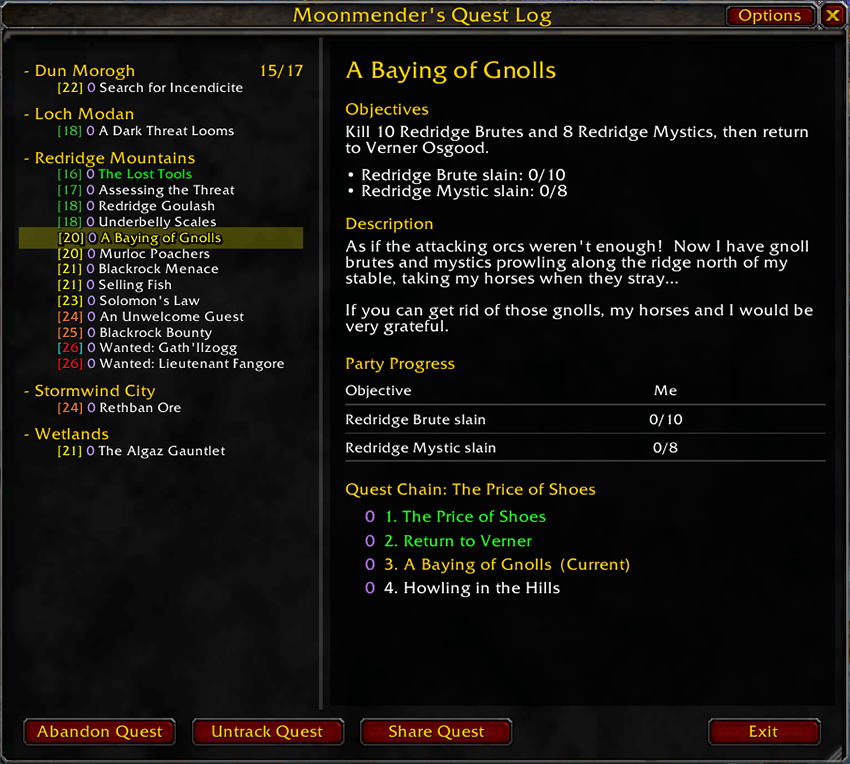
BetterQuestLog replaces the default World of Warcraft Classic quest log with a wider, resizable, highly customizable interface built for easier reading and better party coordination.
It works completely on its own, while Questie integration is optional and adds quest-chain information, party progress, tracker enhancements, and missed-quest warnings.
Features
A Better Quest Log
- Wide, freely resizable quest log
- Adjustable quest-list width and overall window scale
- Persistent size, position, scale, and layout
- Automatic wrapping and row sizing for long quest titles
- Extremely compact quest-list layouts for players who want a narrow sidebar
- Configurable fonts, text sizes, spacing, markers, padding, borders, and scrollbars
- Optional parchment-style Reading Pane
- Custom
(Complete)and(Dungeon)quest-title indicators - Difficulty-colored quest levels
- Dedicated Rewards section with item icons, quality colors, money, experience, honor, and item tooltips
- Shift-click menus for bulk Track, Share, and Abandon actions
Quest Chains
With Questie installed, BetterQuestLog can identify and display complete quest chains directly inside the quest log.
See:
- Your current position in a chain
- Previous and upcoming quests
- Parallel/non-linear quest branches
- A complete Quest Chain list below the selected quest
- Which chain quests are already completed
- How many party members are on each exact quest or elsewhere in the chain
- Party-member names by hovering chain entries
This makes long Classic quest chains much easier to understand without leaving the quest log.
Party Progress
BetterQuestLog can show party information directly beside quests and inside the Reading Pane.
Party features include:
- Same-quest party counts
- Same-chain party counts
- Per-objective progress for each party member
- Completed and incomplete progress coloring
- Party-member tooltips
- Automatic filtering when players leave the group
- Configurable count formatting and alignment
The local Objective and Me information remains available even when playing solo.
Questie Tracker Enhancements
BetterQuestLog can also enhance the Questie tracker without taking over its normal height or manual resizing.
Features include:
- Clicking a Questie tracker quest opens it directly in BetterQuestLog
- Optional party-progress columns
- Shared party-member column ordering across tracked quests
- Optional Me column
- Compact objective counts
- Configurable objective and completion-text alignment
- Dynamic tracker width
- Hover tooltips with configurable delay
- Optional quest objectives and descriptions inside tracker tooltips
- Full player names when hovering party progress
Missed Quest Warnings
BetterQuestLog can help groups avoid leaving someone behind when picking up quests.
Optional alerts can warn when:
- You accept a quest but a nearby party member does not
- A nearby party member accepts a quest but you do not
Warnings support configurable delays and optional sounds.
Quest-chain awareness helps prevent unnecessary alerts when someone has already completed a quest or is simply on a different step of the same chain.
Extensive Customization
BetterQuestLog includes dedicated settings pages for:
Window · Quest List · Reading Pane · Text · Questie · Profiles
Nearly every part of the quest log can be adjusted, including margins, content padding, line wrapping, markers, party counts, fonts, section spacing, borders, scrollbars, and compact layouts.
Options that depend on another feature automatically disable themselves when that feature is not active.
Profiles
BetterQuestLog includes a full profile system for managing different layouts.
You can:
- Automatically save settings for each character
- Create additional account-wide saved profiles
- Use a Global Profile shared between characters
- Import and export compact profile strings
- Share layouts with other players
- Restore the addon defaults at any time
- Choose from included BetterQuestLog presets such as:
- Default
- Classic
- Clean - Checkmarks
- Clean - Dots
- Modern Ultra-Compact
Older BetterQuestLog and WideQuestLog profile strings remain supported.
Questie Is Optional
Questie is not required.
Without Questie, BetterQuestLog still provides the complete replacement quest log, resizing, Reading Pane, rewards, formatting, profiles, tracking controls, window persistence, and customization features.
Questie simply unlocks the additional party, quest-chain, tracker, tooltip, and pickup-warning functionality.
Slash Commands
/bql/betterquestlog
Legacy commands are also supported:
/wql/widequestlog
Use /wql reset if you ever need to recenter the quest log and restore its scale to 100%.
Compatibility
Designed for World of Warcraft Classic with optional integration for Questie.
BetterQuestLog Team