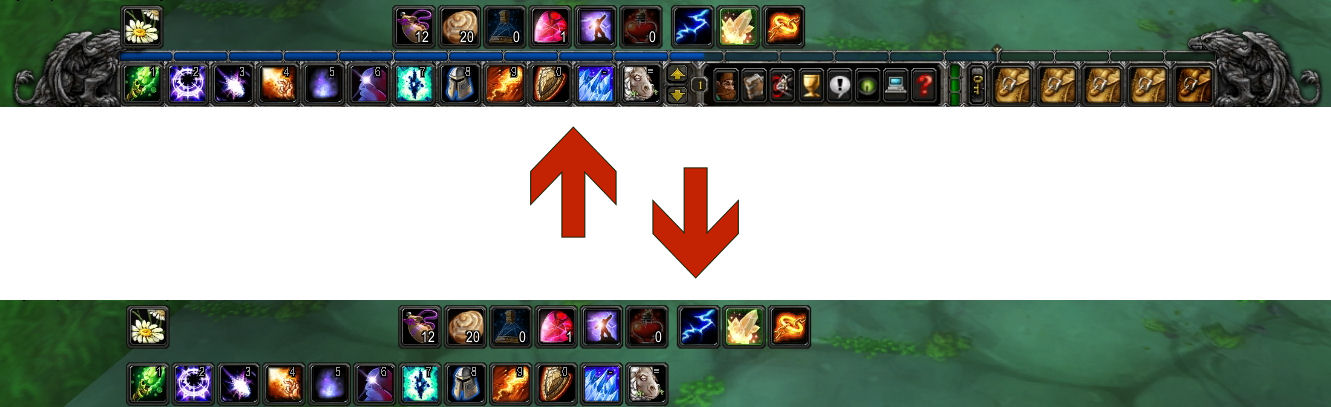
Main Menu Bar Auto-hidden
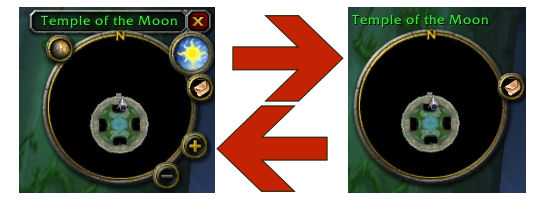
Minimap Cluster Auto-hidden
Description
Future enhancements to MinimalUI will appear as part of the new WoW++ project.
Summary
Are you tired of looking at all the frilly menu bar clutter, yet? MinimalUI auto-hides some infrequently used parts of the basic interface to uncover more of the 3D viewport and reduce overall clutter. These parts reappear when you mouse over them.
Unlike other mods that allow you to hide, move or replace parts of the interface to your liking, MinimalUI does not require you to learn slash commands, remember window names, adjust to a new interface layout, or really to think at all. Just mouse over what you want to use, and when you're done, MinimalUI will move it out of your way again. See screenshots for examples of auto-hidden interface. Note that very important UI elements which are frequently needed are never hidden, including character status, the minimap, and action bar buttons.
Instructions
To use, simply install and forget.
If you would like to 'lock' your interface in 'hidden' mode, type /minimalui. Use the same slash command again to restore standard (auto-hide) mode. While the interface is locked, mousing over will not reveal the hidden elements, so you will have to use keyboard shortcuts to activate menu options.
Compatibility
Although MinimalUI is compatible with all official clients, the slash commands and help text appear in English.
MinimalUI Team