MiniHub

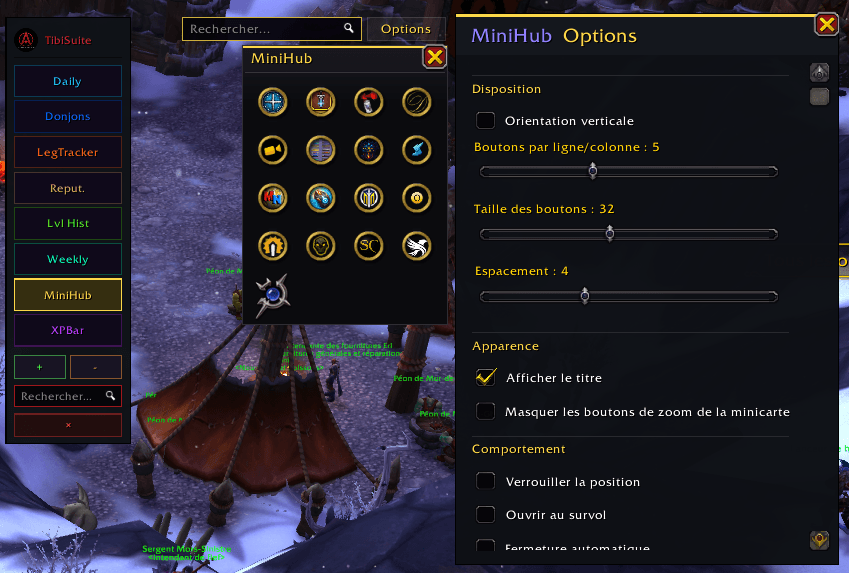
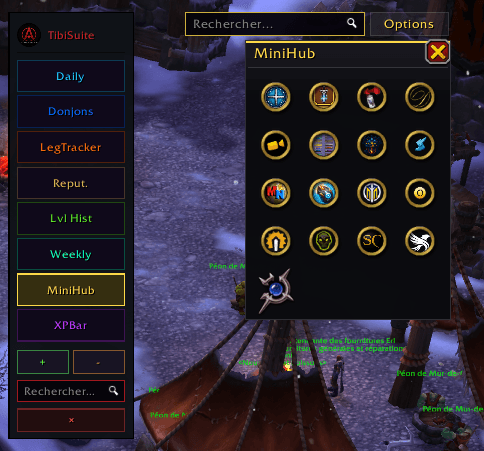
MiniHub gathers all the addon icons cluttering your minimap into a single, clean, movable and collapsible container. One click and the clutter is gone; one click and it's back. Built to feel premium, fully bilingual (English / French)
MiniHub (2).png

MiniHub (2).png

MiniHub (4).png

MiniHub (4).png

MiniHub (3).png

MiniHub (3).png

MiniHub (1).png

MiniHub (1).png

Description

MiniHub

Tidy your minimap. One button to rule them all.

MiniHub gathers all the addon icons cluttering your minimap into a single, clean, movable and collapsible container. One click and the clutter is gone; one click and it's back. Built to feel premium, fully bilingual (English / French), and ready to run on its own or as a module of the TibiSuite family.


✨ Highlights

  • Smart detection. MiniHub only collects real addon buttons (via naming conventions and LibDBIcon). It never touches Blizzard's native buttons, and it ignores map pins and tracking blips (TomTom, HandyNotes, Questie, gathering nodes, quest POIs...). No more grey junk icons in your bar.
  • Clean grid, no gaps. Only visible buttons are laid out, in uniform cells, filling column by column (or row by row). Choose your number of columns/rows and orientation.
  • Three ways in. A movable logo button you can drop anywhere in the UI, a minimap icon, and an entry in the Addon Compartment.
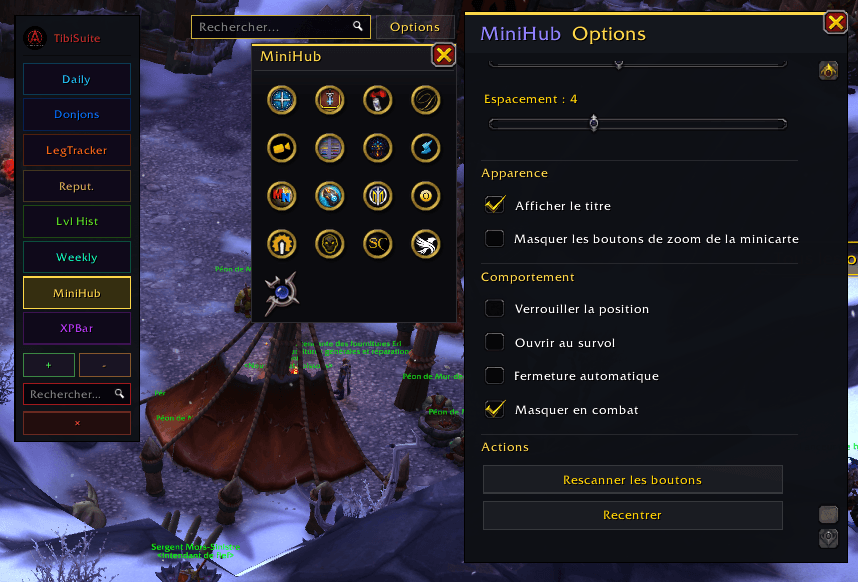
  • Looks the way you want. Built-in themes (WeeklyCompass Dark, TibiSuite Gold, Frosted Glass, Minimal), background and border color pickers, and opacity control.
  • Quality-of-life. Open on hover, auto-close when the mouse leaves, and a subtle fade animation.
  • Context rules. Optionally hide in combat, in dungeons/raids, or during pet battles.
  • Declutter Blizzard too. Optionally hide the default zoom +/- buttons (zoom still works with the mouse wheel).
  • Keybinding. Bind a key to open/close the container.
  • Unrecognized-button assistant. Found a button MiniHub didn't grab? The options panel lists likely candidates so you can collect them in one click.
  • Full control. Exclusion list to leave any button on the minimap, manual whitelist, and profile export/import to share your setup.
  • Bilingual. English by default, automatic French on frFR clients.

🖱️ Usage

  • Left-click the main button, the minimap icon, or the Addon Compartment entry: open / close the container.
  • Right-click: open the options.
  • Drag the main button to place it anywhere; drag the container by its title bar.

Slash commands

Command Action
/mh or /minihub Open / close the container
/mh scan Rescan minimap buttons
/mh reset Recenter the container and main button
/mh config Open the options
/mh debug List minimap children (diagnostic)
/mh block <name> Ignore a button
/mh add <name> Force-collect a button by name

🧩 TibiSuite

MiniHub works perfectly on its own, and integrates seamlessly as a module of TibiSuite when the suite is installed: shared options and unified branding. No dependency is ever required.


💬 Feedback

Bug reports and suggestions are very welcome in the comments. Author: Tibiscui · https://tibiscui.fr

Embedded libraries: LibStub, CallbackHandler-1.0, LibDataBroker-1.1, LibDBIcon-1.0.


MiniHub (Français)

Rangez votre minicarte. Un seul bouton pour tout regrouper.

MiniHub rassemble toutes les icônes d'addon qui encombrent votre minicarte dans un conteneur unique, propre, déplaçable et rétractable. Un clic et le désordre disparaît, un clic et il revient. Pensé pour un rendu premium, entièrement bilingue (anglais / français), utilisable seul ou comme module de la famille TibiSuite.


✨ Points forts

  • Détection intelligente. MiniHub ne collecte que les vrais boutons d'addon (conventions de nommage et LibDBIcon). Il ne touche jamais aux boutons natifs de Blizzard et ignore les marqueurs de carte et pastilles de suivi (TomTom, HandyNotes, Questie, nœuds de récolte, objectifs de quête...). Fini les icônes grisées parasites.
  • Grille propre, sans trous. Seuls les boutons visibles sont placés, en cellules uniformes, colonne par colonne (ou ligne par ligne). Choisissez le nombre de colonnes/lignes et l'orientation.
  • Trois accès. Un bouton logo déplaçable partout dans l'interface, une icône de minicarte, et une entrée dans le menu des addons (AddonCompartment).
  • Le style que vous voulez. Thèmes intégrés (WeeklyCompass sombre, TibiSuite doré, verre dépoli, minimal), sélecteurs de couleurs du fond et de la bordure, et gestion de l'opacité.
  • Confort d'usage. Ouverture au survol, fermeture automatique quand la souris quitte, et une légère animation de fondu.
  • Règles contextuelles. Masquage optionnel en combat, en donjon/raid ou pendant les combats de mascottes.
  • On désencombre aussi Blizzard. Masquage optionnel des boutons de zoom +/- (le zoom reste accessible à la molette).
  • Raccourci clavier. Associez une touche pour ouvrir/fermer le conteneur.
  • Assistant de boutons non reconnus. Un bouton n'a pas été récupéré ? Le panneau d'options liste les candidats probables pour les collecter en un clic.
  • Contrôle total. Liste d'exclusion pour laisser un bouton sur la minicarte, liste blanche manuelle, et export/import de profil pour partager votre configuration.
  • Bilingue. Anglais par défaut, français automatique sur les clients frFR.

🖱️ Utilisation

  • Clic gauche sur le bouton principal, l'icône de minicarte ou l'entrée AddonCompartment : ouvre / ferme le conteneur.
  • Clic droit : ouvre les options.
  • Glisser le bouton principal pour le placer où vous voulez ; glisser le conteneur par sa barre de titre.

Commandes slash

Commande Action
/mh ou /minihub Ouvrir / fermer le conteneur
/mh scan Rescanner les boutons
/mh reset Recentrer le conteneur et le bouton principal
/mh config Ouvrir les options
/mh debug Lister les enfants de la minicarte (diagnostic)
/mh block <nom> Ignorer un bouton
/mh add <nom> Forcer la collecte d'un bouton par son nom

🧩 TibiSuite

MiniHub fonctionne parfaitement seul, et s'intègre naturellement comme module de TibiSuite lorsque la suite est installée : options partagées et identité visuelle unifiée. Aucune dépendance n'est jamais obligatoire.


💬 Retours

Les rapports de bug et suggestions sont les bienvenus en commentaires. Auteur : Tibiscui · https://tibiscui.fr

Bibliothèques embarquées : LibStub, CallbackHandler-1.0, LibDataBroker-1.1, LibDBIcon-1.0.

The MiniHub Team

profile avatar
  • 9
    Projects
  • 706
    Downloads

A seasoned defender of Azeroth, I have been traversing the lands of World of Warcraft since BC as a Paladin Tank on Kirin Tor (EU).

Donate

More from TibiscuiView all

  • TibiSuite project image

    TibiSuite

    A unified tracker suite for World of Warcraft — Midnight & The War Within & Suite de trackers unifiée pour World of Warcraft — Midnight & The War Within

    • 76
    • July 29, 2026
  • DgnTracker project image

    DgnTracker

    Displays the location of all dungeons, raids, Chasm, Torghast from Vanilla to Midnight

    • 92
    • July 29, 2026
  • LegTracker project image

    LegTracker

    Tracking the collection of legendary items existing in the game and collected by your characters

    • 113
    • July 29, 2026
  • RenTracker project image

    RenTracker

    Tracks all reputations from Vanilla to Midnight expansion, including quest completion status, with clear categorization by faction and quest type (one-time, daily, weekly)

    • 149
    • July 29, 2026
  • TibiSuite project image

    TibiSuite

    A unified tracker suite for World of Warcraft — Midnight & The War Within & Suite de trackers unifiée pour World of Warcraft — Midnight & The War Within

    • 76
    • July 29, 2026
  • DgnTracker project image

    DgnTracker

    Displays the location of all dungeons, raids, Chasm, Torghast from Vanilla to Midnight

    • 92
    • July 29, 2026
  • LegTracker project image

    LegTracker

    Tracking the collection of legendary items existing in the game and collected by your characters

    • 113
    • July 29, 2026
  • RenTracker project image

    RenTracker

    Tracks all reputations from Vanilla to Midnight expansion, including quest completion status, with clear categorization by faction and quest type (one-time, daily, weekly)

    • 149
    • July 29, 2026