Milkman's ForeverGear
- By
Smart gear upgrades for WoW Forever! Automatically scan and equip better gear, compare stats, manage main/offspec equipment, and discover why items are upgrades.
01_Cover.jpg
Description
Milkman's ForeverGear
Smart Gear. Smarter Choices.
A smart equipment manager built for World of Warcraft Forever.
Ever pick up a new piece of gear and wonder if it's actually better than what you're wearing? Maybe it has more armor but less Strength, or more Stamina but stats that don't really benefit your specialization.
Milkman's ForeverGear is designed to take the guesswork out of gearing.
It scans your bags, compares equipment, identifies potential upgrades, and explains why an item is better for your selected class and specialization.
Whether you're leveling, running dungeons, tanking, healing, or preparing for raids, ForeverGear helps you make better equipment decisions without constantly comparing every item yourself.
And if you want, it can automatically equip suitable upgrades while keeping uncertain equipment changes under your control.
Features
Smart Automatic Gear Scanning
ForeverGear automatically monitors your inventory and equipped items for potential upgrades.
-
Scans equipment when new items enter your bags.
-
Detects inventory changes from looting, trading, and quest rewards.
-
Rechecks equipment after gear changes.
-
Automatically refreshes upgrade recommendations.
-
Includes manual SCAN buttons for checking equipment whenever you want.
-
Evaluates equipment using your selected specialization and stat priorities.
You don't need to constantly open the addon or manually compare every item you loot.
Automatic Gear Equipping
Want to focus on leveling instead of sorting through equipment?
Enable Auto Equip, and ForeverGear can automatically equip suitable upgrades based on your main specialization.
-
Automatically equips qualifying upgrades.
-
Uses specialization-specific stat weights.
-
Respects protected equipment and locked slots.
-
Keeps your offspec recommendations separate.
-
Blocks uncertain equipment changes from automatic equipping.
-
Allows Auto Equip to be turned on or off whenever you want.
Important: Automatic equipment selection uses calculated stat priorities. These are recommendations, not guaranteed best-in-slot determinations.
Main Spec and Offspec Support
ForeverGear allows you to select a main specialization and an optional secondary specialization.
For example:
Paladin
-
Main Spec: Retribution
-
Offspec: Protection
Druid
-
Main Spec: Restoration
-
Offspec: Balance
Shaman
-
Main Spec: Enhancement
-
Offspec: Elemental
The addon evaluates your inventory for both specializations independently.
Your main specialization controls automatic equipping, while your offspec receives separate upgrade suggestions.
Offspec recommendations are never automatically equipped.
Support for All Nine Classes
ForeverGear includes gear-scoring profiles for all nine original playable classes.
| Class | Specializations |
|---|---|
| Warrior | Arms, Fury, Protection |
| Paladin | Holy, Protection, Retribution |
| Hunter | Beast Mastery, Marksmanship, Survival |
| Rogue | Assassination, Combat, Subtlety |
| Priest | Discipline, Holy, Shadow |
| Shaman | Elemental, Enhancement, Restoration |
| Mage | Arcane, Fire, Frost |
| Warlock | Affliction, Demonology, Destruction |
| Druid | Balance, Feral Cat, Feral Bear, Restoration |
Feral Druids have separate Cat DPS and Bear Tank gear profiles.
Each specialization uses its own stat priorities instead of relying on a single generic class profile.
Green Upgrade Arrows
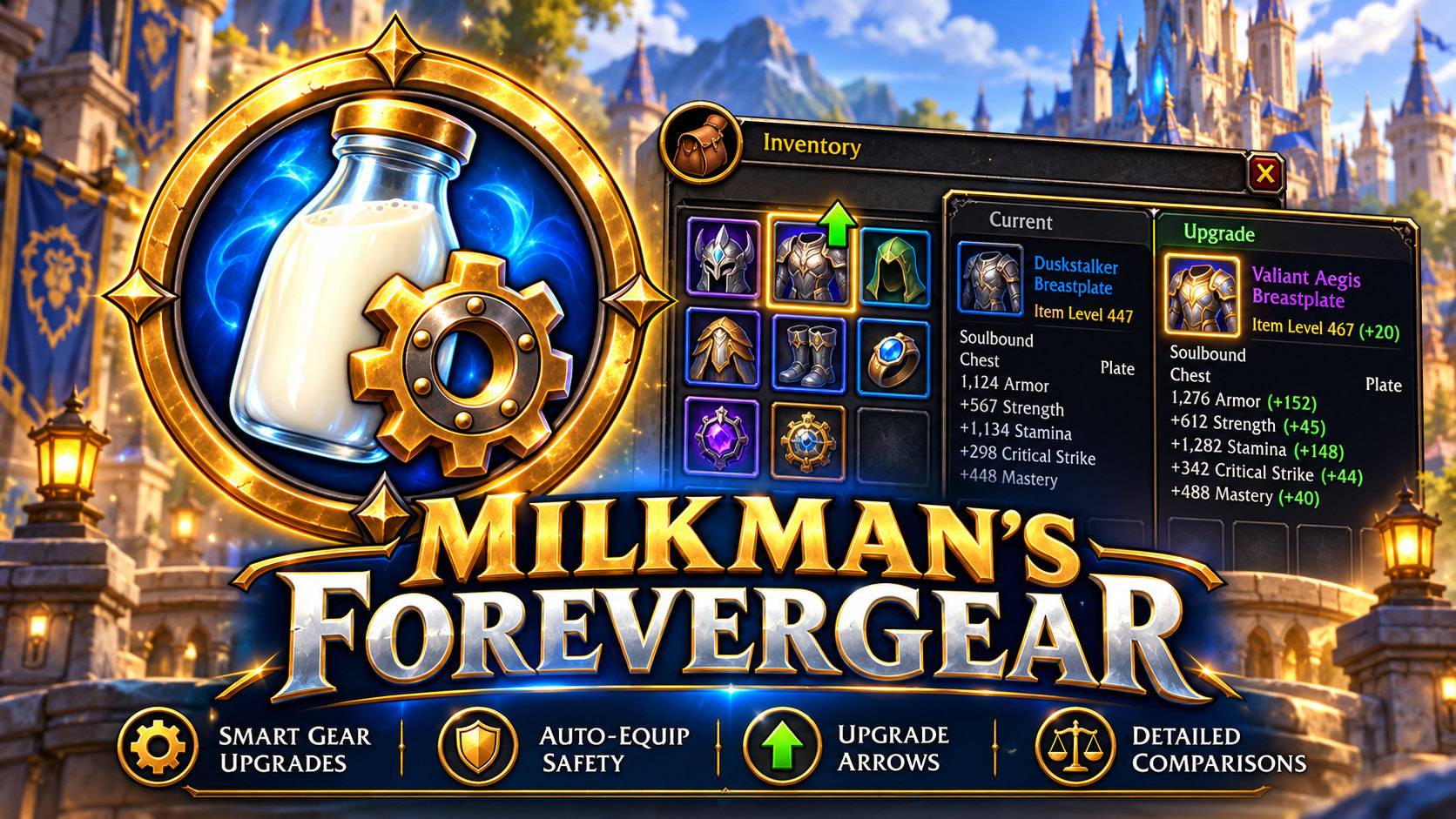
One of ForeverGear's most useful features is its visual equipment upgrade indicators.
When a potential main-spec upgrade is detected, a green upward arrow appears on the corresponding item in your inventory.
-
Quickly identify better equipment without opening every tooltip.
-
Highlight upgrades directly in your bags.
-
Update indicators as your inventory changes.
-
Support for standard inventory layouts and compatible Bagnon layouts.
-
Option to enable or disable upgrade arrows.
No more searching through your entire inventory trying to remember which item was better.
Detailed Gear Comparisons: Why Is This Better?
ForeverGear doesn't just give an item a score and expect you to trust it.
It explains why the item received that score.
When you inspect an upgrade, ForeverGear opens a detailed comparison showing:
-
The item you're currently wearing.
-
The recommended replacement.
-
The score of each item.
-
How much the score improves.
-
Which stats you're gaining.
-
Which stats you're losing.
-
How each stat contributes to the final score.
-
Why those stat changes matter for your selected specialization.
For example, a Retribution Paladin might see an explanation such as:
This chestpiece provides additional Stamina and armor, improving survivability while leveling. The lost Spirit doesn't affect the score under your current Retribution preset.
You can also view the individual calculations used to reach that conclusion.
The explanation is based on the item's measured stats and ForeverGear's built-in scoring weights.
Some unusual item effects, procs, set bonuses, and weapon interactions may require manual evaluation.
Needs Review: Intelligent Equipment Safety
Not every item can be accurately evaluated using simple stat weights.
ForeverGear includes a Needs Review system to identify potentially complicated equipment choices.
An item may be flagged when:
-
A weapon or offhand swap requires additional evaluation.
-
An item has unusual or incompletely measured effects.
-
Important equipment information is missing.
-
The comparison cannot reliably determine the full value of the change.
When this happens, ForeverGear displays a notification explaining why the item needs attention.
You can click INSPECT to open the detailed comparison and decide whether to equip it yourself.
Items requiring review are blocked from automatic equipping.
This is especially useful when comparing two-handed weapons, shields, caster offhands, or equipment with unusual effects.
Manual Equip from the Comparison Window
Found something you like?
You don't have to close ForeverGear and search through your bags again.
The detailed comparison window includes an EQUIP button.
This allows you to review the recommended item and manually request the equipment change.
ForeverGear performs safety checks before attempting to equip the item, including checking that it is still available and that you're not in combat.
Gear Guard and Equipment Protection
Sometimes you want to keep an item equipped even if another piece scores slightly higher.
ForeverGear gives you control over equipment changes.
Protection features include:
-
Gear Guard filtering.
-
Lockable chest equipment slot.
-
Lockable weapon slots.
-
Item ID protection.
-
Filtering for known fishing poles and profession tools.
-
Separate main-spec and offspec recommendations.
-
Restrictions on automatic equipping of uncertain items.
These tools help prevent unwanted equipment changes.
Leveling, Dungeon, and Raid Presets
Different activities can call for different equipment priorities.
ForeverGear includes three selectable gear-scoring presets:
Leveling: Balances specialization priorities with practical solo-play considerations.
Dungeon: Uses weights intended for group content and specialization roles.
Raid: Provides an alternative scoring preset for raid-oriented equipment evaluation.
Switch between these presets from the main addon window.
Gear recommendations are recalculated using your selected preset.
These are general stat-weight profiles, not simulation-based best-in-slot rankings.
Optional Pawn Integration
Already use Pawn?
ForeverGear includes optional Pawn scoring support.
-
Pawn is not required.
-
ForeverGear includes its own built-in stat weights.
-
Pawn support can be enabled when the addon is available.
-
If Pawn isn't installed, the Pawn option is disabled.
-
Hovering over the unavailable option explains that Pawn is required.
ForeverGear's built-in comparison explanations remain available without Pawn.
Note: Detailed stat-by-stat explanations use ForeverGear's built-in weights, even when Pawn scoring is selected for supported automatic equipment decisions.
Upgrade Notifications
When ForeverGear identifies a new upgrade, it can display a notification.
Notifications can include:
-
The recommended item's name.
-
Your selected specialization.
-
The calculated improvement.
-
Whether manual review is required.
-
An INSPECT button to open the item's detailed comparison.
Notifications can be enabled or disabled from the main interface.
Upgrade History
Want to look back at previous recommendations?
ForeverGear includes a history window that tracks recent upgrade activity.
It can display up to 10 recent recommendation and equipment-request records, helping you review what the addon has suggested.
Main Spec and Offspec Gear Sets
ForeverGear includes equipment-set controls for both main and secondary specializations.
Available controls include:
-
Save Main Set
-
Equip Main Set
-
Save Offspec
-
Equip Offspec
These features use the game's native equipment-set functionality where supported.
Compatibility depends on the equipment-set APIs available in your WoW Forever client.
Quest Reward Recommendations
Quest rewards can be difficult to evaluate when several items appear useful.
ForeverGear includes quest reward evaluation to help identify potentially useful rewards for your selected specializations.
It can provide main-spec and offspec recommendations, helping you decide which reward benefits your character most.
Quest rewards are not automatically selected.
Custom Minimap Button
ForeverGear comes with its own custom milk bottle and gear emblem.
The minimap button provides quick access to the addon, while the main window uses matching branding.
No need to remember commands every time you want to check equipment.
Getting Started
-
Download and extract Milkman's ForeverGear.
-
Place the
MilkmansForeverGearfolder in your WoW ForeverInterface/AddOnsdirectory. -
Launch or restart the game.
-
Type
/forevergearto open the addon. -
Select your main specialization.
-
Optionally select an offspec.
-
Choose your Leveling, Dungeon, or Raid preset.
-
Enable or disable Auto Equip, notifications, and upgrade arrows according to your preferences.
-
Scan your bags to review equipment recommendations.
Once configured, ForeverGear will continue monitoring supported inventory and equipment changes.
Slash Commands
/forevergear – Open the ForeverGear interface.
/milkgear – Alternative command for opening the addon.
/mfg – Short command for ForeverGear. May conflict with other addons using the same command.
/forevergear arrowsdebug – Display diagnostic information about detected inventory buttons and upgrade arrows.
Important Notes
Designed for WoW Forever
ForeverGear is developed and tested around the WoW Forever client and its supported addon API.
Compatibility with standard Retail, Classic, or other custom clients is not guaranteed.
Gear scoring limitations
ForeverGear uses customizable-by-preset stat priorities and item information to estimate equipment improvements. It does not simulate complete combat performance or retrieve live best-in-slot rankings from Wowhead.
Certain weapon combinations, special effects, set bonuses, and unusual equipment mechanics may require manual review.
Automatic equipping
Auto Equip is optional. If you're trying the addon for the first time, consider reviewing several recommendations manually before enabling it.
Development and Credits
Milkman's ForeverGear is a community-focused addon project developed for WoW Forever, featuring its own interface, branding, equipment explanations, upgrade notifications, protection systems, and additional gameplay tools.
The project builds upon portions of the original AutoGear addon engine. Original source attribution and applicable licensing information are retained in the included CREDITS.md and LICENSE.md files.
Milkman's ForeverGear is an independent community project and is not officially affiliated with Blizzard Entertainment or the WoW Forever development team.
Milkman's ForeverGear
Smart Gear. Smarter Choices.
Spend less time comparing stats and more time playing the game.
Milkman's ForeverGear Team