Merchant's Favor Optimizer
- By
Seal the right Waylaid Crates, buy Merchant’s Favor at the lowest price, and plan the fastest route to every recipe, Certification and reputation reward.
MFO_Overview.png
MFO_RecipeShopping.png
MFO_GoalPlanner.png
MFO_FillNow.png
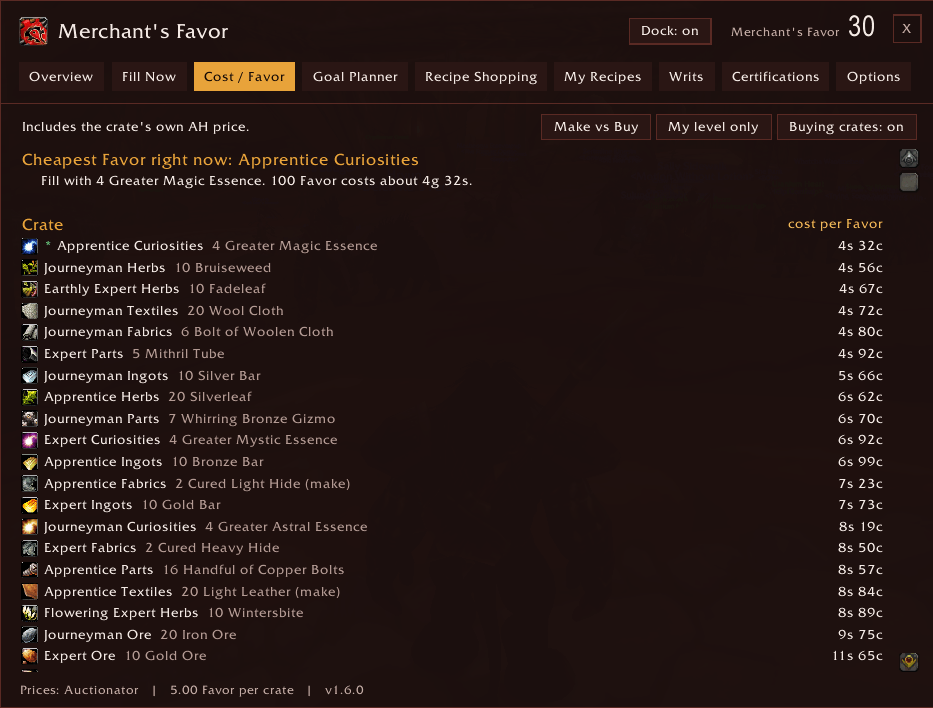
MFO_Cost.png
Description
Merchant's Favor Optimizer
Know exactly what to do with every Waylaid Crate and Craftsman's Writ. Merchant's Favor Optimizer reads your bags and bank, prices everything from the auction house, and tells you what to seal, what to buy, what to craft and how far you are from every recipe, Certification and camp reputation reward you want.
Built for World of Warcraft: Forever.
Your next best move
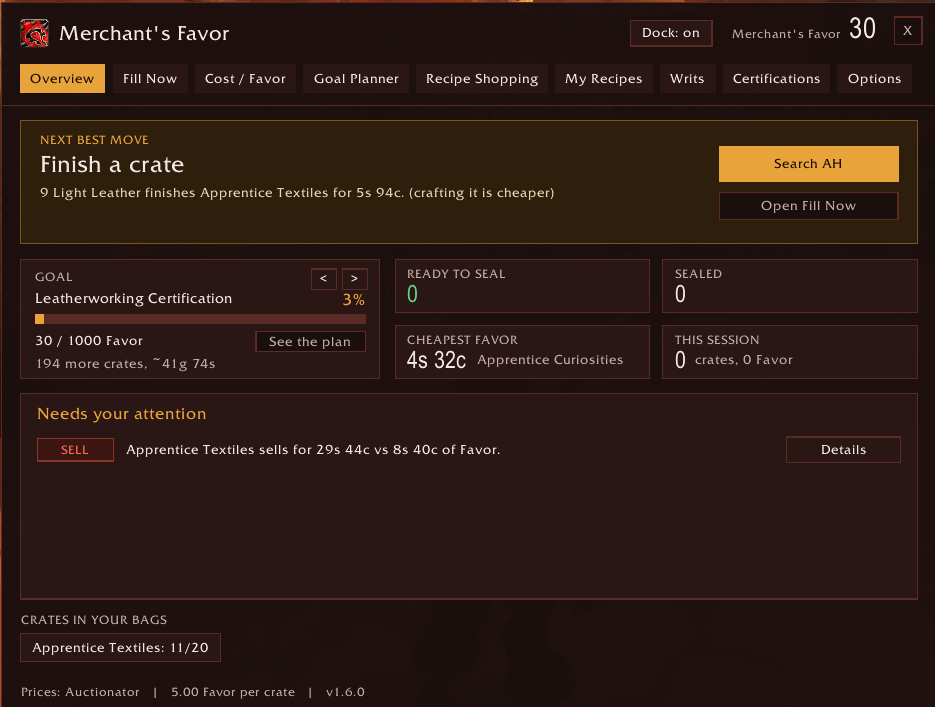
The Overview opens on one clear instruction, with a button that does it:
- Seal 2 crates, then hand in 5, with a waypoint to your camp's crate NPC
- Finish Apprentice Ore for 4s, with one click to search the missing material
- Sell this crate, when its auction price beats the Favor it would give you
- Work toward your Certification, with the cheapest plan one click away
Below it: your goal's progress, crates ready and sealed, the cheapest Favor right now, and a short list of everything that needs your attention.
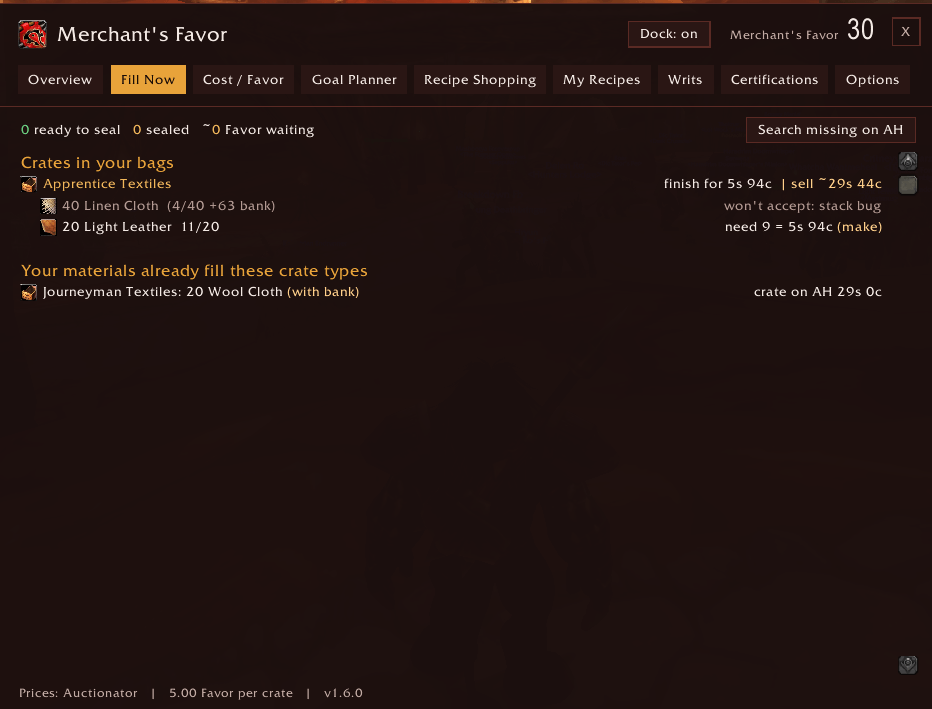
Fill Now: what your bags can seal right now
- Every Waylaid Crate in your bags, each bundle shown as have / need, with a green READY when one is complete
- Combine-stacks warning when you own enough but it's split across stacks
- Cheapest way to finish a half-filled crate, priced from the auction house
- Crates your materials already fill, so you know which ones to buy
- Optionally counts your bank
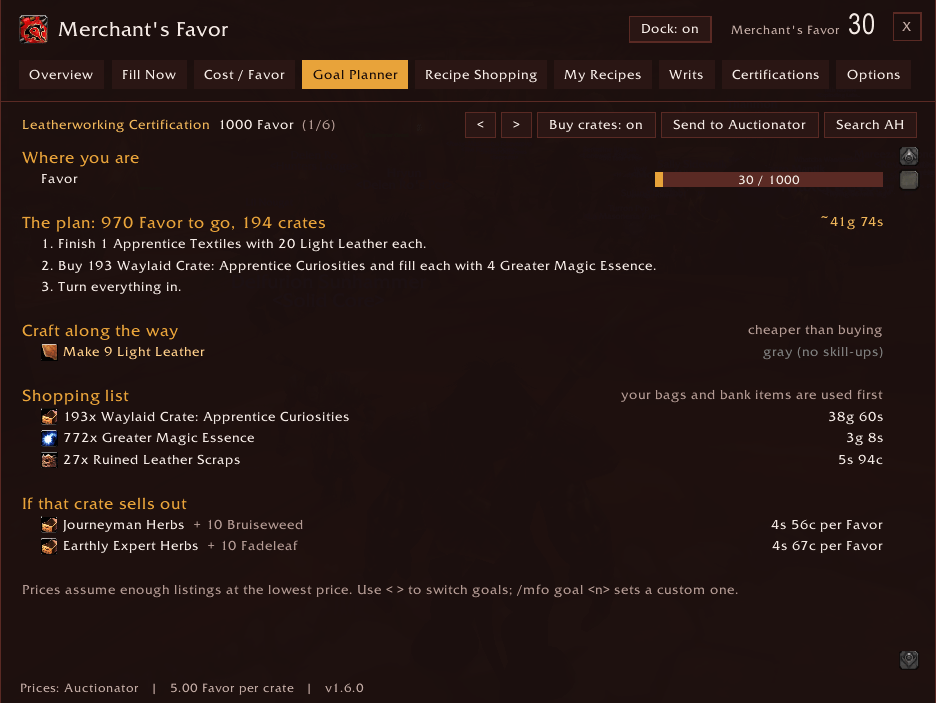
Goal Planner: the cheapest route to any goal
Pick a Certification, your recipe wishlist, the tabard, the toy license, the Packmule Treat, any amount of Favor, or the reputation the tabard and license need. You get a step-by-step plan:
- Hand in sealed crates and seal the ready ones (free)
- Finish the crates already in your bags
- Buy the cheapest crate and bundle per Favor on the auction house
The shopping list uses your bags and bank first and crafts instead of buying when that's cheaper, including smelting chains. Send to Auctionator turns the whole plan into a shopping list with quantities in one click.
Craftsman's Writs and camp reputation
- All 150 writ orders built in, across Alchemy, Blacksmithing, Engineering, Leatherworking and Tailoring
- Each writ in your bags shows whether it's ready to deliver, in your bank, craftable, or what its item costs, plus gold per reputation point
- Reputation goals plan the cheapest writs to reach Honored (toy license) or Exalted (tabard), one of each order per day, with a day count
- Delivery waypoints: click a ready writ to point TomTom or your map at the customer
- Forged Delivery Receipt: see whether an empty crate is worth more as Favor or as 50 reputation
Cost per Favor and Make vs Buy
- All 30 crates ranked by gold per Favor, with stale-price warnings
- Favor per crate by tier and material: crafted-goods crates pay double, and the addon learns the real payout the first time you turn each type in
- Make vs Buy for Fabrics, Ingots and Parts bundles, using your real recipes and skill-up colours
- Sell or fill: every crate compared both ways
Recipes and Certifications
- All 309 Favor recipes with the game's own item tooltip on hover
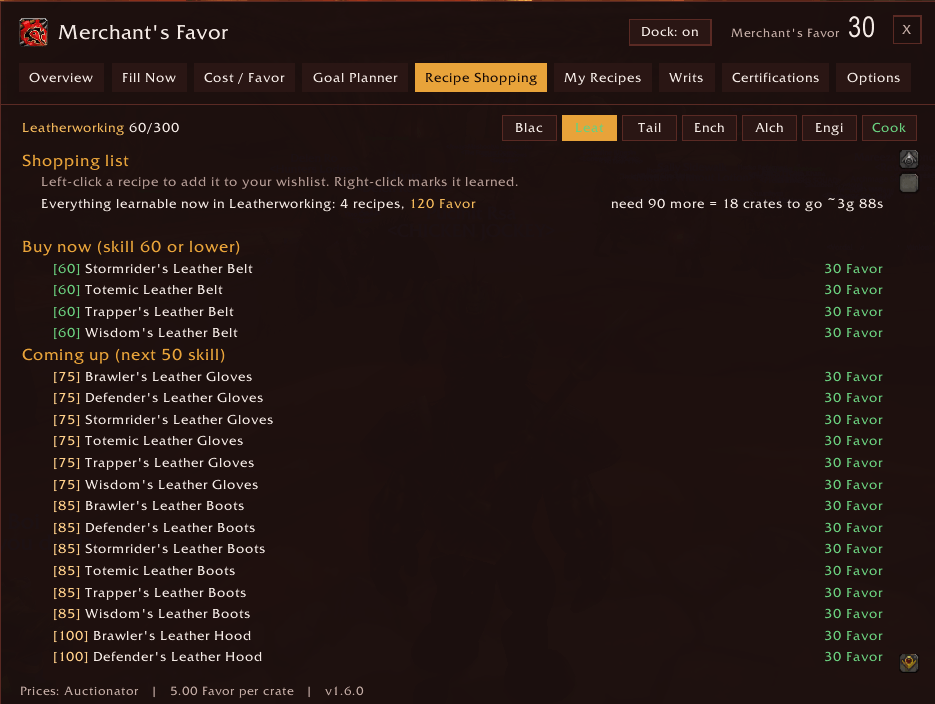
- Recipe Shopping by skill: buy now, coming up next, and later
- My Recipes: what each of your characters already owns, so you never buy a recipe twice
- Certification progress for all six professions: skill to 300 and Favor to 1,000
Alerts, tooltips and the Tracker Dock
- Loot alerts when a crate or writ drops, with the best move
- Turn-in reminder when you reach the crate NPC with crates to hand in
- Item tooltips for crates, writs and materials, wherever you see them
- Tracker Dock: an optional on-screen panel with crates to seal, finish, sell and hand in, your writs, and your goal
Prices from any source
Works with Auctionator, TradeSkillMaster or Auctioneer. No price addon? Open the auction house and press Scan prices (or type /mfo scan), and the addon prices just the items it needs.
Every language, readable for everyone
- 11 languages: English, Deutsch, Français, Español (EU and Latin America), Italiano, Português (Brasil), Русский, 한국어, 简体中文, 繁體中文
- Crate, recipe, item and profession names always come from your game client
- Colour themes: Horde, Alliance, or the original Command Center look
- Window and dock size, high contrast and reduced motion options
Getting started
- Open the window with
/mfoor the minimap button. - Open each of your profession windows once, so known recipes and reagents are read.
- Visit the auction house with your price addon (or press Scan prices).
Commands
| Command | What it does |
|---|---|
/mfo or /favor |
Open or close the window |
/mfo fill · cost · plan · writs · shop · known · goals · options |
Jump to a tab |
/mfo dock |
Show or hide the Tracker Dock |
/mfo scan |
Price what the addon needs at the open auction house |
/mfo goal <n> |
Plan for a custom Favor target |
/mfo perf 0-3 |
Set your Legacy Performance Bonus rank |
/mfo favor <n> |
Set your Favor if the currency can't be read |
/mfo forget <name> |
Remove a deleted character from My Recipes |
/mfo reset |
Recenter the window |
Optional addons
- Auctionator (recommended), TradeSkillMaster or Auctioneer for prices
- TomTom for waypoints (the game's own map pin is used without it)
Notes
WoW Forever is in beta, so crate contents and Favor payouts can change. Bundle quantities are re-read from the game every session, and Favor per crate is learned from your own turn-ins, so most changes are picked up without an update. Translations are machine-assisted; corrections in the comments are very welcome.
Found a bug or a wrong number? Please leave a comment with your game build and what you saw.
If Merchant's Favor Optimizer has been useful to you, donations help support continued development of this and other addons: [Donate via PayPal](https://www.paypal.com/donate/?business=HMQ3NMCPFYD2S&no_recurring=0&item_name=Any donations will help the support and development of these game changing addons! ¤cy_code=USD)
<sub>License: GPLv3 · © AddonsByFranny ·</sub>
Merchant's Favor Optimizer Team