Meimi Important Buffs
- By
A lightweight, customizable World of Warcraft addon for Classic Season of Discovery (SoD). This addon creates a simple, movable bar to track specific important buffs on your character.
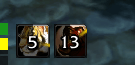
example-druid.png
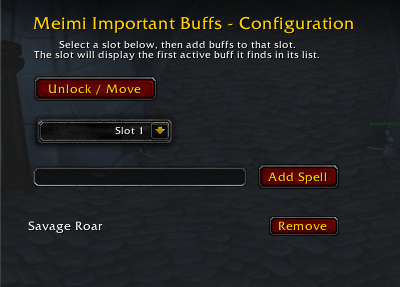
settings.png
Description
MeimiImportantBuffs_SOD
A lightweight, customizable World of Warcraft addon for Classic Season of Discovery (SoD). This addon creates a simple, movable bar to track specific important buffs on your character. It was designed to work alongside custom resource bars (like MeimiResourceBar) but can be placed anywhere on your screen.
Features
- Customizable Tracking: You choose exactly which buffs to track.
- Smart Grouping: If you track mutually exclusive buffs (like Paladin Seals), they will only occupy a single slot when active, saving screen space.
- Minimalist Design: Uses standard WoW icons with built-in cooldown sweeps and stack counts.
- Movable Anchor: Easily drag and drop the bar to position it wherever you need it.
Installation
- Download or clone this repository.
- Place the
MeimiImportantBuffs_SODfolder inside your World of Warcraft addons directory:_classic_\Interface\AddOns\ - Log into the game and ensure the addon is enabled in your character selection screen.
Configuration & Usage
The addon is configured via the central MeimiCore hub.
Adding Buffs to Track
- Type
/meimiconfigin chat to open the master settings window. - Select the Important Buffs tab on the left.
- Select a Slot (1 through 5) from the dropdown menu. This determines which icon frame you are editing.
- Type the exact name of the buff you want to track in this slot (e.g., "Seal of Righteousness", "Power Word: Fortitude").
- Click the Add Spell button.
- You can add multiple buffs to the same slot (e.g., add all your Seals to Slot 1). The slot will automatically display whichever buff in its list is currently active.
To stop tracking a spell, simply click the Remove button next to it in the options panel.
Moving the Bar
- Type
/mib unlockin chat. This shows a green anchor box. You can click and drag this box to move the buff bar. - Type
/mib lockto hide the anchor box and lock the bar in place.
Character Specific
Your tracked spells and the position of the bar are saved per character. This allows you to track different spells on your Paladin than you do on your Priest!
Release Notes
Version 2.0
- Major Update: Integrated with
MeimiCore_SODconfiguration hub. - Settings are now managed in the centralized
/meimiconfighub.
Version 1.1.0
- Redesign: Transitioned from a global spell pool to a Slot-Based Tracking System.
- Mutually Exclusive Grouping: You can now add multiple spells (like Paladin Seals) to a single slot, ensuring they only ever occupy that one specific icon space.
- Tight Packing: Icons now pack tightly to the left, removing visual gaps if a slot is empty.
Version 1.0.0
- Initial Release.
The Meimi Important Buffs Team