MeierLootPool (discontinued)
- By
See at a glance which items in a dungeon or raid are actually worth your time. MeierLootPool reads the loot table straight out of the in-game journal and rates every item against your spec's stat profile.
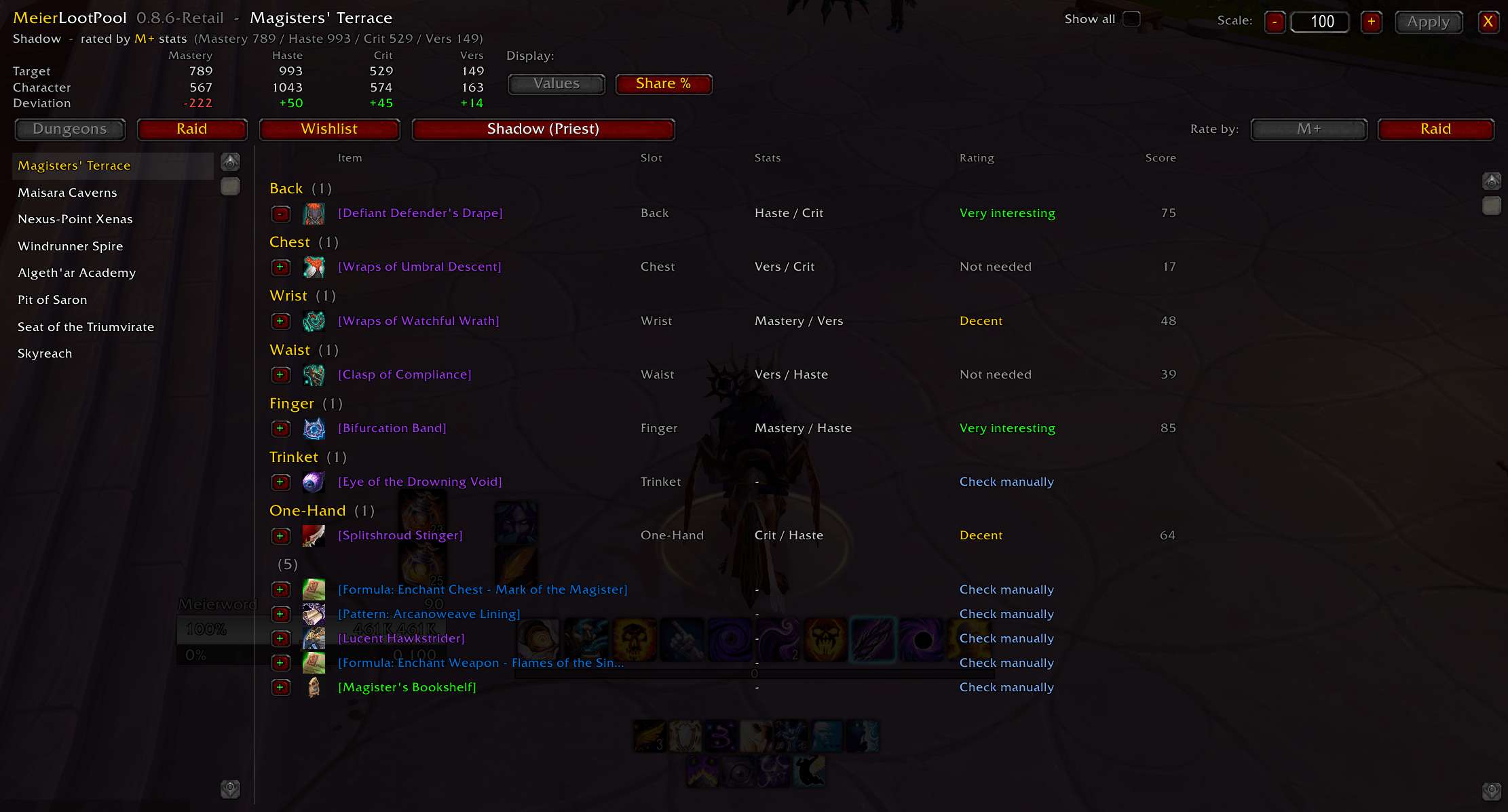
Basic Window with Stat Values
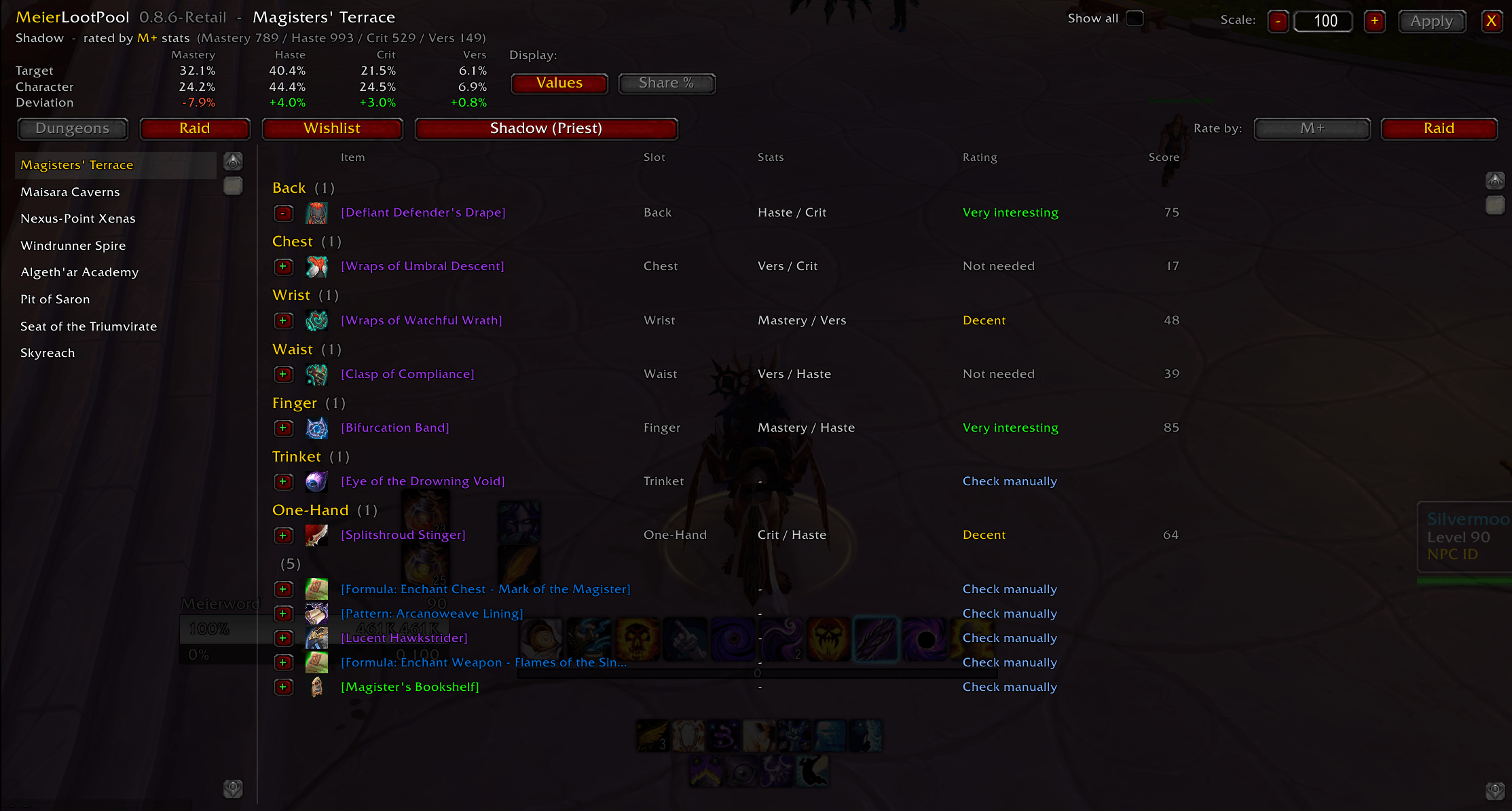
Basic Window with Stat Values
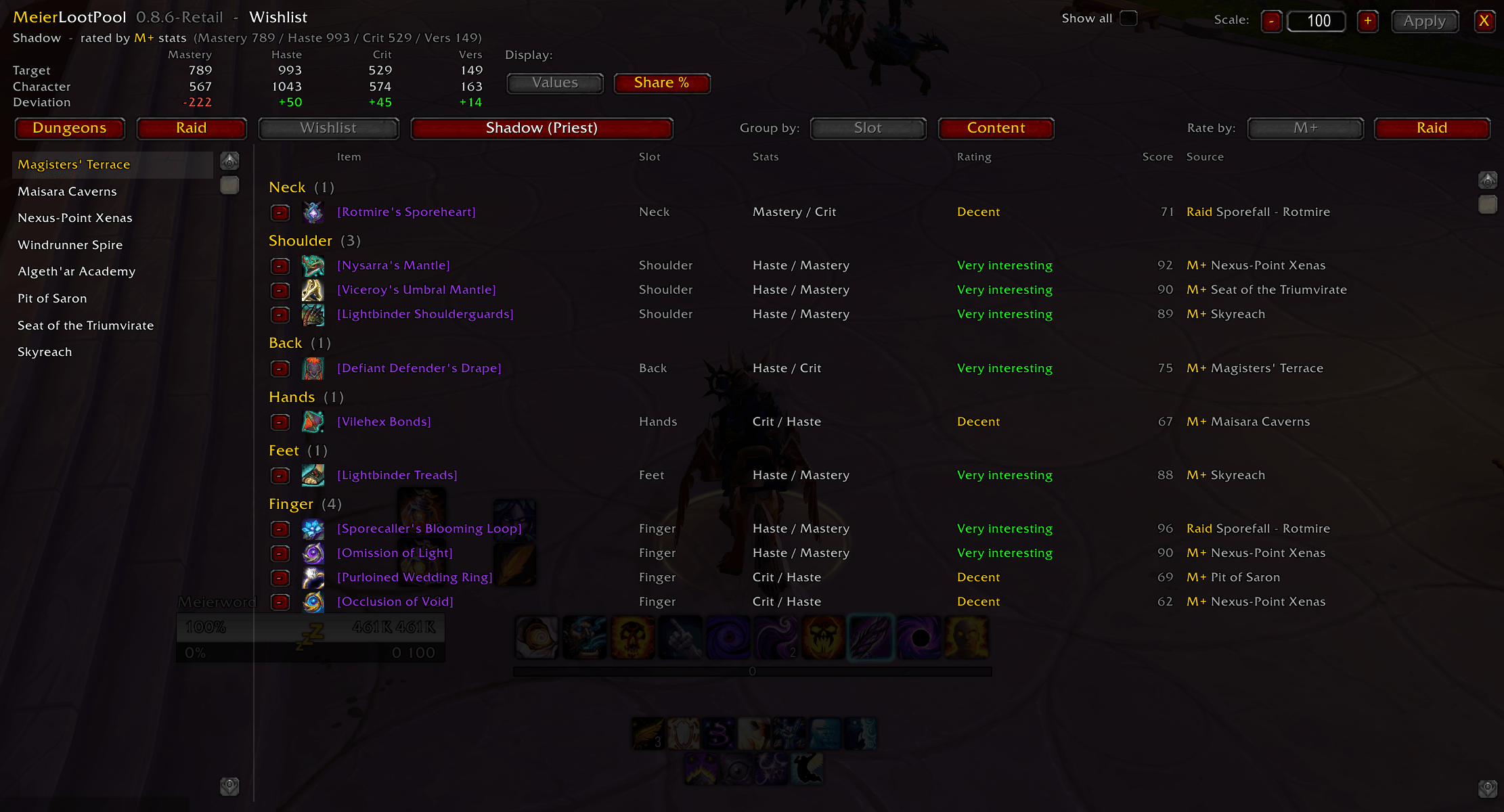
Wishlist
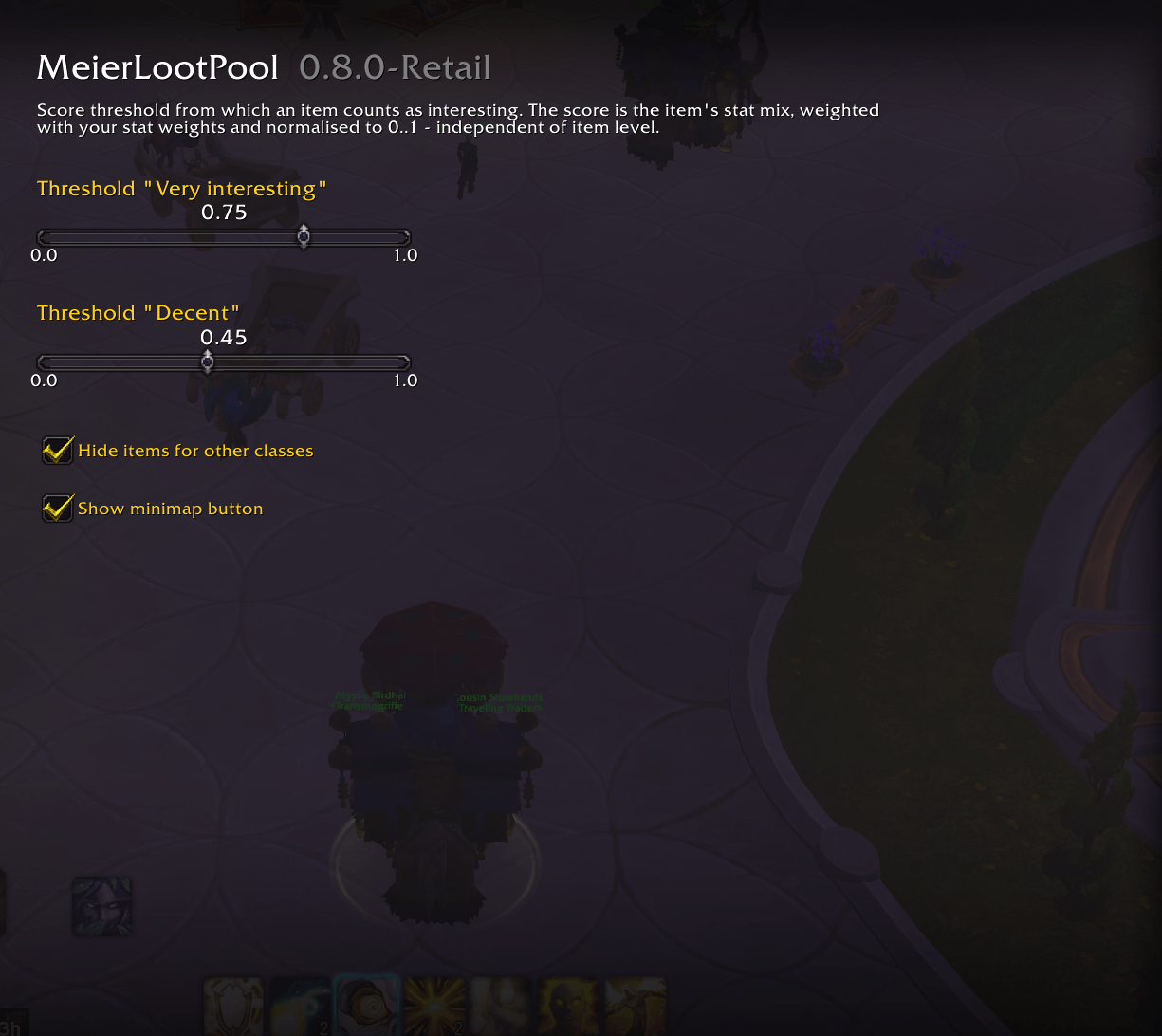
Options
Description
MeierLootPool
Discontinued. Focus is on WoW Forever.
See at a glance which items in a dungeon or raid are actually worth your time.
The Adventure Guide tells you what drops. It doesn't tell you what's good for you. MeierLootPool reads the loot table straight out of the in-game journal and rates every item against your spec's stat profile — so "worth chasing" and "not for me" are one glance apart, without alt-tabbing to a website.
What it does
- Reads the loot pool live from the in-game Encounter Journal. Always current with the patch. Nothing to sync, nothing that can go stale after a hotfix.
- Rates every item's stat combination against your spec, as a score from 0 to 100: Very interesting / Decent / Not needed.
- Shows how your character compares to that profile — target, actual and deviation per secondary stat, right in the window header, as plain values or as percentage shares.
- Ignores item level. Only the stat mix is judged, not raw item power — so the rating doesn't shift just because you're looking at a different difficulty.
- M+ and Raid profiles, switchable at any time. Which one is active is your choice, not derived from where the item drops.
- Any class, any spec. Check what a dungeon holds for your alt while staying logged in on your main — and see exactly the items that spec is meant to use, because the usability filter is the game's own.
- Dungeon loot grouped by equipment slot, raid loot by boss. In Mythic+ the whole dungeon pool is what matters, not the individual boss.
- Wishlist per character, grouped either by equipment slot or by source — including which dungeon or raid boss the item comes from.
How the rating works
Every spec has a stat profile: Mastery / Haste / Crit / Versatility. An item's score is its stat mix weighted by that profile, normalised to a range of 0 to 100.
- 100 = purely your best stat
- 0 = purely your worst stat
A Balance Druid running Mastery 927 / Haste 766 / Crit 581 / Vers 176 gets:
| Item | Score | Rating |
|---|---|---|
| Mastery + Haste | 89 | Very interesting |
| Haste + Crit | 66 | Decent |
| Crit + Vers | 27 | Not needed |
Because the score is normalised, it is independent of item level. The same item at 246 and at 289 rates identically — only the ratio between the stats matters.
The two thresholds (75 and 45 by default) are adjustable in the options.
Your stats against your profile
The window header carries a small table: the stats the spec runs, the stats your character actually has, and the gap between the two.
| Mastery | Haste | Crit | Vers | |
|---|---|---|---|---|
| Target | 575 | 954 | 676 | 162 |
| Character | 612 | 880 | 700 | 150 |
| Deviation | +37 | -74 | +24 | -12 |
The target row is the spec's line from Data.lua, shown unchanged. Those are real character stats, so they sit next to yours one to one — nothing is scaled or converted, the deviation is simply character minus target, in plain rating points.
Values or Share %
A switch next to the table flips both rows to percentages of your own secondary stat total:
| Mastery | Haste | Crit | Vers | |
|---|---|---|---|---|
| Target | 24.3% | 40.3% | 28.6% | 6.8% |
| Character | 26.1% | 37.6% | 29.9% | 6.4% |
| Deviation | +1.8% | -2.7% | +1.3% | -0.4% |
Use it when your item level doesn't match the profile's. On plain numbers a lower-geared character reads as a shortfall in every stat, which says nothing; as shares, item level drops out and you see what actually matters — whether your distribution is right. Same distribution at half the item level means a deviation of zero.
Surplus is green with a +, shortfall is red with a -. The table follows the M+ / Raid switch and the spec you're previewing, and updates as soon as you change gear. The character row always shows your logged-in character — while you preview another spec it is highlighted, because the numbers still belong to the character you're on.
What it is not
This is not a BiS list. It knows nothing about trinket procs, set bonuses, weapon speed or hero talents. It answers exactly one question:
Does this item's stat combination suit my spec?
For actual best-in-slot decisions, use Wowhead, Bloodmallet or your own sims. This addon is the quick filter in front of that — not a replacement for it.
Items without secondary stats — most trinkets, many weapons — are honestly marked Check manually instead of being given a made-up rating.
Stat data
The stat values live in Data.lua. They are a snapshot of the stats top players of each spec actually run, maintained by hand and shipped with the addon. They are updated when the addon is updated — they do not fetch anything at runtime.
Want your own numbers? Data.lua is deliberately plain. Every spec already has both lines ready; only the numbers get changed:
[102] = { -- Balance
    mplus = { mastery = 927, haste = 766, crit = 581, vers = 176 },
    raid  = { mastery = 1074, haste = 706, crit = 803, vers = 101 },
},
For the rating only the ratio between the four numbers matters — it is normalised internally, which is why item level never shifts a score. The header comparison puts them next to your own stats one to one, so enter real character stats rather than scaled weights. /reload, then /mlp weights to check.
A spec whose four values are all identical counts as "not maintained": the addon then shows the loot unrated and says so, rather than inventing a rating out of placeholders. The header table then shows your own stats only, without a target.
Usage
| Command | |
|---|---|
/mlp |
Open/close the window |
/mlp mplus |
Rate using M+ stats |
/mlp raid |
Rate using raid stats |
/mlp weights |
Show the stats of your current spec |
Also available via the minimap button (drag it anywhere around the minimap) and the addon compartment.
Languages
English · Deutsch · Français · Español (ES/MX) · Italiano · Português (BR) · Русский · 한국어 · 简体中文 · 繁體中文
Any string that isn't translated falls back to English, so nothing can ever show up blank.
Good to know
- The addon uses stat data from archon.gg
- Retail only (Midnight, 12.1.0).
- The journal is read at the highest available difficulty, so tooltips show Mythic / M+ values. Upgrades that happen after the drop (e.g. 6/6 Myth) are not represented — the journal only knows what actually drops.
- Item usability comes from the game itself. The addon asks the Encounter Journal's own loot filter what a spec should use, so it matches the Adventure Guide one to one — including the fine print a static list never gets right. Use Show all in the header to see the hidden items anyway; they stay marked and read "Not usable" instead of a rating.
- Window scale is adjustable from 50 to 200 percent, right in the title bar.
- No dependencies, no embedded libraries.
- Settings and wishlist are stored per character.
Feedback and bug reports are welcome — please include your class, spec and what you expected to see.
MeierLootPool (discontinued) Team