MDHelper
- By
One-click Misdirection helper for Hunters: pick a raid member from a list, then cast on them via a keybind or auto-created macro.
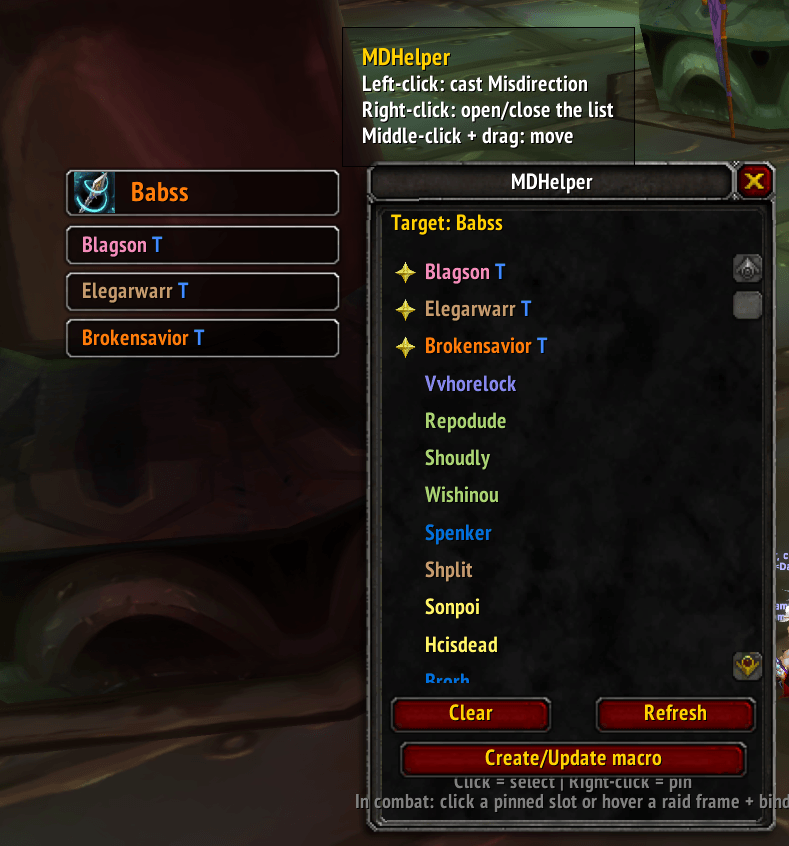
Capture d'écran 2026-05-28 214758.png
Description
MDHelper
A no-frills, taint-free Misdirection helper for Hunters on WoW Classic Anniversary Edition (TBC 2.5.5).
Pick a raid member. Cast Misdirection on them in any of five different ways. Switch targets mid-fight without breaking your rotation.
No combat log scraping. No tank auto-guessing that fights you over the right call. No bloated config. You decide who gets the threat.
How you cast
| Method | Best for |
|---|---|
| Floating button — left-click | Quick visual cast on your "default" target |
| Favorite slot buttons (auto-tanks + manual pins, up to 10) | Mid-fight target switching — each button is its own pre-configured secure cast |
Action-bar macro (auto-created, named MDHelper) |
One-handed play |
| Keybind (Options > Key Bindings > MDHelper) | Spam on your default target |
| Mouseover (built into the macro) | Hover any raid frame (Blizzard, Grid, ElvUI, …) and press the bind |
Features
- List window with class-colored names, online status, tank flag, and pinned-on-top ordering. Opens with
/mdor by right-clicking the floating button. ESC closes it - Floating button that follows you between sessions, draggable with the middle mouse button. Left-click casts. Right-click opens the list
- Favorite slot buttons that appear in a column below the floating button. The addon automatically treats tanks (Main Tank assignment or role = TANK) as favorites; you can pin anyone else manually by right-clicking their name in the list. Each slot is its own secure cast button — clicks work in combat because each one has its own fixed cast attribute, no taint
- Auto-created macro named
MDHelper(Misdirection icon, ready to drag onto your action bar) — created on first load with the live/castbody, kept in sync with your selection out of combat - Bindable under Options > Key Bindings > MDHelper for keyboard play
- Locale-aware spell name via
GetSpellInfo(34477)— works on French (Détournement), English (Misdirection), and any other locale. Fallback table for the rare caseGetSpellInforeturns nil at load - Strict targeting — every clause in the cast macro has
[help,nodead], so MD never fires on a dead, hostile, or invalid target. Important: MD has a 30 s cooldown, you don't want to waste it on yourself
The macro it builds
When you select someone, the addon keeps both the in-game macro and the secure buttons in sync with:
/cast [@mouseover,help,nodead][@,help,nodead] Misdirection
@mouseover is checked first (hover-cast on raid frames), then @<unit> (the raid/party slot of the selected target). If neither matches a friendly alive unit, the cast doesn't fire — by design.
The favorite slot buttons use a tighter macro pinned to the specific person:
/cast [@,help,nodead][@,help,nodead] Misdirection
Why a "favorite slot" per tank?
Blizzard's combat lockdown forbids changing a secure button's cast target during combat. Any single button can only cast on whatever target it was configured for before combat started. Mouseover macros work around this for raid-frame users, but if you'd rather click a dedicated button per tank, MDHelper auto-creates one per pinned member — each one is its own secure cast, set up out of combat.
So in a fight:
- Press the bind → MD on your selected target
- Tank switch? Click the second tank's slot button → MD lands immediately, even mid-cast
- Or hover a raid frame and press the bind for the same effect
Installation
- Drop the
MDHelperfolder intoWorld of Warcraft/_anniversary_/Interface/AddOns/ /reloador restart the client- The
MDHelpermacro appears in your macros — drag it onto your bar (or bind a key in Options > Key Bindings > MDHelper) /mdto open the list, click a name to set the default target, right-click anyone to pin them as a favorite
Slash commands
| Command | What it does |
|---|---|
/md |
Toggle the list window |
/md clear |
Clear the selected target |
/md macro |
(Re)create the action-bar macro |
/md float |
Show/hide the floating button (and its slot column) |
/md debug |
Print spell + selection + button state, useful when reporting issues |
/md help |
List all commands |
Compatibility
- Built for WoW Classic Anniversary Edition (Burning Crusade, 2.5.5), Interface
20505 - No library dependencies, single
Main.lua, fits in a few KB - Works alongside any raid frame addon (Blizzard, Grid, Cell, ElvUI, …) — the mouseover feature is independent of MDHelper's own UI
Feedback
Bug reports and feature requests welcome on the GitHub repo or the CurseForge comment section.
MDHelper Team