
Matt's Action Bar Fonts & UI QoL
- By

File Details
v8.2.1
- R
- Apr 23, 2026
- 219.89 KB
- 533
- 12.0.5
- Retail
File Name
MattActionBarFont-v8.2.1.zip
Supported Versions
- 12.0.5
Matt's Action Bar Fonts & UI QoL
v8.2.1 (2026-04-23)
8.2.1 - 12.0.5 update
Updated .toc for patch 12.0.5
Fixed Action Bar 1 endcaps reappearing when hidden.8.2.0 - buff/debuff clickthough
Added buff/debuff clickthough camera drag to UI features8.1.9 - world ms to perf meter
added world ms to perf meter8.1.8 - numpad labels / fading fix
Made numpad keybind labels shorter so they show like N1, N2, N5 instead of longer NUM/NP style text.
Fixed pet bar fade so keybind text now properly disappears when the pet bar fades out.8.1.7 - restore active highlights
Fixed minimal-theme action buttons to correctly restore Blizzard pressed/active highlights (including stance active state).8.1.6 - glyph font fix
Hide unsupported hotkey indicator glyphs (dot/box placeholders) by blanking glyph-only hotkey text instead of rendering fallback squares.8.1.5 - new ab features
Added two new off-by-default checkboxes so you can hide text on the stance bar and pet bar whenever you want.8.1.4 - Equipment Manager Labels for blizzard bags
Added a new bag option to show your Equipment Manager set name on gear items (for example, Frost), including items in your bank.
Item level text and set-name labels now have separate on/off toggles and update instantly when your equipment sets change.8.1.3 - fix consumable in dungeons
Fixed taint for secret value on consume reminder8.1.2 - Hide while mounted option for reminders
Hide while mounted option for reminders.
Reminder page consistency clean up8.1.1 - Lock button for reminders
Added a new Reminders lock toggle button that switches between Unlocked (red) and Locked (green), with dynamic helper text and click-through behavior when locked.8.1.0 - Major Core Refactor & Stability Update
Major internal overhaul focused on long-term stability, maintainability, and cleaner architecture.
~6 hours of focused refactor work to reorganize core systems and options modules.
Improved code structure and load flow to make future updates safer and faster.
Full feature set remains intact, including performance monitor and all UI/QoL systems.
This is a major under-the-hood quality release with no feature removals.Revise README with new features and images
Updated features section and added images for better clarity.8.0.0 - Class Reminders, Custom Font controls
Full Class Reminders implemented
Added custom font checkbox to disable back to Blizzard defaults.
Cleaned up UI Features tab into 3 sub tabs for better readability7.1.1 - Pet Hotkey fix
Fixed pet bar hotkey font/brightness flicker (gray/white)7.1.0
Fixed an issue where keybind text could turn gray instead of full alpha white.7.0.9
Revert range check to Blizzards7.0.8
Fixed an in-combat action bar bug that could trigger UI errors when bar fade/mouseover effects updated during combat.
Improved keybind text behavior so your hotkey font/style stays consistent while rebinding, with better stability and fewer position jumps.
Other minor bug fixes7.0.7
Full action bar fading7.0.6
Added mabf to minimaps addon compartment.7.0.5
updated toc7.0.4
fixed a scaling issue that would cause gui snapback when draggingAdd image to README for action bar fonts
Added an image to the README for visual reference.7.0.3
Fixed font selection reliability (including tricky fonts like SKURRI) by forcing a reload prompt after changing fonts.
Improved font stability/fallback handling so selected fonts apply more consistently.
Fixed combat behavior for options: auto-closes in combat and reopens after combat.
Added saved position for the MABF options window (it now remembers where you moved it).
Fixed a taint issue introduced by anchor checks in font updates.7.0.2
-Fixed performance monitor position not persisting after /reload
-Minor optimization update7.0.1
Added cursor circle to ui features sectionChange feature image in README
Updated feature image in README.md.Change feature image URL in README
Updated feature image link in README.update readme
7.0.0
-Added brand new themes!
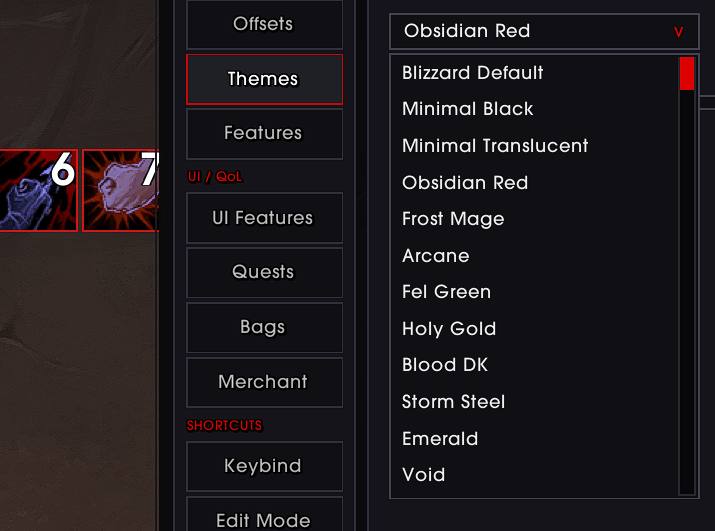
-Cleaned up existing buttons to be more minimal and flush, pixel perfect.
-Cleaned up the GUI to be more consistent with my other addons.
-Added a gui scaler
-Fixed an issue where keybinding would animate when inputting new keybinds.
-Fixed an issue with shared media fonts not always applying.
-Bunch of bug fixes.
-Major code cleanup.6.0.4
Added extra action button functionality and scaling to offsets6.0.3
-fixed an issue where pet action bar text was not saving after reload.6.0.2
Fixed Lua error (attempt to compare number with nil) on PLAYERBANKSLOTS_CHANGED caused by the removal of NUM_BANKGENERIC_SLOTS and BankSlotsFrame in WoW 12.0.1. Bank item level display now uses the new tab-based BankPanel API.Added "Mouseover Fade (Pet Bar)" option to Action Bars > Features. The pet bar now fades out when not hovered, matching the existing behavior for Bars 4 & 5.
Consolidated all reload confirmation popups into a single generic prompt.
Revise README for better clarity and features
Updated README to enhance feature descriptions and clarify usage instructions.Delete MABFCDText.lua
6.0
-updated gui to be more cohesive-new tab sections; full QoL & UI options added, system tab w/ auto apply layouts for edit mode and much more!
-added more action bar themes
-added sharedmedia access to fonts dropdown
bug fixes: fixed an issue where consumables were graying out in combat.
5.0.2
theme updatedUpdate README to remove Cooldown Text feature
Removed the mention of 'Cooldown Text' feature from the README.5.0.0 release
Fixed bugs w/ new API changes.Added new gui color for midnight.
Added experimental features.
4.0.1
Support for Midnight expansion, Dominoes supportEnhance README with Dominoes support information
Updated README to include support for Dominoes.Fix formatting in README note about addon compatibility
Revise compatibility note for action bar addon
Updated note about addon compatibility and functionality.4.0.0a
support for Dominoes users3.9.4 release
Added latest release of my addon to githubRevise README for clarity and additional details
Updated README with new formatting, features, instructions, and examples.Initial commit