Matreshka | Russian Language Pack
- By
Lightweight add-on translating quests, NPC text, items, gear, spells, interface and skills.
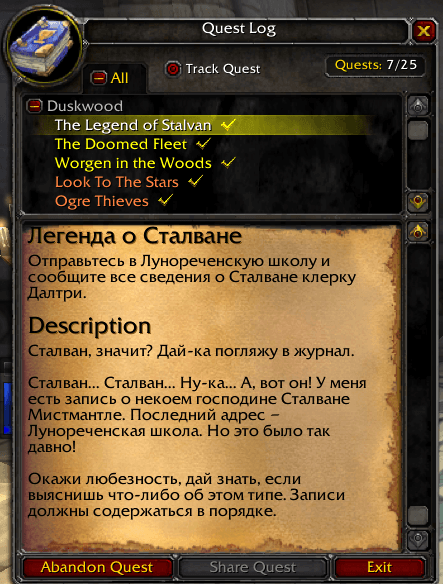
Quest log translation.png
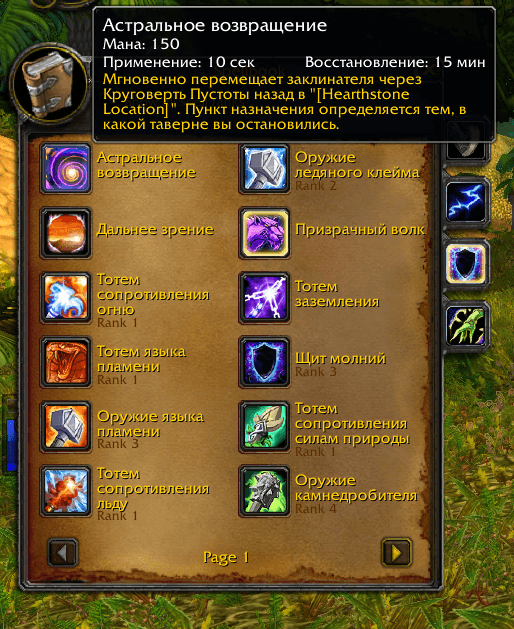
Translation of spellbook.png
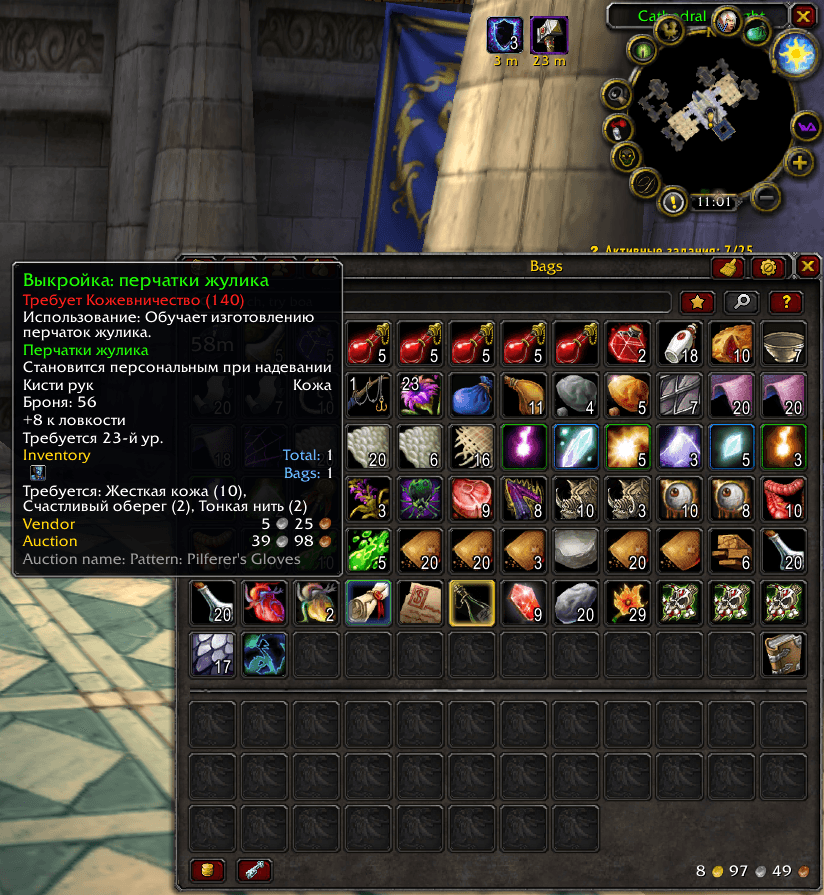
Translation of subjects in bag.png
Description

Matreshka
An in-game Russian translation for World of Warcraft: TBC Anniversary (client 2.5.x) and Classic Era (client 1.15.x, including Hardcore and Season of Discovery). It translates items, spells, NPCs, quests, NPC dialogue and chat lines, mail and books right in the game's own windows and tooltips. The text is replaced in place: no second window, no mode switching, and no need to change the client language.
Внутриигровой русификатор для World of Warcraft: TBC Anniversary (клиент 2.5.x) и Classic Era (клиент 1.15.x, включая Hardcore и Season of Discovery). Он переводит предметы, заклинания, NPC, задания, диалоги и реплики NPC, почту и книги прямо в родных окнах и подсказках игры. Текст подставляется на месте, без второго окна и переключения режимов, и менять язык клиента не нужно.
Features / Возможности
- Tooltips: item, spell and NPC names and descriptions are translated right in the tooltip. Each category is switched on separately, and there is a "name only" option.
- Quests: the title, description, objectives, progress and rewards appear in Russian in the quest log and in the quest giver window.
- NPC dialogue: greetings and answer options in the NPC dialogue window.
- NPC and boss chat lines: what NPCs and bosses say, yell and whisper in chat, including their emotes, in Blizzard's official Russian wording. Player chat is left as is. Friend online and offline notices are in Russian too.
- Mail: the whole mail window (tabs, buttons, field labels, time left), auction house letters (sender, subject, sale details) and letters from NPCs.
- Books and notes: pages of books, notes and plaques you can read in the game, together with their titles.
- Auction name line with the original English name at the bottom of the item tooltip, handy for searching the auction house.
- IDs of items, spells, NPCs and quests in tooltips, for reporting translation errors.
- Built-in Cyrillic font (FrizQuadrataCTT) so the translation displays correctly.
- In-game translation editor: hover over an item, spell or NPC and press Ctrl+Shift+E to correct its translation. Your edits apply only in your own game, and /mtexport shows them so you can send them to us.
- Version check: the addon tells you when someone in your guild or group has a newer version.
- Подсказки: названия и описания предметов, заклинаний и NPC переводятся прямо в подсказке. Каждая категория включается отдельно, для них есть опция "только название".
- Задания: заголовок, описание, цели, прогресс и награды выводятся по-русски в журнале заданий и в окне выдачи задания.
- Диалоги NPC: приветствия и варианты ответа в окне разговора с NPC.
- Реплики NPC и боссов в чате: всё, что NPC и боссы говорят, кричат и шепчут, включая их эмоции, выводится официальным русским текстом Blizzard. Чат игроков не затрагивается. Уведомления о входе и выходе друзей тоже на русском.
- Почта: окно почты целиком (вкладки, кнопки, подписи полей, срок хранения), письма аукциона (отправитель, тема, итоги сделки) и письма от NPC.
- Книги и записки: страницы книг, записок и табличек, которые можно прочитать в игре, вместе с заголовком.
- Строка "Auction name" с оригинальным английским названием внизу подсказки предмета: по нему удобно искать предмет на аукционе.
- Показ ID предметов, заклинаний, NPC и заданий в подсказках, чтобы сообщать об ошибках перевода.
- Встроенный шрифт с кириллицей (FrizQuadrataCTT) для правильного отображения перевода.
- Редактор перевода в игре: наведите курсор на предмет, заклинание или NPC и нажмите Ctrl+Shift+E, чтобы поправить перевод. Правки действуют только в вашей игре, а команда /mtexport покажет их, чтобы вы могли прислать их нам.
- Сверка версий: аддон сообщит, если у игрока из вашей гильдии или группы версия новее.
Help with the translation / Как помочь с переводом
Some text, especially NPC dialogue, comes from the server one page at a time, so rare lines may still be in English. If you see one, type /mtscan, go through the dialogue or read the text, then type /mtmissing. Send the file WTF\Account<account>\SavedVariables\Matreshka.lua to our Discord; the link is in the welcome window (/mtwelcome).
Часть текста, особенно диалоги NPC, игра получает с сервера по одной странице, поэтому редкие реплики пока могут оставаться на английском. Если встретили такую, наберите /mtscan, пройдите диалог или прочитайте текст, затем наберите /mtmissing. Файл WTF\Account<аккаунт>\SavedVariables\Matreshka.lua пришлите в наш Discord, ссылка есть в окне приветствия (/mtwelcome).
Languages / Языки
The Matreshka core contains Russian (ru) and English (en). The optional Matreshka_Options package adds Simplified Chinese (cn) and Traditional Chinese (tw) for items, spells, NPCs and quests. It loads only when needed, so it does not waste memory. NPC dialogue, chat lines, mail and books are translated into Russian only.
Ядро Matreshka содержит русский (ru) и английский (en). Дополнительный пакет Matreshka_Options добавляет китайский упрощённый (cn) и традиционный (tw) для предметов, заклинаний, NPC и заданий. Он грузится только при необходимости, чтобы не тратить память впустую. Диалоги, реплики NPC, почта и книги переводятся только на русский.
Chat commands / Команды чата
| Command / Команда | Action / Действие |
|---|---|
| /matreshka | Open the addon settings Открыть настройки аддона |
| /mtid | Show or hide IDs in tooltips Показать или скрыть ID в подсказках |
| /mtfont | Turn the built-in font on or off (turning it off takes effect after /reload) Включить или выключить встроенный шрифт (выключение срабатывает после /reload) |
| /mtwelcome | Open the welcome window Открыть окно приветствия |
| /mtscan | Start or stop collecting untranslated text Включить или выключить сбор непереведённого текста |
| /mtmissing | Show how much text has been collected Показать, сколько текста собрано |
| /mtmissing clear | Clear the collected text after sending the file to the developer. The same button is in the settings. Очистить собранный текст после отправки файла разработчику. Та же кнопка есть в настройках. |
| /mtedit | Edit the translation of the object under the cursor, same as Ctrl+Shift+E Поправить перевод объекта под курсором, то же, что Ctrl+Shift+E |
| /mtexport | Show your translation edits for sending Показать ваши правки перевода для отправки |
Matreshka | Russian Language Pack Team