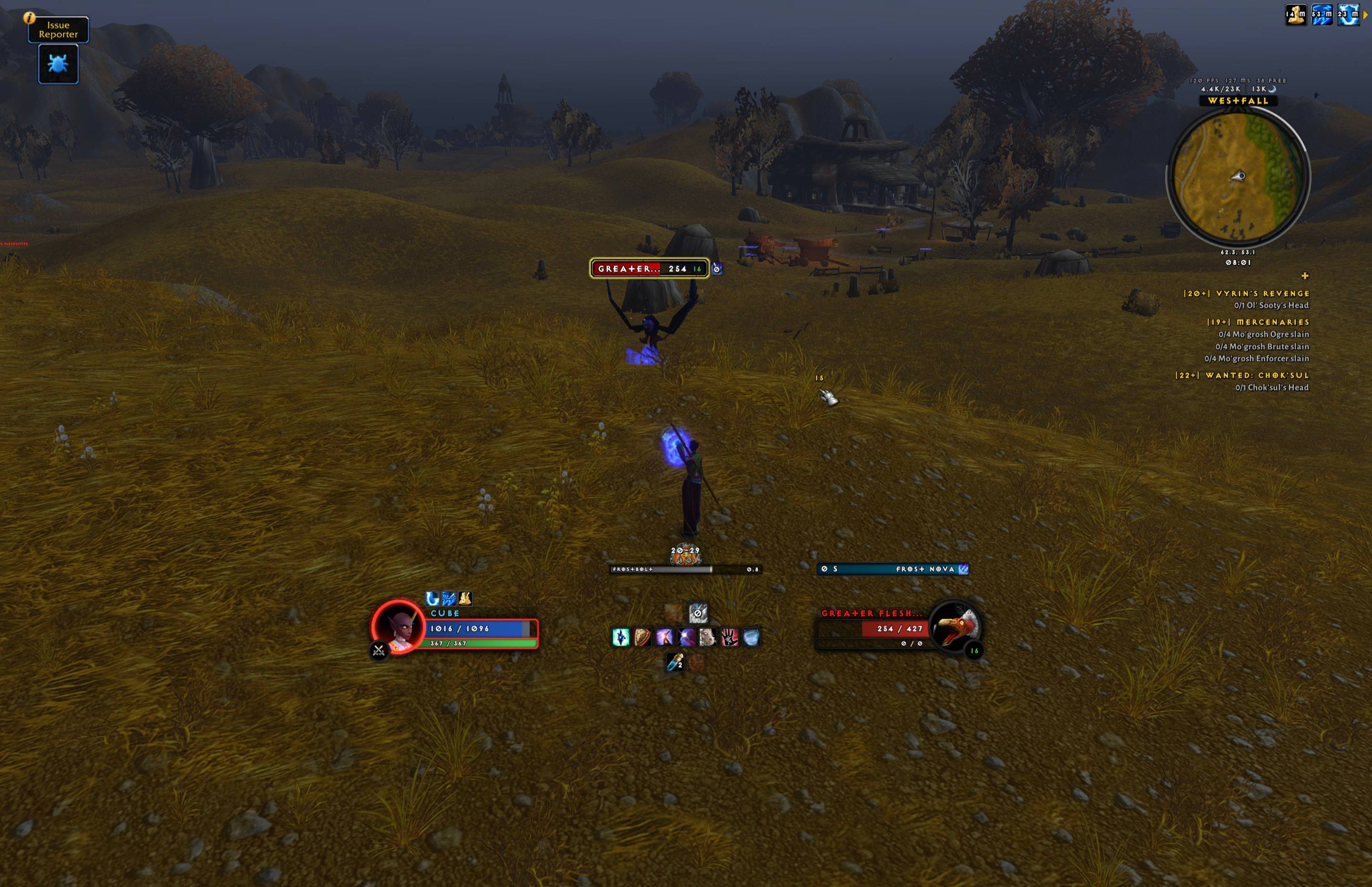
The whole screen in a fight: frames, cast bars, range, cooldown rows, supplies, nameplate, minimap and quest tracker
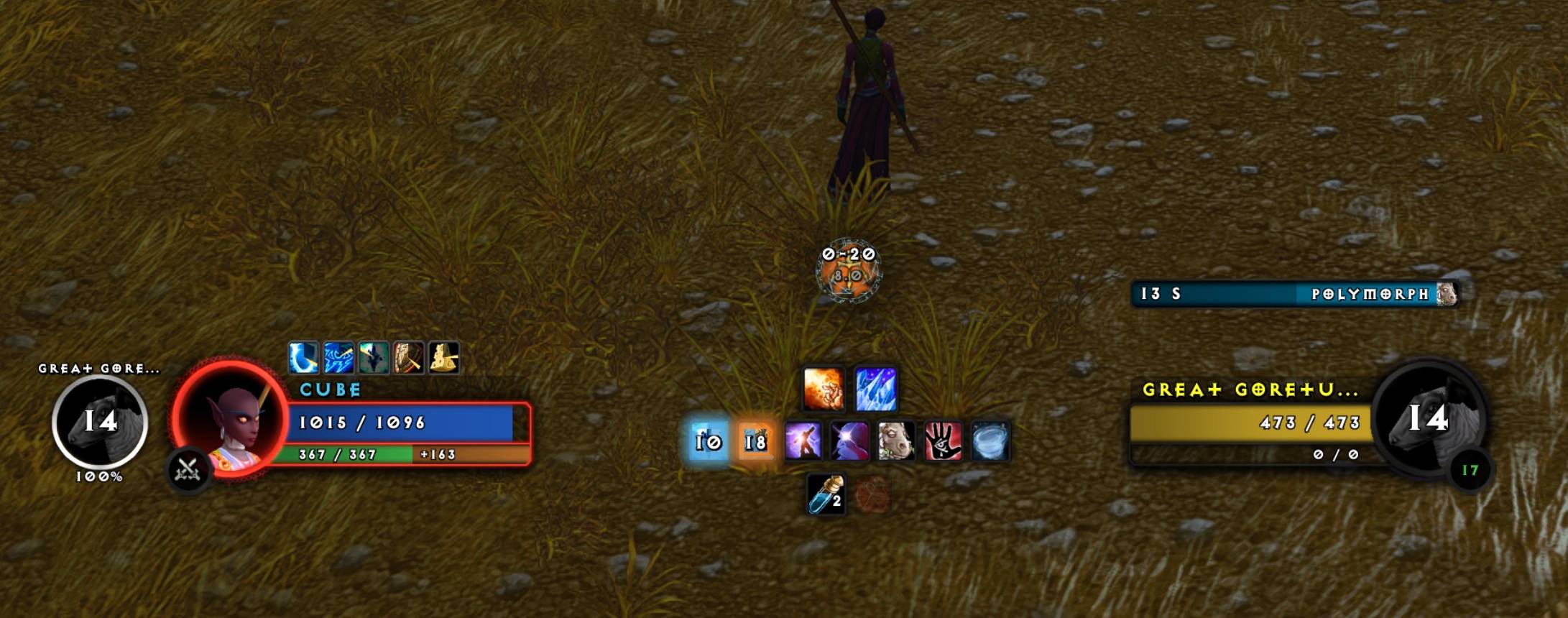
Frames and the centre column: a Polymorph timer on the target, your shield’s amount on the health bar, your pet.
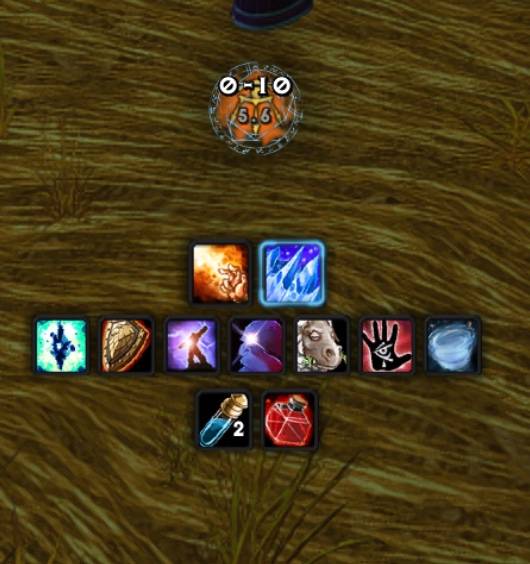
The centre column: distance and speed on the spell art, a proc, both cooldown rows, supplies.
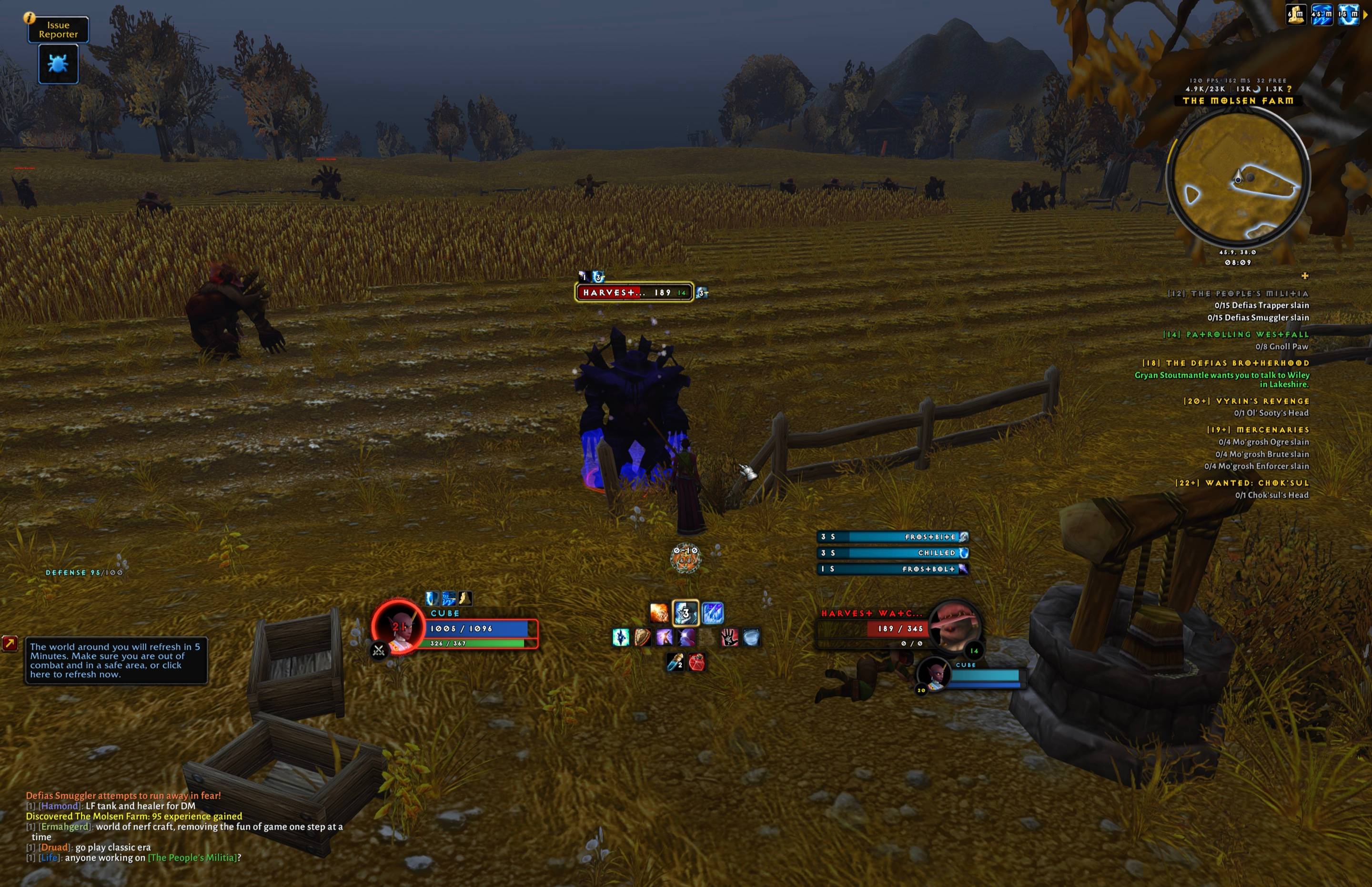
Your debuffs as bars over the target, a proc in the middle of the rows, the target’s target.
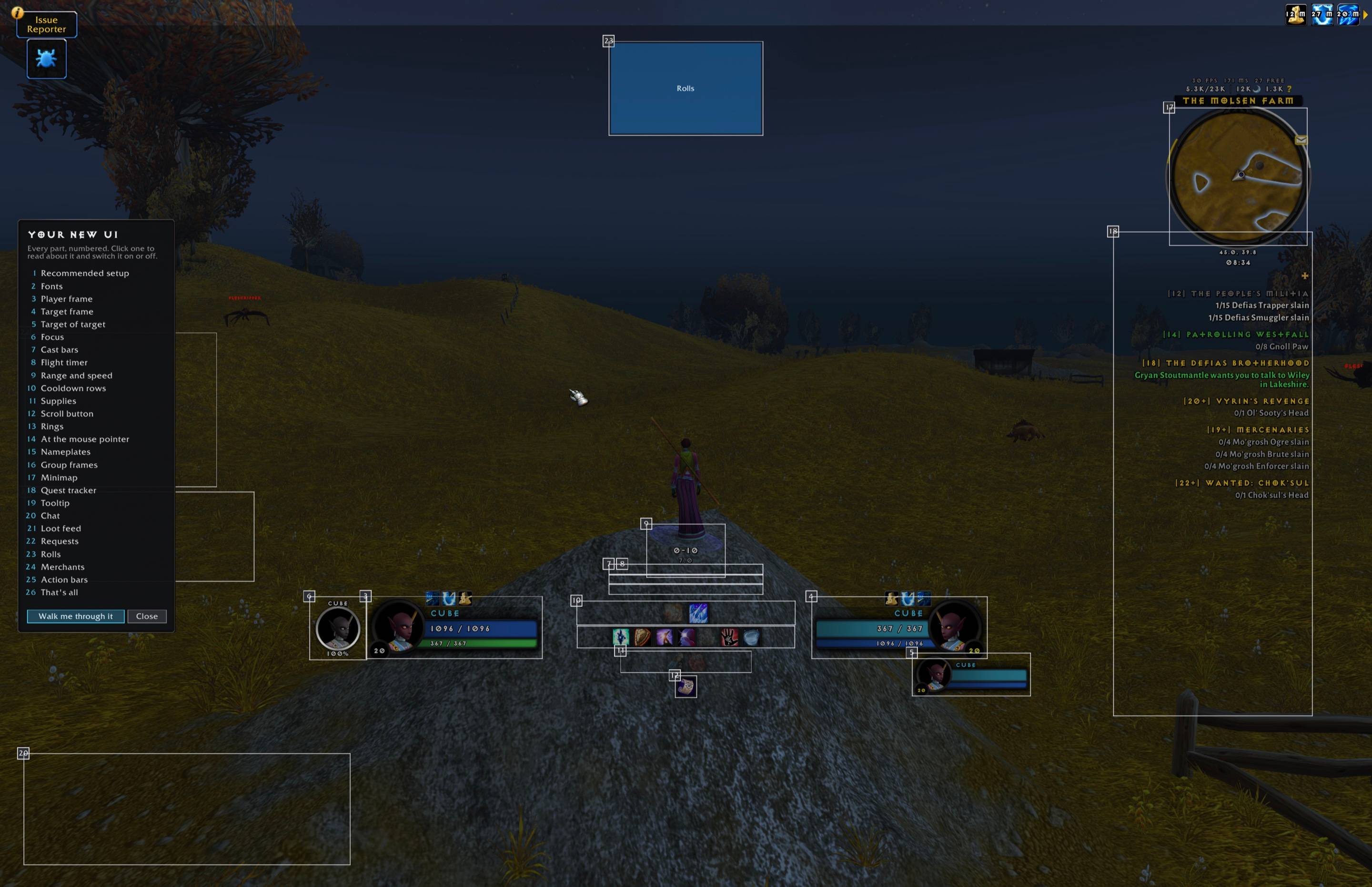
/mmf tour: every part numbered.
Description
I started with wanting a new unitframe. Then things escalated quickly.
Mateos Mage Frames
is a unitframe addon that is tailored to my specific taste and needs while leveling in Forever.
What started as a unitframe became a complete, minimal UI for mages on World of Warcraft: Forever: unit frames, cast bars, cooldowns, consumables and the rest of what a mage watches, built around one column in the middle of the screen.
The rule behind every part: only show what you can use right now. Glows mean "press this now", full brightness means "you can", faint means "not now".
The centre column
From your character down:
- Range cluster: the distance to your target as a range from the spells you know, the target's run speed, and soft art behind the numbers for what you can cast from here (a cloud for Fireball, a rune circle for Frostbolt, an eye for Arcane Blast or Missiles), in monochrome or colour. The rune flares while your target is frozen. In a group, a threat warning above it, with the game's own aggro sounds.
- Cast bars: yours, your target's and your focus's, stacked. Tick marks on channels, your latency, red on an interrupt, and a glow on an enemy's bar when Counterspell would land. A flight timer takes your bar's place on a flight master's flight.
- Cooldown rows: Blizzard's Cooldown Manager, restyled into two rows (offence and defence). Faint while on cooldown, out of mana or out of range; glows only for moments, like Frost Nova with an enemy in melee. Stack counts for Arcane Blast and Heating Up. A shield that is up has a rim round its icon, and Mana Shield its time left.
- Consumables row: mana gems, potions, bandages, food and water you carry, and a reminder when your armor, Arcane Intellect or (with buff food in your bags) Well Fed is missing.
Frames
- Player, pet, target, target of target and focus, on the silver ring frame. Buffs, debuff bars, heal prediction, spell cost, Polymorph's seconds. What your shields will still take shows as a piece on your health bar with the amount, coloured by ward. Hits, crits and heals you take show briefly on your portrait.
- Focus in three looks: the full frame, a portrait medallion, or one line of text. Mirrored if you like.
- Nameplates: Blizzard's enemy plates, tightened: level inside the bar, threat on the bar and its glow.
- Group frames: Blizzard's party and raid frames, restyled, with a threat halo, role icons and a mark on anyone missing Arcane Intellect.
Around the screen
- Tooltip: darkened, the name in class colour, the guild in gold under it, one line of level, race and class, a player's faction crest beside them, quest lines as in the tracker, and the health as a thin line inside the bottom edge. Above your frame, at the mouse, or in Blizzard's corner.
- Chat: Blizzard's windows in the reading font, short channel labels ([1], [T], [S], [P], [PL]…), first names only, web links you can copy, money written as
8s 27c, a sound on every whisper, and the typing box over your cast bar./mmf chatsetupsets up General, P+W (party, say, whispers), guild and loot windows. - Quest tracker: Blizzard's, right-aligned and minimal, sorted by the focused quest, then your zone, nearest first. Optional auto-accept and auto-turn-in (Shift skips), a key for the current quest item and one for named quest mobs, and a timed quest's time left beside its title. Quest mobs get a red (kill) or gold (drop) dot on their nameplate.
- Minimap: darkened, with an experience ring round it, the zone name on its rim, and the clock and coordinates below. Above it: frame rate, latency and free bag slots; over the experience numbers, the time to your next level.
- Loot: a loot feed above your chat (items with how many you carry, quest items in gold with how many the quest needs, money, junk with its value, experience, reputation and skill-ups), group roll results on the roll board, and a summary card when you leave a dungeon (time, money, experience, the best items, cloth). A sound and a line when a rare or a treasure is near, and a line when your main spell has a new rank at the trainer.
- Merchants: junk sold, gear repaired (guild funds first) and your runes and Arcane Powder topped up by themselves, the cost in chat.
- Requests: when someone asks you for water or a portal, or whispers "inv", a card with Trade, Invite and Whisper. Nothing happens without your click.
- At the cursor: the global cooldown ring, a swing ring, and how many casts your mana has left.
- Rings: a supplies ring on Ctrl+T (the best food, drink, potions and bandages you carry, usable in combat), a travel ring on T (teleports, portals, Hearthstone), a professions ring on Shift+T (your professions, read from the professions window, your campfire kit and camp features), and a raid-mark ring on a key of your choice.
- Scrolls: a key that reads the next untranslated scroll in your bags.
- Also: mouseover action bars, a roll board, the damage meter restyled, breath and fatigue bars, and the screen's red and yellow messages restyled.
Other classes
The suite is made for mages, but it runs on any class. On a character that isn't a mage it switches its mage-only parts off by itself, keeps your action bars in sight and leaves macros, bars and keys alone. You keep the frames, cast bars, nameplates, tooltip, chat, quest tracker, minimap, loot feed and rings.
- Rogues and warriors: health in the tall bar of your own frame, energy or rage in the thin one.
- Rogues and cat-form druids: combo points light up pieces of the target frame's ring, with matching segments under the target's nameplate bar and a glow at five.
- Cooldown rows: filled from Blizzard's Cooldown Manager for your class, in Blizzard's order.
Class-specific cooldown order and supplies for other classes are planned; reports from non-mages are welcome.
Moving and sizing
Type /mmf unlock. Every part gets a box: drag it to move, drag its corner to resize. /mmf lock when you're done.
Settings
Type /mmf for the settings window, with tabs by place on the screen, each setting with a short explanation and "Show me" on the headings. /mmf tour walks you through every part with pretend content, and a recommended setup to start from. On a new client, /mmf setup go does the whole setup in one go.
Commands
| Command | What it does |
|---|---|
/mmf |
open the settings |
/mmf unlock / /mmf lock |
move and resize |
/mmf show |
show the click areas |
/mmf reset |
put every part back in its starting spot |
/mmf macros / /mmf layout |
write the mage macro set, and put it on your bars and keys |
/mmf tour |
the guided tour |
/mmf chatsetup |
set up the chat windows |
/mmf setup / /mmf setup go |
list the setup steps for a new client, or run them all |
/mmf flight / /mmf stacks |
preview the flight timer and the stack counts |
/mmf loot, /mmf lootrolls, /mmf dungeoncard, /mmf requests, /mmf hits |
preview the loot feed, roll results, dungeon card, request cards and portrait numbers |
/mmf supplies, /mmf professions |
what the supplies and professions rings found |
/mmf restock, /mmf trainer, /mmf rare, /mmf aggro, /mmf crest |
reagent numbers, new ranks, rares in view, the aggro sound, the tooltip crest's look |
/mmf quests, /mmf cooldowns, /mmf tip, /mmf fonts |
status reports, for bug reports |
/mmf perf / /mmf hitches |
what the addon costs, and any slow frames it caught |
The Diablo look: your own display font
The pictures show a Diablo-style display font that can't be shared, so the download uses Fira Sans ExtraBold instead. If you have Exocet (the typeface of the Diablo games, sold by Emigre; use the Heavy weight) or another Diablo-style font you have the right to use, the addon picks it up:
- Rename the font file to
DiabloHeavy.ttf. - Copy it to
Interface/AddOns/MateosMageFrames/Media/Fonts/. - Copy it to the
Fontsfolder in your game folder as well (make the folder if it isn't there). This one is for damage numbers and the names over heads. - Restart the game.
/mmf fontssays which files were found.
After an addon update, put the copy from step 2 back; the one from step 3 stays. Delete both to go back to Fira Sans.
Notes
- A mage addon, built for Forever. Other classes get the basics (see above). Forever hides health, power, cooldowns and more from addons; every part is written for that.
- Fonts, all under the SIL Open Font Licence (the licences are in
Media/Fonts): Fira Sans ExtraBold for headings and numbers. For text, a choice of Alexandria, Alegreya Sans or Fira Sans. The Alexandria and Alegreya files are modified versions, renamed "MMF": weights between the standard ones, and figures that line up. - The pictures show the author's own display font, which can't be shared. The download uses Fira Sans ExtraBold in its place, in capitals.
- Artwork: the game's own, used from the game files, plus a few textures of ours drawn from it (
Media/SOURCES.txt). - Frames can't be moved in combat.
Mateos Mage Frames Team