Mash Guard - Don't die to chat
- By
MashGuard is a World of Warcraft addon that closes your chat box when you mash a movement or spell key while it's open. MashGuard notices the repeated key, cancels the chat, and hands your keyboard back to the game.
example.png
Description

MashGuard
Stop typing 11111 into party chat.
MashGuard is a World of Warcraft addon that closes your chat box when you mash a movement or spell key while it's open. You left chat open, the pull started, and your rotation is going into the text box instead of your action bars. MashGuard notices the repeated key, cancels the chat, and hands your keyboard back to the game.
Built for WoW Forever.
Contents
- Features
- How it works
- Installation
- Commands
- Default settings
- Choosing your keys
- What triggers a cancel
- Limitations
- Troubleshooting
- FAQ
- Uninstalling
- Changelog
Features
- Automatic cancel: closes the chat box and clears its text when the same key is pressed repeatedly.
- WASD detection: also cancels when you quickly press any mix of
W,A,SandD. - Works in every chat window: includes whisper windows opened during your session.
- Avoids false alarms: ignores slash commands, slow typing and amounts like
10000. - Configurable: choose the keys and how many presses it takes.
- Tells you what happened: prints a chat message on each cancel, which you can turn off.
- Lightweight: only does work when you type in a chat box.
How it works
While a chat box is open, MashGuard looks for two patterns. With the default settings, either one cancels chat:
- The same watched key, 4 times in a row: for example
1111orffff. - Any mix of WASD, 5 presses in a row: for example
wasdworadada.
Both patterns have the same two rules:
- Each press must come within 0.75 seconds of the one before it.
- The text in the box must not start with
/.
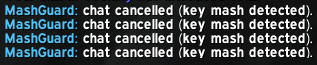
When chat is cancelled, MashGuard clears the text, closes the chat box and prints this message:

Your next key press goes to the game as normal. The screenshot shows four cancels, one line for each.
Installation
- Put the
MashGuardfolder in your game's AddOns folder. For WoW Forever, that's:
World of Warcraft\_classic_beta_\Interface\AddOns\- Check that the addon's files are directly inside its own folder:
   Interface\AddOns\MashGuard\MashGuard.toc
Interface\AddOns\MashGuard\MashGuard.lua- Start the game. If it's already running, restart it, because
/reloaddoesn't pick up newly added addons. - On the character select screen, open AddOns and make sure MashGuard is enabled.
To test it, open chat and quickly press 1 four times. The chat box should close and the message above should appear.
Commands
You can use either /mg or /mashguard.
| Command | What it does |
|---|---|
/mg |
Shows the list of commands |
/mg on |
Turns MashGuard on |
/mg off |
Turns MashGuard off |
/mg count <2-20> |
Sets how many presses of the same key cancel chat |
/mg keys |
Shows the watched keys |
/mg keys <keys> |
Replaces the watched keys |
/mg keys default |
Restores the default keys |
/mg wasd on |
Turns WASD detection on |
/mg wasd off |
Turns WASD detection off |
/mg wasd <4-20> |
Sets how many WASD presses cancel chat |
/mg notify |
Turns the cancel message on or off |
/mg status |
Shows your current settings |
Examples:
/mg count 5
/mg keys 12345wasdqe
/mg wasd 4
/mg notify
Default settings
| Setting | Default | Can be changed? |
|---|---|---|
| Enabled | On | /mg on or /mg off |
| Presses of the same key | 4 | /mg count |
| Watched keys | 1–9, w, a, s, d, q, e, r, f |
/mg keys |
| WASD detection | On | /mg wasd on or /mg wasd off |
| WASD presses in any order | 5 | /mg wasd <4-20> |
| Cancel message | On | /mg notify |
| Maximum time between presses | 0.75 seconds | No |
Settings are saved in MashGuardDB and shared by all characters on your account.
Choosing your keys
/mg keys replaces the whole list, so include every key you want watched:
/mg keys 123456zxcvwasdThe watched keys and /mg count only control the same-key check. WASD detection is separate: it always uses W, A, S and D, even if they aren't on your list, until you turn it off with /mg wasd off.
Keep these points in mind:
- Watch the keys you actually press in combat. The defaults may not match your bindings.
- Capital letters count the same as lowercase.
Wandware the same key to MashGuard, so Caps Lock won't get in the way. - Fewer letters means fewer false alarms. Letters you often repeat when stretching a word, like the
sinyessss, are the most likely to cause an accidental cancel. - Be careful adding
0. It's left out by default so that amounts like10000are safe to type. - Only keys that type a character can be watched. See Limitations.
What triggers a cancel
These examples use the default settings:
| You type | Result | Why |
|---|---|---|
1111 |
Cancels | Four quick presses of a watched key |
wwwww |
Cancels on the fourth w |
The fifth press goes to the game |
WWWW |
Cancels | Capitals count the same as lowercase |
hello 1111 |
Cancels and deletes hello |
Mashing counts anywhere in a message |
wasdw |
Cancels | Five quick WASD presses |
adada |
Cancels | Any mix of WASD counts |
wasd |
Stays open | Only four WASD presses |
dads |
Stays open | Only four WASD presses |
was sad |
Stays open | The space restarts the count |
assassin |
Stays open | Known word, see Limitations |
111 |
Stays open | Only three presses |
1212121212 |
Stays open | The key changes each time, so the count restarts |
10000 |
Stays open | 0 isn't watched |
www.example.com |
Stays open | Only three w in a row |
/run print(1111) |
Stays open | Slash commands are ignored |
1, pause, 1, pause… |
Stays open | More than 0.75 seconds between presses |
Limitations
- The draft is lost. A cancel deletes everything in the box, just like pressing Esc.
- The presses that trigger a cancel don't reach the game. Those keys went to the chat box, so they don't cast or move you. MashGuard never replays them.
- Only WASD is detected in combination. Other keys must repeat, so mashing
1,2,3in turn won't cancel chat. - Stretched words can trigger it.
yessssorjaaaawill cancel chat if the letter is watched. - Words made of WASD letters can trigger it.
assassin,sassafrasandwassailare exempt, but other long runs of these letters will cancel chat. At/mg wasd 4, so will short words likedads,sawsandwads. - Backspace doesn't lower the count. Typing
sss, Backspace,sstill counts as four presses. - Some keys can't be watched. Arrow keys, mouse buttons and keys that don't type a character are invisible to MashGuard, as are modifier combinations that type nothing.
- Shift changes the character. Shift+
1usually types!, which doesn't count as1. If you need it, add the character itself to your list.
Troubleshooting
Chat keeps closing while I'm typing normally.
Raise the same-key count with /mg count 5, or remove the letters causing trouble with /mg keys. If WASD words are the cause, raise that count with /mg wasd 6 or turn it off with /mg wasd off.
Chat doesn't close when I mash a key.
Run /mg status and check that MashGuard is enabled and the key is on your list. Your presses also need to be less than 0.75 seconds apart. For WASD, check that detection is on and that you've reached the number of presses shown.
The addon doesn't load.
Make sure MashGuard.toc is at Interface\AddOns\MashGuard\MashGuard.toc, not in an extra folder inside it, and that MashGuard is enabled in the AddOns list.
I see an "Interface action failed" error after a cancel.
Slash commands for protected actions, such as /cast, could be affected after MashGuard closes the chat box. If this happens, a /reload should clear it. Please report it, along with what you typed.
FAQ
Does it press keys or cast spells for me? No. It only clears and closes the chat box. It never casts, moves or presses anything for you.
Does it read or send my messages? No. It looks at each key as you type and at the first character in the box, to spot slash commands. It stores nothing you type and sends nothing anywhere.
Will it interfere with slash commands?
No. If the text starts with /, the mash check is skipped, so /w and /run work normally.
Can I keep it from printing the message?
Yes. Type /mg notify to turn the message off.
Is there an options window? No. All settings are changed with slash commands.
Uninstalling
- Delete the
Interface\AddOns\MashGuardfolder. - To remove your settings as well, delete this file:
WTF\Account\<YOUR ACCOUNT>\SavedVariables\MashGuard.luaDeleting that file while the game is closed is also how you reset MashGuard to its defaults.
Mash Guard - Don't die to chat Team