Mapzeroth
- By
Google Maps for Azeroth—intelligent travel routing that finds the fastest path to your destination using portals, teleports, flight paths, and more.
MZ-Forever Search.png
Description
🆕 WoW Forever Beta — Mapzeroth 2.0
Playing WoW Forever? There's a beta release built for it. On the Files tab, pick the file marked for the WoW Forever game version (0.5.0-forever).
This beta is the first public piece of Mapzeroth 2.0, a ground-up rebuild of the whole addon: a new routing engine, a new interface, and one addon for both Modern WoW and WoW Forever. The Forever version is out first. The Modern version will replace the current one here once it's ready.
Retail players: nothing changes yet. Keep using the current release. Your version keeps getting updates until 2.0 replaces it.
What's in the Forever beta
- Built for the Forever world. With no flying, routes use flight paths, boats, zeppelins, the tram, portals, your hearthstone and class teleports, and walk the roads between them. They go through city gates, not over walls.
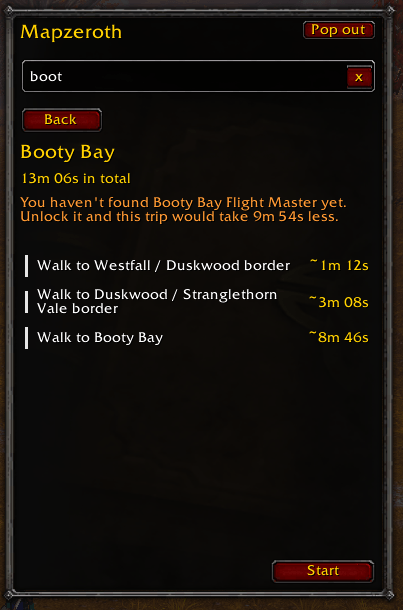
- Knows your flight points. Open a flight master once and Mapzeroth learns which points you've found. It only plans flights you can actually take, and tells you when finding one would save time ("Unlock it and this trip would take 9m 54s less").
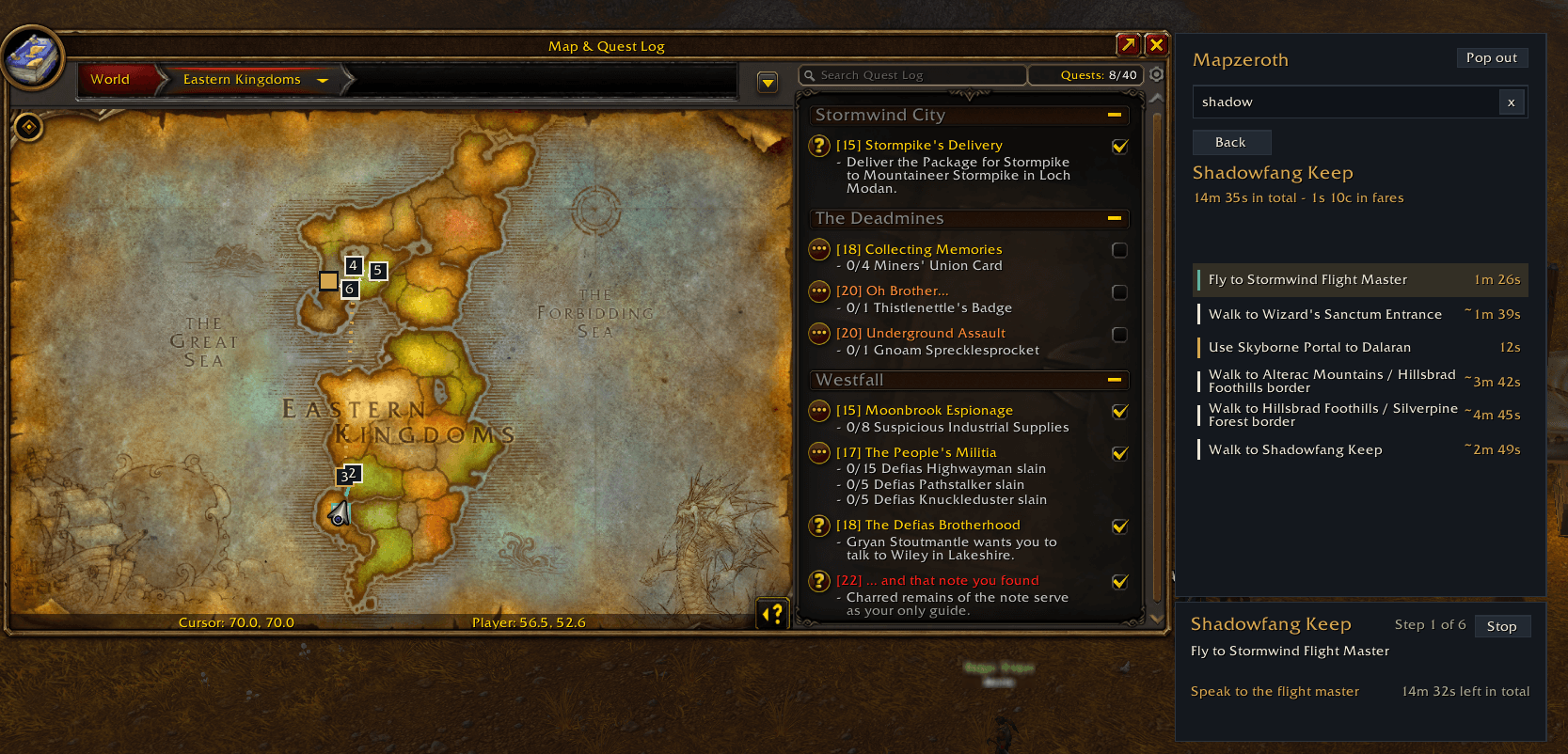
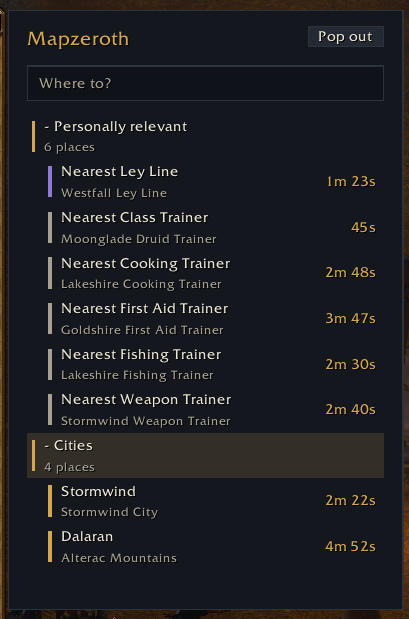
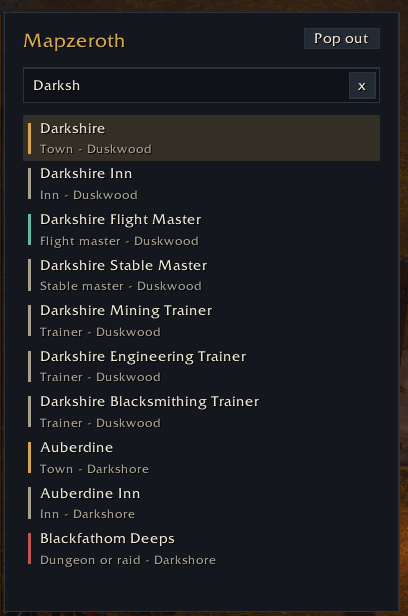
- A panel beside your world map. Search for any town, inn, bank, trainer, flight master or dungeon, or open Personally relevant for your nearest class trainer, profession trainers, weapon master and more. Every entry shows how long it takes to get there.
- Step-by-step trips. Press Start and a small trip window follows you as you go, with a button for spells and items you need to use. The route is drawn on the world map and the minimap.
- Times and fares. Each step shows its time and flight costs, and routes fit what you can afford.
- Two themes (Classic and Modern Dark), and translations for nine languages (early, machine-made: corrections welcome).
It's a beta. Forever's newest zones are still being mapped: some flights there are estimates, and inns and banks in the new zones aren't listed yet. It's a new addon, so it starts with fresh settings. Please report anything odd in the comments or on GitHub, ideally with a screenshot of the route.
Mapzeroth - Travel Routing for World of Warcraft
Stop wasting time figuring out how to get places.
Mapzeroth calculates the fastest route from wherever you are to wherever you want to go in WoW. It knows about portals, teleports, flight paths, hearthstones, class abilities, and everything else, then tells you exactly what to do, step by step.
How It Works
The addon builds a travel graph of every major location and travel method in the game, then runs Dijkstra's algorithm over it to find the quickest route by actual travel time. It accounts for cast times, loading screens, cooldowns, and time-phased zones (Zidormi and friends) where relevant.
It's smart about what you actually have access to. It won't route you through a portal you haven't unlocked, and it only suggests abilities and items you actually have available.
What It Supports
- World Travel Network (Portals, boats, zeppelins, tram, etc)
- Flight Paths (used only where they're the sole connection between isolated zones, e.g. bridging Shadowlands covenant sanctums or Zul'Aman; otherwise Mapzeroth prefers portals and teleports over queuing you for a taxi)
- Time-Phased Zones (Zidormi-gated routing through Darkshore, Blasted Lands, Silithus, Dustwallow Marsh, Tirisfal, Vale of Eternal Blossoms, Uldum)
- Multi-Destination Routes (route through all your current TomTom waypoints, or paste in a list of your own)
- NPC or "hidden" Shortcuts (Pet Shop Dungeon Ports, Campfire on Timeless Isle, etc)
- Spells and Abilities (Mage Teleports, Dreamwalk, Dungeon Teleports, Mole Machine, etc)
- Items and Toys (Engineering gadgets, Jaina's Locket, Tortollan Lucky Charm, etc)
- Equipment Items (Dalaran Ring, Guild Cloaks, Tol Barad/Argent Tourney Tabard, etc)
Getting Started
- Click the minimap button or type
/mz show - Click "Choose Destination" and pick where you want to go
- Click "Navigate" to see your route
Multi-Destination Routes: Find the best route between a list of destinations. I would recommend not trying to do anything larger than 20 destinations in one route, but YMMV.
Two ways to multi-route:
- Click TomTom in the destination selector to route through all of your currently active TomTom waypoints.
- Click Paste Waypoints and drop in a list of waypoints. Accepts both
/way mapID x yand/way #mapID x yformats.
Clickable Route Steps: In the GUI window, route steps are clickable.
- Clicking a spell, ability, or item will use it for you.
- Clicking a fly/walk step will set a waypoint to that step's destination.
Hearthstone: The addon automatically detects when you bind your hearthstone. Just bind it normally at an inn after installing and Mapzeroth will remember it.
Waypoints: The addon currently supports these waypoint types:
- Standard map waypoints
- Point of Interest waypoints (flightmasters, dungeon portals, etc)
- TomTom waypoints (single destination, or all of them at once for a multi-destination route)
- Pasted waypoint lists (multi-destination routing)
Commands
/mz show- Open the main window/mz help- List all commands
Settings
You can adjust several options to match your preferences and system:
- Loading Screen Delay - Adjust the time cost for loading screens to match your PC's load times. A larger value here will favour flying/walking rather than short teleport steps.
- Max Cooldown - Ignore travel methods with cooldowns longer than you want to wait. Save your 8 hour dungeon cooldowns for manual usage.
- Window Scale - Resize the interface to whatever size works for you
- Minimap Button - Toggle visibility if you prefer a cleaner minimap
Known Issues
Phase Detection in Tirisfal and Vale of Eternal Blossoms: Zidormi phase auto-detection isn't fully reliable in these two zones. If a route sends you to the wrong phase for Undercity, Scarlet Monastery, Siege of Orgrimmar, or Ny'alotha, switch it manually with Zidormi once you reach the zone.
Equipment Item Usage: Equipment items must currently be manually equipped before clicking the step will activate them.
Support
This is a free addon I built to solve my own forgetfulness with the expansive WoW travel options. If you find it useful and want to support development, you can buy me a coffee on Ko-fi.
Feedback
Bug reports and feature requests go on the GitHub issues page or in the comments here. I read and respond to them and work through the backlog regularly. If there's a shortcut or transport method I missed, let me know so I can add it.
The Mapzeroth Team


Owner