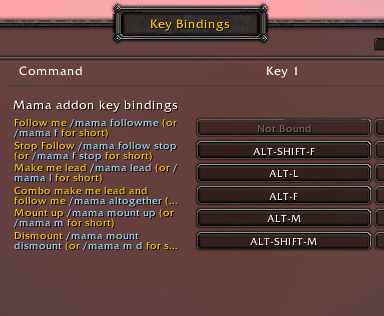
MAMA keybindings as of v0.6.0
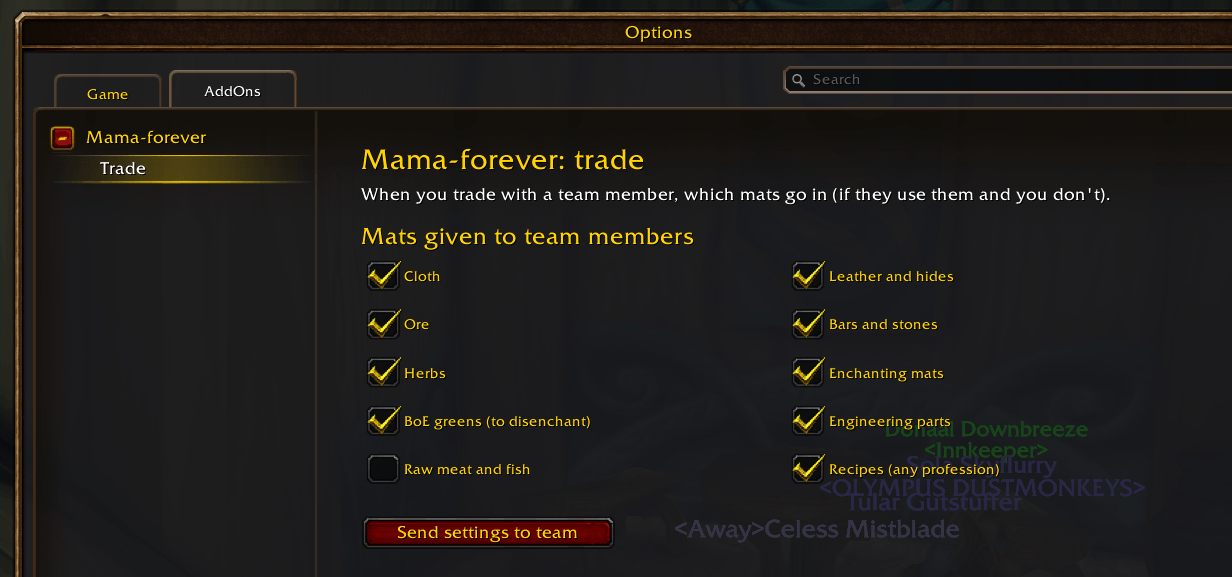
Trade options menu
Description
About M.A.M.A. Multiboxing
This is manually updated, have a look at https://github.com/mooreatv/MAMA-multiboxing/blob/master/README.md for the most recent description.
About M.A.M.A. Multiboxing
MAMA is now Mama-forever: Multiboxing helper for WoW Forever (the new beta client, interface 16xxx). One standalone addon, no libraries and no other addon needed. It is the successor of MAMA + DynamicBoxer + MoLib, rewritten for Forever only.
It lets all your windows of the same team:
- find each other and form a group automatically (one-time setup per window),
- follow and assist whoever is the lead, with one key or one macro,
- follow in a train ordered by team slot, with one key,
- share, accept and abandon quests together,
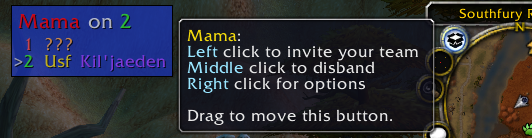
- be managed from a small team status window (invite, disband, party/raid, target, …).
Names in Forever are First Last (with a space) and there is no realm part: Mama-forever treats them as opaque names.
Install
Copy the Mama folder to
World of Warcraft\_classic_beta_\Interface\AddOns\ (or run install.bat from a clone, adjust the path in it if
needed), then restart the game (a /reload isn't enough the first time, key bindings are only read at startup).
One-time setup
Do this once per window/character:
- In the first window:
/mama s 1. A dialog shows the team token: press Ctrl-C, then Enter. - In the second window:
/mama s 2, press Ctrl-V in the dialog and Enter ("token accepted"). - Same for the third window with
/mama s 3, and so on (up to 40). /reload(or just keep playing): the windows announce themselves to each other, the status window appears, and slot 1 invites everybody (switching to a raid above 5 characters).
The token is saved, so you don't redo this at the next login. Team messages are signed with the token's secret, so
only messages signed with that secret are accepted as team commands. Characters that exchange the token
are added to the trusted team and their group invites are auto accepted. /mama token shows it again,
/mama token new (slot 1) makes a new one. /mama team add [Full Name] can separately trust a name for auto-accepting
that character's group invites; it does not pair that character, assign it a slot, or give it the token needed to
exchange team messages. Each participating window still needs its own /mama s N setup and the shared token.
Each character remembers its own team (slot, token, teammates): switching between teams played on the same accounts picks up the right one at login.
Log in slot 1 last (when you can't log in all windows at once). Slot 1 invites its team as soon as it logs in, and
the others accept automatically. If slot 1 logs in first, those invites find nobody, and the group only forms once the
other windows' announces reach slot 1, which can take minutes when the server's chat lags. If that happens, left click
the status window on slot 1 (or /mama invite, or the Invite team key) once everyone is logged in.
New team or new master (other characters, or another character as slot 1): on the new slot 1, /mama s 1 then
/mama token and copy it (/mama token new for a brand new team). On each other window, /mama s N if its slot
changes, then /mama token and paste it (or /mama token <paste>, or Ctrl+Right on the status window). Pasting a
token makes that window forget the previous team and talk to the new master right away.
New characters may need one manual invite. Windows find each other by whispering names they already know (slot 1 from the token, characters recorded in earlier sessions). Addon messages only work by whisper, party/raid or guild (not say/yell), so a character never seen before, or the first team on another faction, can't be found: invite it once by hand (or have both in the same guild). Once grouped they record each other and it's automatic from then on.
Using it
Follow and assist
The "lead" is the group leader by default. /mama lead on a window makes that window the lead for the whole team
(and the group leader promotes it), /mama lead auto goes back to following the group leader.
Follow and assist are protected actions that must come from a key press or your own macro, so there are two ways:
- Key bindings (Game Menu > Key Bindings > Mama-forever): Follow + assist lead, Assist lead, Follow train + assist lead (each slot follows the previous slot; the lead stops following), Make me lead, Invite team, Disband team, Identify slot.
- The MAMA macro: Mama-forever creates a per character macro called
MAMAwith a starter for your class (follow and assist the lead, attack, send the pet, cast a basic spell) and keeps its/followand/assistlines pointed at the current lead. Open the macro window (/macro, character tab), dragMAMAto an action bar once and use it. Edit it freely (spell, icon, extra lines): only the/followand/assistlines are updated. Until you edit it, the starter picks up a better spell when you learn it (Judgement for paladins, Serpent Sting for hunters, Charge out of combat and Rend for warriors)./mama macro resetputs the class starter back,/mama macro offstops managing it. The account wideMAMAmacro of older versions is deleted.
Quests
- Quests you accept are shared with the group, and shared quests are accepted automatically on the other windows.
- Hold Shift, Ctrl or Alt while opening a quest giver (or clicking a quest) to skip auto accept and read it first.
- Abandoning a quest on one window abandons it on the others (never a completed quest).
- Talking to an NPC whose dialog has only one option and no quest (most vendors and trainers) picks that option: you go
straight to the vendor window. Same for an NPC with only one quest to pick up and nothing else: the quest opens (and
gets auto accepted when grouped), or with only one completed quest to turn in: it opens for turn in. Hold Shift, Ctrl
or Alt while opening the NPC to see the dialog;
/mama gossip offturns it off. - The lead's dialog choices (gossip options, quests, flight paths) are made on the other windows too, and so are the
lead's clicks on popups (spirit healer, accept resurrect or summon, release spirit…) on the windows showing the
same popup. Never for deleting items, logging out or quitting.
/mama dialog offturns it off.
Professions and trading mats
Each window tells the team its professions (/mama profs lists them, /mama profs sync asks everyone again; also in
the status window row tooltips). Opening a trade with a team member puts the mats they use in the trade window (6
stacks per trade, trade again for more); you still click Trade. Mats you could use yourself stay with you (a tailor
keeps their cloth, unless the other tailor is better); the "Mama: give mats" button above the trade window gives them
anyway (e.g. a blacksmith's spare bars to an engineer):
| Mats | Go to |
|---|---|
| cloth | tailor |
| leather and hides | leatherworker |
| ore | miner (to smelt) |
| bars and stones | blacksmith or engineer |
| herbs | alchemist |
| enchanting mats, BoE greens | enchanter (to disenchant) |
| engineering parts | engineer |
| recipes and patterns | whoever has that profession |
| raw meat and fish | cook (off by default) |
Pick the kinds in Options > AddOns > Mama-forever > Trade (or /mama trade list, /mama trade greens off);
/mama trade off turns the auto fill off (the button still works). "Send settings to team" (on both options pages)
copies this window's options and trade kinds to the rest of the group.
Alerts to the lead
- Follow broken: when a window stops following out of combat (not in a fight, where that's normal) and the lead then gets out of follow range (stuck behind a tree or a wall), the lead's window gets a raid warning and a sound. Same when a follow key or the MAMA macro doesn't start following out of combat (too far, out of sight…).
- Whispers: whispers from players outside the team to the other windows are shown in the lead's window (click the
name to answer). GM whispers are tagged
<GM>with a raid warning and the GM sound. If the whisper can't be read (chat lockdown), the lead is still told to look at that window.
Both are on by default (Options > Alerts to the lead).
Status window
One row per slot. White is this window, green is in the group, yellow is online but not grouped, grey is not seen yet,
* marks the lead. The number right of each name is its free bag slots (orange under 5, red when full). The bottom
line is the team's gold; hover it for the gold and bag slots of every character of this faction you've played with
Mama, alts included (last known values). Hover the title for all the shortcuts:
| Click | Action |
|---|---|
| Left | invite the team |
| Middle | disband (leader uninvites the team, others leave) |
| Right | options |
| Shift+Left / Shift+Right | toggle party/raid / toggle compact view |
| Shift+Middle | show the big slot number, class and name |
| Ctrl+Left / Ctrl+Right | toggle auto invite / show or paste the token |
| Alt+Left | resend our info to the team |
| Ctrl+Middle | turn Mama off/on for this character (see below) |
| Alt+Right | mark the team complete (forget slots that aren't here) |
| Mouse wheel / drag title | resize / move |
On a row: left click targets the character (or invites it when not grouped), right click opens its unit menu.
Turning Mama off for one character (e.g. one that is sometimes part of another team): /mama disable, the
Turn Mama off/on key binding or Ctrl+Middle click on the status window. That character then sends and reads no
team messages and does no team automation (auto accept invites/quests, quest sharing, loot, trade fill, alerts); the
status window title shows "disabled" in red. Its slot and token setup are kept, and it is remembered for that
character until /mama enable turns it back on.
Commands and options
/mama help lists everything: s, token, lead, team, invite, disband, raid, autoinvite, status,
macro, quest, dialog, gossip, profs, trade, ui, enable, disable, identify, options, complete, debug, bug (copyable log), clearlog. The options panel is in Game Menu > Options > AddOns > Mama-forever
(/mama options): auto accept/share quests, abandon everywhere, auto accept team invites, auto invite, auto raid,
mirror the lead's dialog choices, skip single option dialogs, free-for-all loot, auto fill trades, MAMA macro, follow broken warning, whisper
forwarding, status window, slot display at login, debug.
Not included (compared to the old addons)
No ISBoxer team discovery (Even if it should still work, but use WowOpenBox instead), no EMA integration, no support for other WoW versions (yet)
More info
Get the binary release using curse/twitch/overwolf/wowup-cf… clients https://www.curseforge.com/wow/addons/mama-multiboxing
See source files (and issues etc) https://github.com/mooreatv/MAMA-multiboxing
MAMA (Minimal yet Awesome Multiboxing Assistant) Team

Owner