
malko.png
Description
Malkorok Smash Helper
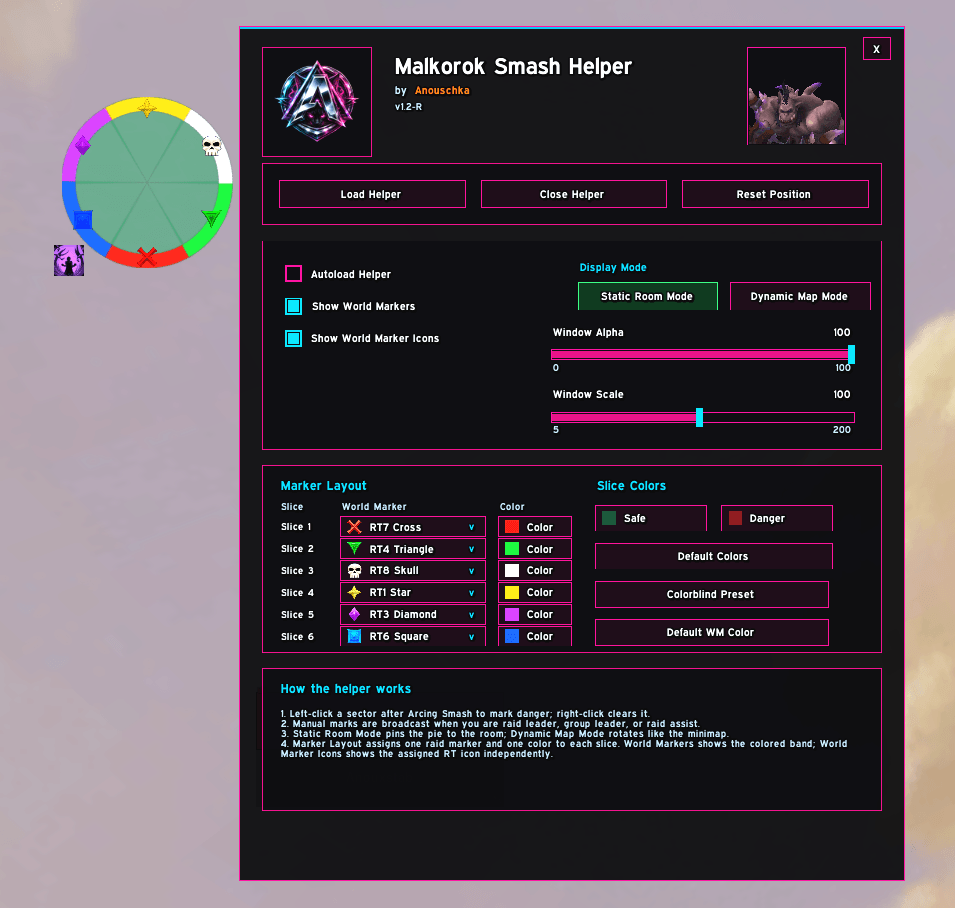
Malkorok Smash Helper is a standalone raid helper for Malkorok in Siege of Orgrimmar. It helps your raid manually track which sectors of the room were hit by Arcing Smash, so the raid can quickly identify the safe area before Breath of Y'Shaarj.
Main Idea
Malkoroks room is represented as a circle divided into six sectors. During the fight, Arcing Smash hits different areas of the room. Those areas become dangerous for the upcoming Breath of Y'Shaarj. The addon lets the raid leader or raid assistant mark these sectors visually, broadcast the marked sectors to other addon users, and keep the whole raid aligned.
Requirements
For raid-wide syncing to work:
- The raid leader or raid assistant must actively mark sectors.
- Every raider who should see synced sectors needs to have the addon installed and enabled.
- Players without the addon will not see helper updates.
- Non-assist players can use the helper locally, but they cannot broadcast marks to the raid.
Slash Commands
Use either command:
/mal
/malkorok
Opening the command without arguments opens the addon GUI.
Available commands:
/mal load/mal close/mal reset
How To Use The Helper
- Open the addon with
/mal. - Click Load Helper, or enable Autoload Helper.
- During the fight, watch where Arcing Smash lands.
- Left-click the affected sector in the helper circle to mark it as dangerous.
- Right-click a sector to clear it again.
- Before Breath of Y'Shaarj, red sectors are dangerous and the remaining green sectors are safe options.
Autoload Helper
When Autoload Helper is enabled, the addon automatically loads the helper when Malkorok is detected.
The helper can load when:
- The Malkorok encounter starts.
- Malkorok is detected as your target.
- Malkorok is detected as an active boss unit.
This only loads the visual helper. It does not automatically mark sectors.
Texture And Color Meaning
Green Sectors
Green means the sector is currently considered clear or safe.
Red Sectors
Red means the sector was manually marked as hit by Arcing Smash and should be treated as dangerous for Breath of Y'Shaarj.
World Marker Overlay
The Show World Markers option displays marker-colored references on the helper circle. These help your raid match spoken calls, marker colors, and helper sectors. This does not automatically place Blizzard world markers on the ground. It is only a visual overlay inside the addon.
World Marker Icons
The Show World Marker Icons option displays the assigned raid marker icon on each sector. This can be used together with, or separately from, the colored world marker overlay.
Breath Icon And Timer
The spell icon near the helper shows the estimated timing for the next major AoE cycle. It helps you prepare for Breath of Y'Shaarj after the Smash sequence.
Display Modes
Static Room Mode
Static Room Mode pins the helper circle to the actual room layout. This mode is recommended if your raid wants fixed sector calls that always match the room.
Dynamic Map Mode
Dynamic Map Mode rotates the helper display similar to the minimap. This can feel more natural for players who are used to reading position relative to their current facing or minimap orientation.
Marker Layout Customization
The addon allows assigning one raid marker to each sector. For each slice, you can configure:
- The assigned raid marker.
- The marker color.
- Whether marker-colored overlays are shown.
- Whether raid marker icons are shown.
This makes it easier to match the helper with your raid's existing strategy, assignment sheet, or voice calls.
Slice Colors And Colorblind Support
The addon supports custom slice colors. You can adjust:
- Safe sector color
- Dangerous sector color
- World marker colors
A colorblind preset is also available for players who need stronger visual separation between safe and dangerous sectors.
Why AI Mode Was Removed
Older versions of the addon included an experimental AI Mode and Raid Dots feature. These features depended on Blizzard API functions that could read player or raid member positions inside the encounter area. After Blizzard API changes and behavior changes around early June 2026 in Mists of Pandaria Classic, those position-related functions are no longer reliable inside this instanced raid environment.
In practice, the addon can no longer safely determine:
- Where raid members are standing inside the Malkorok room.
- Which exact sector contains which players.
- Which sector was most likely hit based on player distribution.
Because of this, automatic detection could produce incorrect sector calls, mark too many sectors, or broadcast misleading information to the raid. To keep the addon safe and reliable, AI Mode and Raid Dots were removed. The addon now focuses on deterministic manual marking and raid syncing, which remains accurate and fully under the control of the raid leader or raid assistant.
Raid Sizes
The manual helper can be used for both 10-player and 25-player raids. Because the addon no longer relies on automatic raid position detection, the same manual marking logic works for every raid size.
Settings Overview
Load Helper
Shows the main Malkorok helper frame.
Close Helper
Closes the active helper frame.
Reset Position
Moves the helper frame back to its default position.
Autoload Helper
Automatically loads the helper when Malkorok is detected.
Show World Markers
Shows marker-colored overlays on the helper circle.
Show World Marker Icons
Shows the assigned raid marker icon on each sector.
Static Room Mode
Keeps the helper aligned to the room layout.
Dynamic Map Mode
Rotates the helper display similar to the minimap.
Window Alpha
Controls helper transparency.
Window Scale
Controls helper size.
Language Support
The addon is designed to work on all game clients because the important fight logic uses IDs instead of localized spell or boss names.
Included localization files currently cover:
- English
- German
- French
- Russian
- Chinese
- Spanish
Unsupported locales should fall back to English text.
Recommended Raid Usage
For best results, assign one person to control the helper. The assigned player should be the raid leader, group leader, or raid assistant. That player marks each Arcing Smash sector manually. Everyone else keeps the addon open and receives the synced sector state. This keeps calls consistent and avoids conflicting marks from multiple people.
Version Notice
This description applies to v1.2-R.
Malkorok Smash Helper (SoO) Team

![AnouQualitySuite [AQS] project image](https://media.forgecdn.net/avatars/thumbnails/1628/485/256/256/639044585248933937.png)