Malkoms Set Icon Filter
- By
Adds a class filter to the equipment set icon picker, to filter icons by a class's spells & talents.
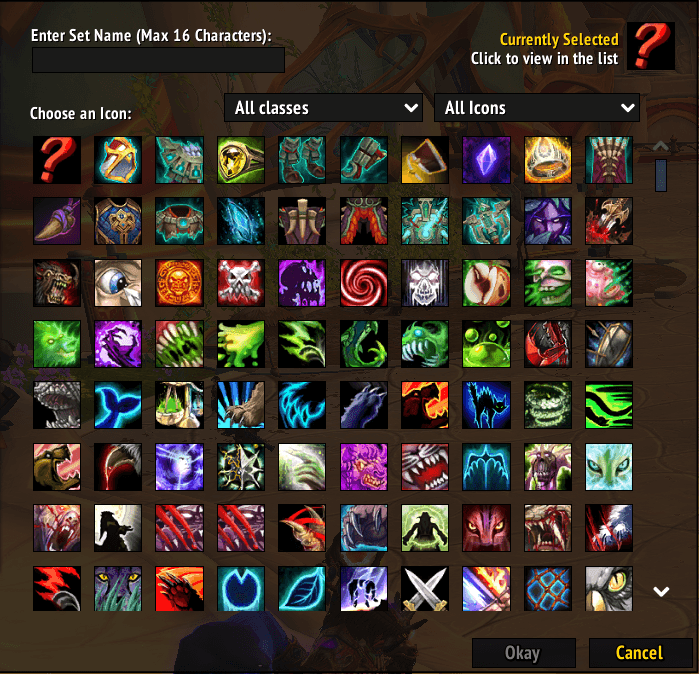
Menu
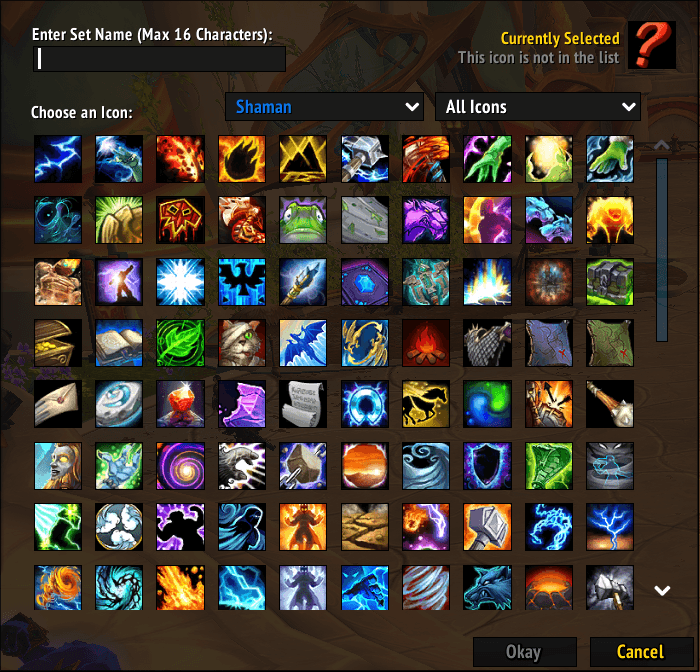
Class Filter
Description
Malkoms Set Icon Filter adds a class filter to Blizzard's equipment-set icon picker. When you create or edit an equipment set and click Choose an Icon, a new dropdown lets you pick a class to narrow the huge icon grid down to that class's spell and talent icons — so you can quickly find a themed icon for your set.
Features
- Adds a class dropdown right next to the existing All Icons / Items / Spells filter, on the equipment-set icon selector (
GearManagerPopupFrame). - Selecting a class shows only that class's spell/talent icons; All classes restores the normal Blizzard list. The filter resets each time the picker opens.
- For your own class, it gathers your complete spellbook and full talent tree icons live — so even unpicked talents (e.g. Call Dreadstalkers, Summon Demonic Tyrant, …) are included.
- Other classes use a bundled list of iconic spells (easily extendable).
- ElvUI skinning: if ElvUI is installed, the class dropdown (and the existing icon-type dropdown) are skinned to match.
Usage
Character frame → Equipment Manager → create or edit a set → Choose an Icon → use the new class dropdown. No setup required.
Dependencies
None required. Optional: ElvUI (used only for skinning the dropdowns).
Languages
English (enUS) and French (frFR).
Feedback
Found a bug or have a suggestion? Please use the Comments tab on this CurseForge page.
License & credits
Released under GPLv3. Author: Malkom. Original code (Blizzard API only).
Known limitations
- Gathering talents for other classes isn't possible in-game (it needs a player-specific config), so non-player classes rely on a bundled spell list — while your own class is fully covered live.
Malkoms Set Icon Filter Team