Malitor's Armory
- By
Malitor’s Armory tracks your account’s characters and gear, then shows compatible alt equipment comparisons on Bind on Equip and account-bound item tooltips.
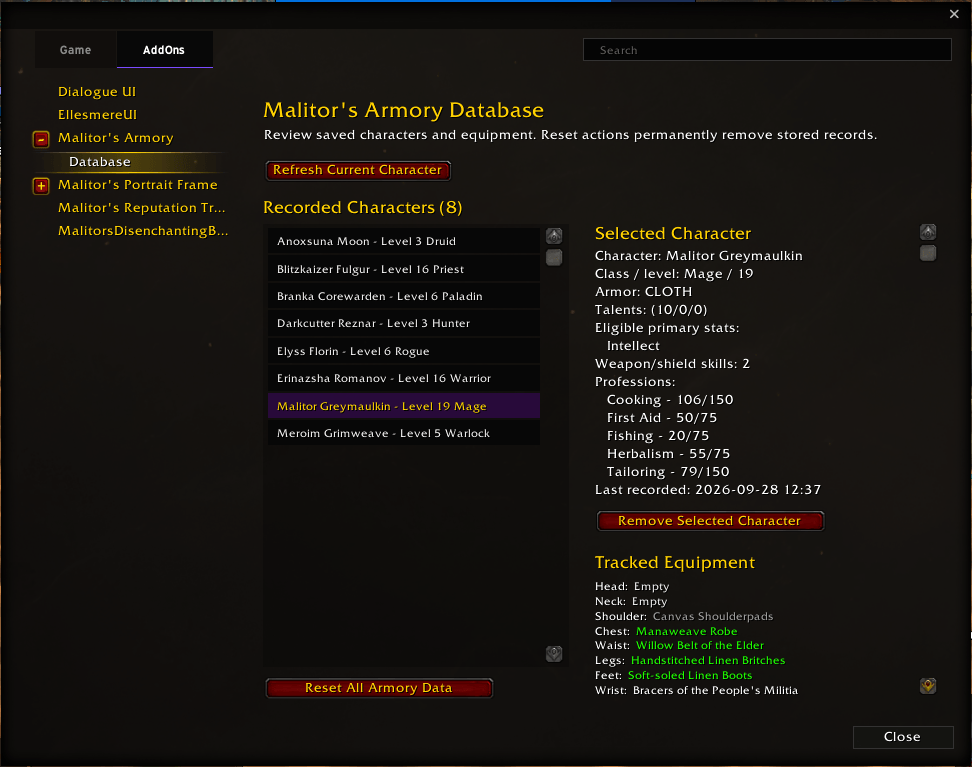
MalArmory_Settings_Database.png
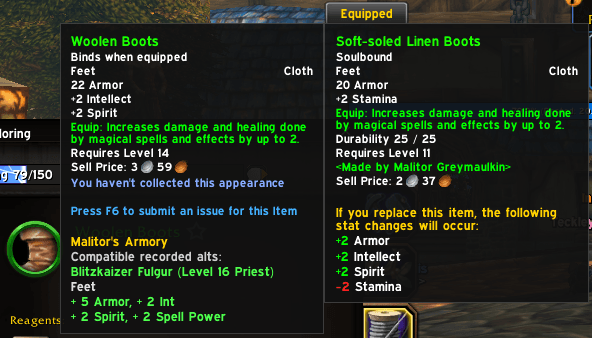
MalArmory_Tooltip_Compare.png
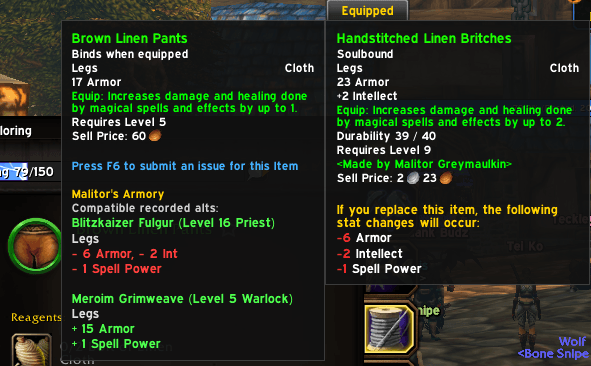
MalArmory_Tooltip_Compare_Negative.png
Description
Malitor's Armory
Now supporting Mainline and Forever!
Malitor's Armory records your account's characters, equipment, professions, and relevant eligibility information so you can quickly see whether transferable gear may be useful for an alt.
When you hover over a **Bind on Equip** or account-bound item, the addon checks your recorded characters and adds a clear comparison to the item tooltip when the item is compatible.
Note: Comparisons are informational and provide a quick view of an item’s potential stat changes for compatible alts. Malitor’s Armory does not use weighted stat matrices or assign an upgrade score.
Features
Account-Wide Character Database
Malitor's Armory automatically records character information when you log in, including:
* Character name and realm
* Level and class
* Primary armor type
* Eligible primary stats
* Talent point distribution
* Profession ranks
* Weapon and shield proficiency
* Equipped gear for gameplay-relevant slots
Character data is stored account-wide and updates as your characters level, change equipment, learn weapon skills, or improve professions.
Compatible Alt Tooltips
When hovering over a Bind on Equip or account-bound item, Malitor's Armory checks recorded alts and displays compatible matches directly in the tooltip.
Compatibility checks include:
* Required character level
* Class restrictions
* Primary armor type
* Eligible primary stats
* Profession requirements and ranks
* Weapon, shield, and off-hand eligibility
Only recorded alts that can use the item are shown.
Direct Stat Comparisons
Malitor's Armory compares an item against the gear currently equipped by each compatible alt.
The tooltip shows:
* Compatible character name, realm, level, and class
* Target equipment slot
* Positive stat changes in green
* Negative stat changes in red
* Additional stat changes on separate lines
Items with identical static stats are not shown as comparisons.
Weapon and Off-Hand Support
Weapon comparisons account for the type of item and the alt's recorded proficiency.
Supported comparisons include:
* One-handed weapons
* Two-handed weapons
* Shields
* Held-in-off-hand caster items
* Ranged weapons
* Dual-wield eligibility
Two-handed weapons compare against both the equipped Main Hand and Off Hand, so lost off-hand stats are included in the result.
Profession Requirement Support
Items with profession requirements are checked against each alt's saved profession ranks.
For example, an item requiring Engineering will only display alts with the required Engineering skill level.
Blizzard Settings Integration
Malitor's Armory includes a Blizzard Settings page with:
* Account database status
* Tooltip comparison toggle
* Character database viewer
* Character refresh option
* Safe removal of individual character records
* Full database reset option
Type the following command to open the settings page:
/malarmoryDatabase Viewer
The Database Viewer lets you review every recorded character on your account.
You can view:
* Character identity and level
* Armor type
* Talent point distribution
* Eligible primary stats
* Profession ranks
* Weapon and shield proficiency
* Last recorded time
* Tracked equipment
Hover over any equipped item in the viewer to see its normal in-game tooltip.
Designed for Clear Alt Decisions
Malitor's Armory does not use a hidden weight system or arbitrary upgrade score.
Instead, it shows the direct stat difference between the item you are viewing and the equipment currently worn by a compatible recorded alt.
This makes it easier to decide whether an item is worth saving, mailing, or listing for another character.
Feedback & Suggestions
If you encounter bugs or have feature suggestions, please submit them through the CurseForge project page.
The Malitor's Armory Team