


Mail-fufu
- By
Mail window helper: remembers addressees, collects attachments in bulk, forwards mail text and logs sent mail. Retail and WoW Forever.
fufu-mail.png
fufu-history.png
Description
Mail-fufu
A mail window helper that remembers who you mail, collects attachments in bulk, forwards mail text and keeps a log of what you sent.
Mail-fufu runs on retail (12.1.x) and on the WoW Forever (1.60.x) client from one package. It is a clean-room, library-free implementation of the classic EasyMail feature set: no EasyMail code, strings or artwork, written fresh against the modern mail UI on both clients.
Features
Sending mail
- Last addressee per character is prefilled when the mail window opens.
- Recently-mailed list per realm and faction (8 to 40 names), in a dropdown next to the To field. Left-click fills the field, right-click removes a name, "Add Name" adds one by hand.
- Friends and guild members can be added to the dropdown and to the autocomplete.
- Autocomplete feeds your recent names into Blizzard's own To-field suggestions. Switch back to the stock behaviour with one option.
- Money subject: typing an amount with an empty subject writes
Money: 12g 5s. - Bags open when you click the Send Mail tab.
Inbox
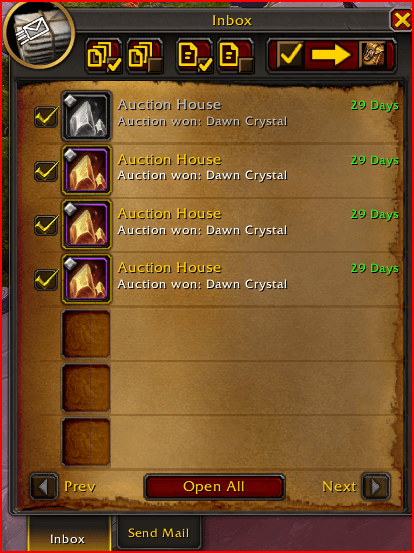
- Checkboxes on every inbox row, remembered across pages.
- Toolbar: Mark All, Clear All, Mark Page, Clear Page and Get Checked, which collects every money and item attachment from the marked mail. COD and GM mail is skipped. Optionally deletes pending-auction invoice mail.
- Collection runs like Blizzard's Open All, stops when the mailbox closes, and gives up cleanly if the bags fill up or the inbox changes under it.
- Right-click a row to take its attachments or delete a text-only mail (unread mail always asks first). Both off by default.
- Mail text in the inbox tooltip (off by default; reading the text marks the mail read).
- Blizzard's Open All button can be hidden; it is disabled while the inbox is empty.
Open mail
- Take All takes every attachment of the open mail (disabled on COD mail until you accept the COD).
- Forward opens a new mail with
FW: <subject>and the original text (attachments cannot be forwarded by the game API). - Chat lines for money received per mail, with auction sales named by item, and a batch total.
History
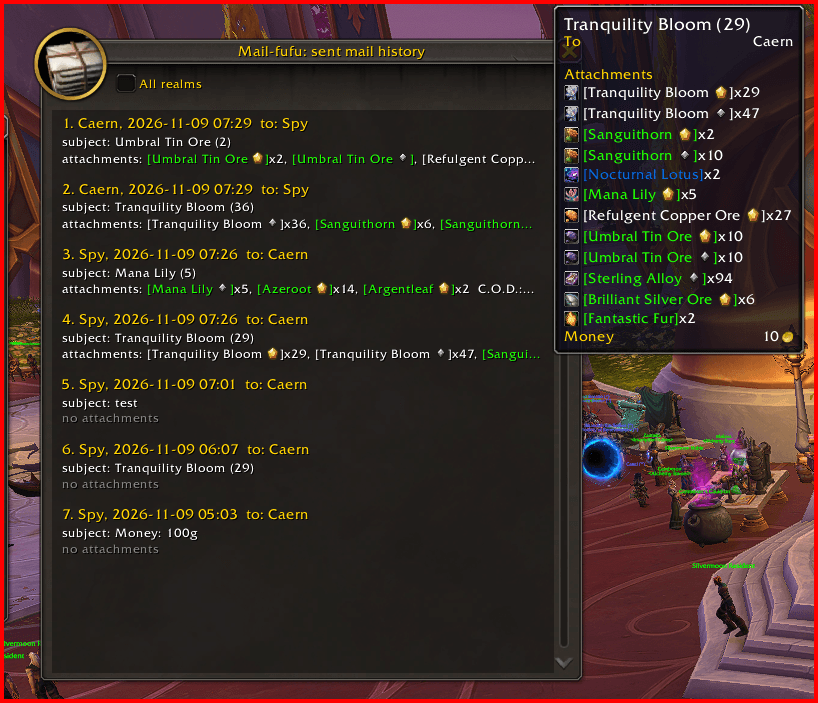
- Every sent mail is logged. Left-click the envelope in the mail window's corner for the history window (per realm, with an "All realms" toggle). Right-click it for the options.
Slash commands
/mailfufuopens the options/mailfufu historytoggles the history window/mailfufu lastprints the last sent mail/mailfufu debugprints the client-shape report
Options
Game Menu > Options > AddOns > Mail-fufu. "Defaults" resets the options only; it never clears your recently-mailed list or your history.
Supported clients
- Retail 12.1.x
- WoW Forever 1.60.x (Interface 16001)
Source
Mail-fufu Team

