


tbag-fufu
- By
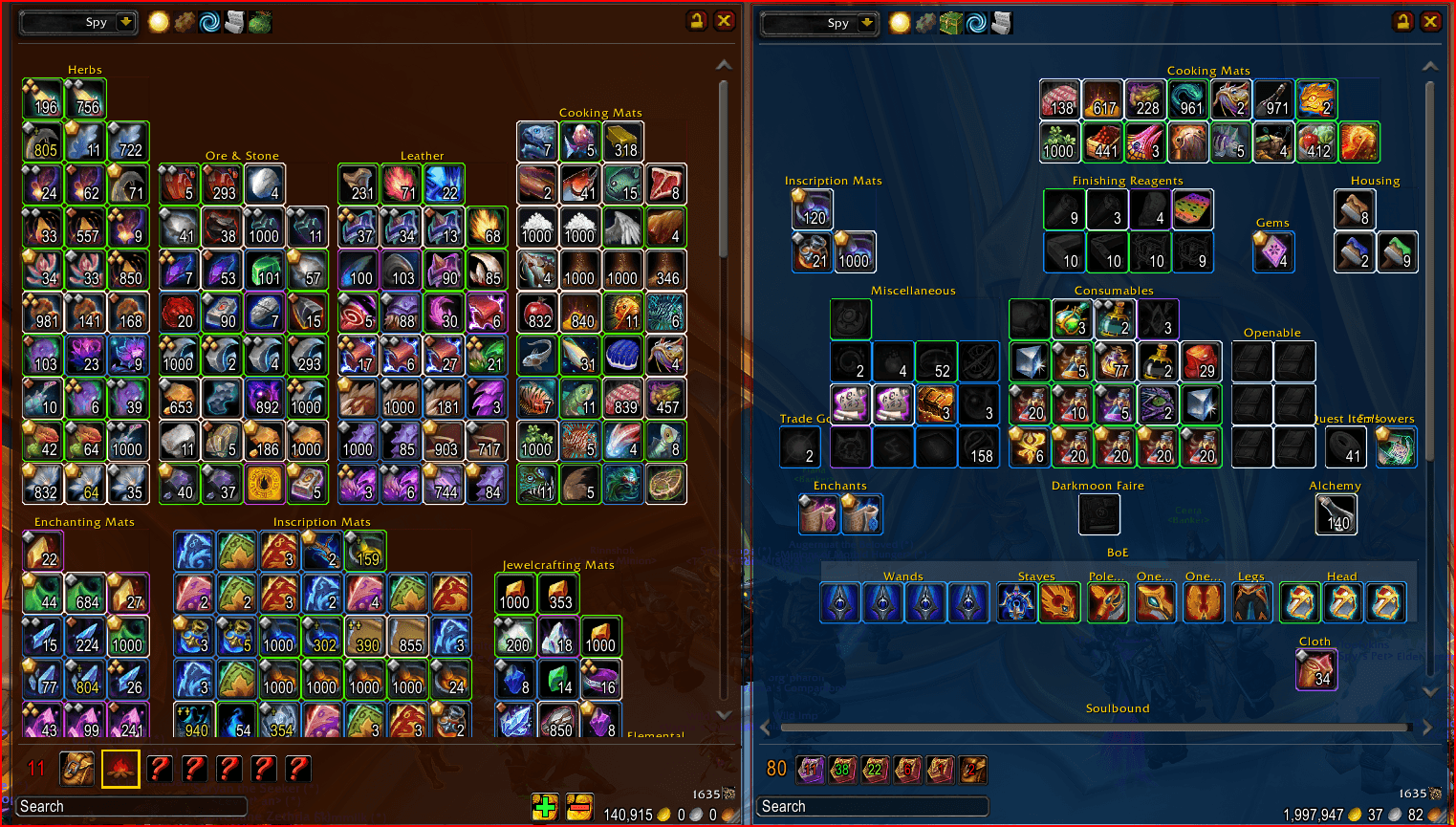
Screenshot for Curseforge.png
Description
TBag-fufu
A configurable bag & bank replacement that auto-sorts your items into categories and lets you view any character's bags and bank from anywhere.
TBag-fufu replaces the default bag and bank UI with a single, tidy, auto-sorted window — viewable for any of your characters, from any character — and rebuilds the bank around World of Warcraft's modern account (Warband) bank.
It is a community revival fork of the long-abandoned TBag (tbag-shefki),
brought forward to retail and rebranded -fufu:
Engbags → TBag (Talos) → tbag-shefki (Shefki) → tbag-fufu
Features
Inventory
- Unified inventory & bank windows that replace the default bag/bank UI.
- Auto-sorting into categories by item type and your professions, with optional category names and adjustable spacing.
- Item search across the current window (and your cached data).
- Manual layout mode: free-placement, draggable category bars for a hand-arranged look.
- Scrollable, resizable windows with configurable column counts.
- Drag-and-drop item moves and stack splitting.
- Hide what you don't use — collapse the player dropdown, bag buttons, and filter button from the right-click menu.
View any character from anywhere
Once a character's data has been cached, you can browse its bags, bank, and currency from any other character via the name dropdown. (TBag-fufu can only show what it has "seen" — see Getting started below.)
Modern 12.0 bank (built on the new C_Bank API)
- Character and Warband (account) bank, with a per-tab selector strip.
- Buy new bank tabs in-window (taint-safe).
- Deposit-all buttons — Deposit All Reagents (Character) and Deposit All Warbound (Warband).
- Warband money display, with deposit / withdraw.
- Bank tab settings dialog (right-click a tab): rename, pick an icon, set the auto-deposit assignment flags, and the expansion filter — matching Blizzard's own bank tab settings.
Configuration
- Extensive in-game options, with separate inventory and bank option panels, plus an advanced configuration window.
Slash commands
| Command | Opens |
|---|---|
/tbag or /tinv |
Inventory window |
/tbnk |
Bank window |
Most settings live in the right-click menus on the windows and in the option panels reachable from there ("Advanced Configuration").
Getting started
TBag-fufu can only show what it has "seen." For full cross-character viewing, on each character once:
- Open your bags
- Visit the bank
- Open a merchant / trade window
After that, you can view that character's contents from any other character.
Heritage & license
As noted above, TBag-fufu continues the Engbags → TBag (Talos) → tbag-shefki (Shefki) → tbag-fufu lineage.
The original TBag/Engbags code shipped with no license and remains under its
original authors' copyright (this fork does not relicense it). The -fufu
contributions — the rebrand, the 12.0 port, and subsequent features and fixes
— are released under the MIT License.
Provided as-is, with no warranty.
Credits
- Talos — original author of TBag (built on Engbags).
- Shefki — maintained
tbag-shefki. - Little-Bunny-FuFu — this
-fufurevival fork.
The project logo is AI-generated.
Feedback
Issues and suggestions: https://github.com/Little-Bunny-FuFu/tbag-fufu/issues
tbag-fufu Team
