Magic Quest Tracker
- By
A replacement for the built-in objective tracker for WoW Retail and Classic Forever.
Screenshot_20261010_153241.png
Screenshot_20261010_153211.png
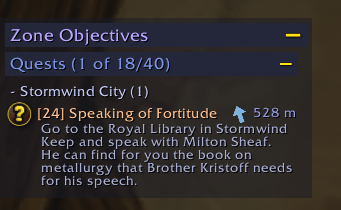
Screenshot_20261010_153036.png
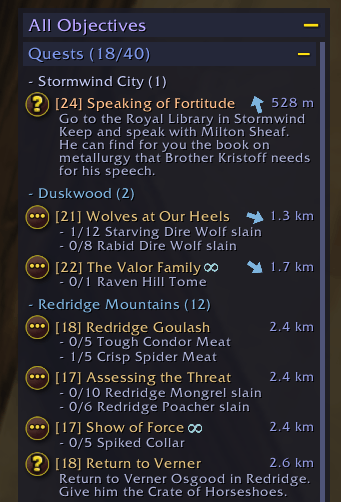
Screenshot_20261010_153056.png
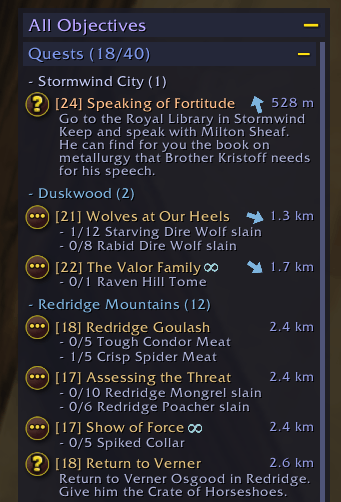
Screenshot_20261010_153056.png
Description
Magic Quest Tracker
A replacement for the built-in objective tracker, for WoW Retail and Classic Forever.
Features
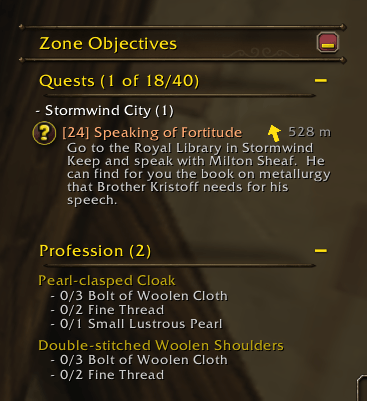
- Familiar layout: collapsible sections for Quests, World Quests, Bonus Objectives and Professions
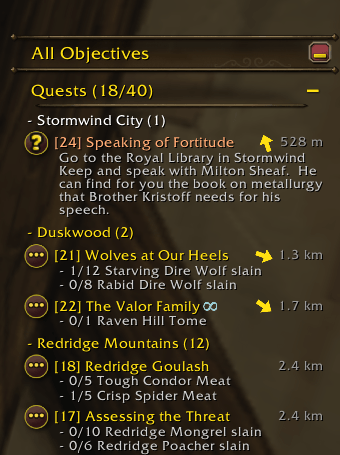
- Quests grouped by zone using only the built-in quest log API (no quest database)
- Current zone first, optional auto-fold of all other zones, option to hide quests outside the current zone
- Sort zones and quests by level, name or distance
- Distance (yards) and direction arrow on each quest
- Quest item buttons for quests with a usable item
- Ctrl-click to navigate to a quest's next location via TomTom, Blizzard navigation, or both
- Quest type suffixes on levels (+, D, R, H) and in titles
- WoW Forever: quests not in original Classic are marked with an infinity sign
- Scrollable, with configurable width, max height and scale via Edit Mode (saved per layout)
- Themes: Blizzard and additional 13 presets, or create your own (based on a preset).
- Custom themes cover fonts, colors, textures, borders and background opacity
- Optional hiding in combat and inside instances
Usage
- Left-click: open quest on map
- Shift-click: link quest
- Right-click: quest menu
- Ctrl-click: navigate to quest
- Tracker title: middle-click toggles current-zone filter, right-click opens settings
- Move and resize in Edit Mode (
/editmode). "Match Blizzard tracker" copies the built-in tracker's position and height.
Commands
/mqt toggle: show/hide the tracker contents/mqt config: open settings
Note on item buttons
Using quest items is a protected action, so the buttons can't change in combat. While one is shown in combat, the tracker won't update until combat ends. They can be disabled in the options.
License
GPLv3
Credits
Infinity sign texture and the idea of marking new-to-Forever quests come from Forever Quest Tint by xanastar (GPLv3).
Magic Quest Tracker Team

Owner