


Forever Quest Tint
Forever Quest Tint
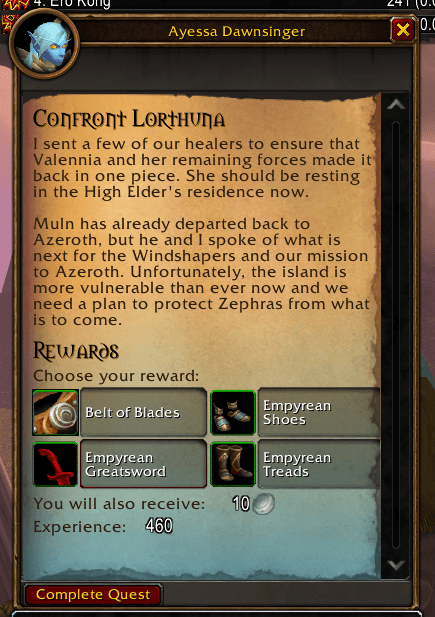
A small addon for World of Warcraft: Forever that tints the quest text background a light teal, to match the Forever logo, whenever the quest was not part of original Classic (vanilla).
Vanilla quests keep the normal parchment. Everything new to Forever gets a teal gradient rising from the bottom of the page.
| Quest giver window |
|---|
 |
Install
- Download the latest release zip.
- Extract it so you have
World of Warcraft\_classic_beta_\Interface\AddOns\ForeverQuestTint. - Restart the game or type
/reload.
Options
Type /fqt, or open Options → AddOns → Forever Quest Tint.
- Enable tint: turn the addon's effect on or off.
- Tint colour: the colour of the overlay.
- Bottom opacity: strength of the teal at the bottom of the page.
- Top opacity: strength where the fade ends.
0%fades out completely. - Fade length: how far up the parchment the fade reaches.
/fqt id prints the ID of the quest you have open, and whether the addon considers it vanilla.
How it decides what is vanilla
The addon contains a list of the quest IDs that existed in original Classic (VanillaQuests.lua). Any quest not on that list is tinted. The list was generated from the Classic quest database in //github.com/Questie/Questie" rel="noopener nofollow" target="_blank">https://github.com/Questie/Questie" target="_blank" rel="noopener noreferrer">Questie. A few genuine vanilla quests may be missing, and would show as teal. If you spot one, open an issue with the ID from /fqt id.
Only quests that are open in a quest window are tinted. Gossip windows have no quest ID, so they are left alone.
Notes
- Built for the Forever beta (interface
16001). It relies on Blizzard's quest log art, so it may need updates if that changes.
Licence
GPL-3.0-or-later. See LICENSE. The vanilla quest list is derived from Questie's data, which is GPL-3.0 licensed.
The Forever Quest Tint Team
