Macro Workshop
- By
Blizzard's macro window, made easier: move it, auto complete, and click / drag commands and templates for your macro.
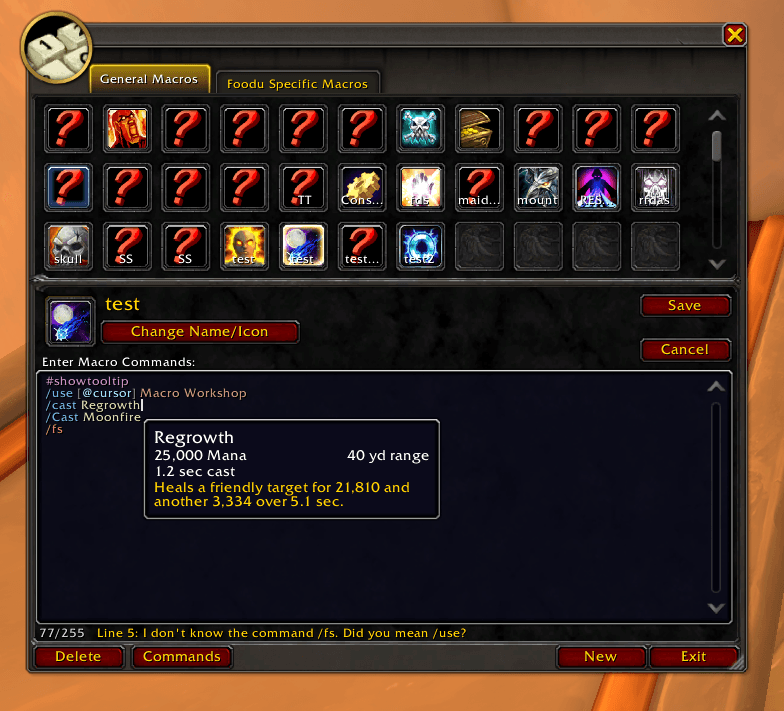
📌 Macro Workshop makes Blizzard's macro window easier to use without changing how it works: move and resize it, open a list of every command, condition and spell to click or drag into your macro, and get autocomplete, soft syntax colors, explanations and friendly checks as you type. Whether you're writing your very first macro or tidying up a bar full of them, it all happens right in the macro window you already know.
🔥 Features
✅ Move & resize – Drag the macro window anywhere and make it bigger: a larger text box and more icons. It remembers.
✅ Command list – Commands, targets, conditions, your spells, items and mounts, with search and a plain explanation and example for each.
✅ Click or drag – Click an entry to add it at the cursor, or drag it into the text exactly where you want it.
✅ Templates – Mouseover heal, cast on focus, stop and interrupt, trinket + spell, mount up and more, explained part by part.
✅ Autocomplete – Suggests commands after /, conditions inside [ ], and your own spells and items while you type.
✅ Explains as you type – Stop at the end of a word and a tooltip tells you what it does and when it's useful; spells and items show their own tooltip.
✅ Syntax colors – Soft code-editor colors for commands, conditions, targets and spells (or High Contrast). Your saved macro stays plain text.
✅ Blizzard style – Blizzard's own window, buttons and fonts; the command list stays hidden until you open it.
✅ Every client – WoW Forever, Retail, MoP Classic, Titan, TBC Anniversary and Classic Era.
✅ Lightweight & dependency-free – Just install and play!
Macro Workshop Team

Owner