MacroSense
- By
The IDE your WoW macros deserve — autocomplete, syntax highlighting, and live error checking.
MacroSense-CurseForge.jpg
Description
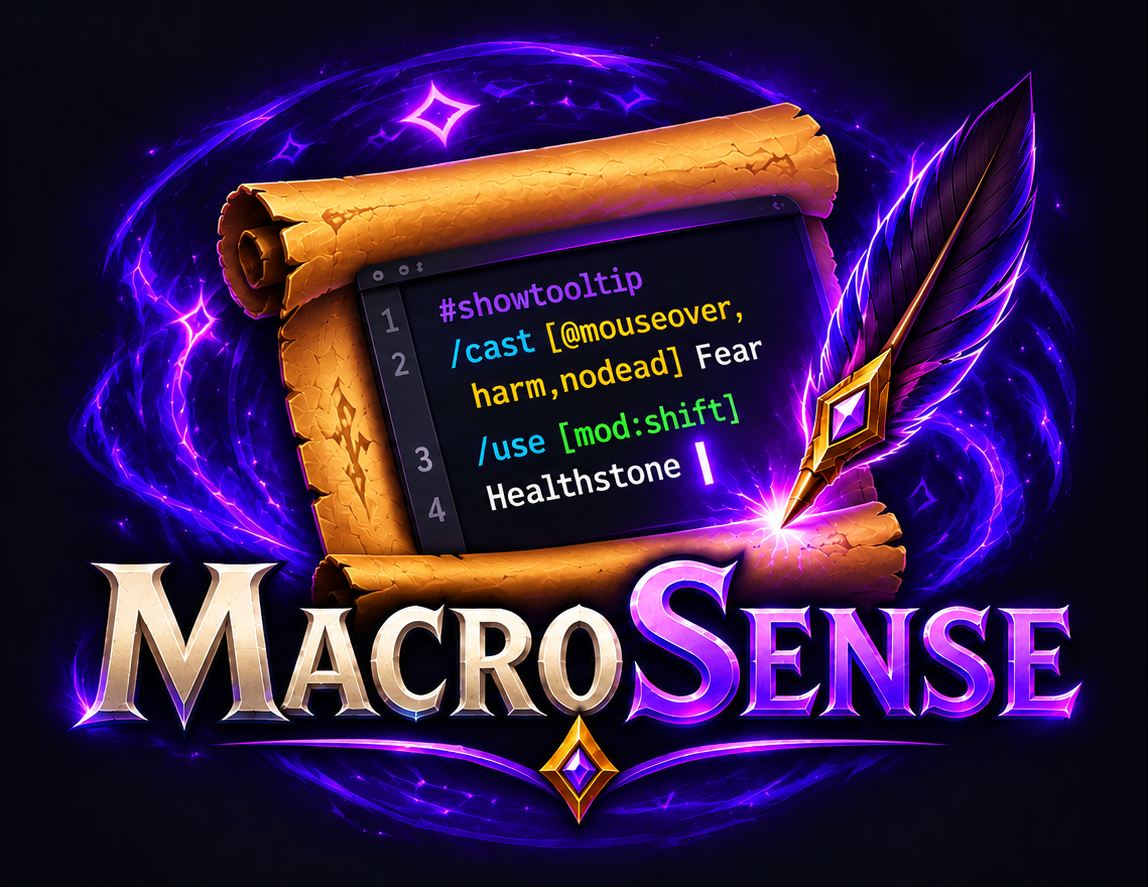
A macro editor that knows macros: a macro wizard, autocomplete, highlighting, error checks and a live preview.
Early development. MacroSense is young and still growing. If something looks wrong, behaves oddly or you miss a feature, please tell me: no report is too small. I read every one and try to fix things as fast as I can. Type
/ms bugin game for the details to include.
The Blizzard macro window is a plain text box. MacroSense opens your macros in a real editor: it suggests commands, conditions, units, spells and items as you type, colors the syntax, and underlines mistakes before you find them in combat. The macros stay the game's own, so the Blizzard window, your action bars and other addons see every change.
Open it from the minimap button (drag it along the edge to move it), with /ms, or with the
MacroSense button in the game's macro window. On Retail it's in the addon menu by the minimap too.
Works on every client: Retail, Mists of Pandaria Classic, TBC Anniversary, Classic Era and WoW Forever.
Quick guide
A macro from the wizard
- New (Wizard) under the macro list.
- Cast: a few letters of the spell (or the first letters of its words, in capitals).
- On: Mouseover, then As usual. Only: Enemies, set from the spell.
- With a key held: Alt casts Immolate on the same units.
- Create macro: it is saved and opens in the editor.

A macro by hand
- A name and an icon (or the question mark: with
#showtooltipthe macro shows its spell's). - Type:
#offers#showtooltip,/the commands,[the conditions,@the units,mod:the keys, then your spells. Tab or Enter takes one. - Mistakes are underlined as you type; the column on the right says what each line would do right now.
- Save, then drag the icon onto an action bar.
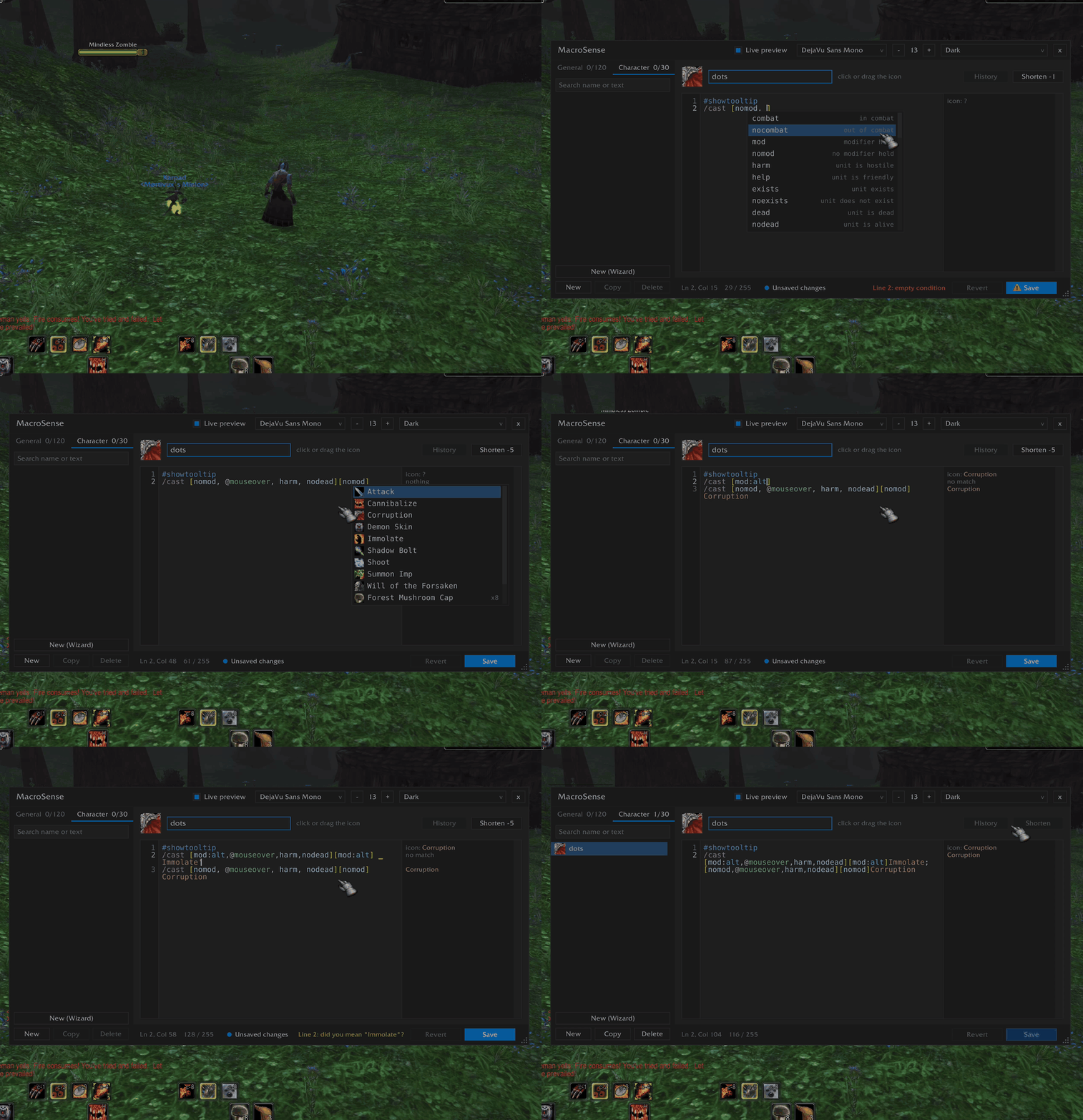
Macro wizard
Don't want to type [@mouseover,help,nodead] by hand? New (Wizard) opens a form where you pick it all:
- the command:
/cast,/use,/castsequence(with what starts it over),/castrandom, or/target,/focusand/assiston units (party members by key, say;/targetby name too), or pet commands (attack your mouseover, follow with Shift, move to the cursor with Ctrl…) - what to cast: a spell or item, found by a few letters or by the first letters of its words in capitals
- on whom, in order: mouseover, focus, your target, yourself, your pet, party members 1-4, target's target, arena enemies 1-3, the cursor, or as usual
- friends, enemies or anyone, alive only: set from the spell for you
- Shift, Ctrl, Alt (and Cmd on a Mac): another spell, or the same one on someone else, with a fallback of its own
- and also: stop your cast first, your trinkets, auto attack, your pet, the nearest enemy if none is targeted,
out of your form or off your mount first, a buff cancelled first, a line in chat (
%tis your target)
The macro shows as you choose; Create macro saves it and opens it in the editor.
Autocomplete
| You type | You get |
|---|---|
/ |
slash commands, emotes, chat commands, commands of your other addons |
/cast [ |
macro conditions: combat, harm, mod, stance, … |
[@ or [target= |
units: mouseover, focus, party1, arena2, … and party1target style chains |
[mod: |
shift, ctrl, alt, cmd on Mac, left / right keys |
[form: / [stance: |
your forms with their names |
[spec:, [equipped:, [group:, [bar:, [btn:, [pet: |
specs, weapon and armor types, party / raid, bar pages, buttons, your pet |
/cast or after ] / ; |
your spells, then usable items |
/use |
items with a use effect (bags and gear), then spells |
/equip / /equipslot 13 |
gear from your bags |
/castsequence reset= |
target, combat, shift, ctrl, alt or seconds |
/use 1 / /equipslot |
equipment slots with what is in them: 13 Trinket 1 |
/use 0 |
what that bag holds, slot by slot |
/click |
the buttons there are now (the game's bars, Bartender4, ElvUI, Dominos), with what is on them |
| a spell with several learned ranks (Classic) | its ranks, highest first: Fireball(Rank 4) |
# |
#showtooltip, #show |
Capitals find names by the first letters of their words: DA finds Demon Armor, SWP Shadow Word:
Pain, CoA Curse of Agony. Small letters stay in one word, in their order: nmd finds nomod.
Tab or Enter accepts, Up / Down move through the list, PageUp / PageDown jump 10, Esc closes
it (after a spell, Esc keeps the plain name without a rank). Long lists scroll, also with the mouse wheel.
Typing [ adds the ] for you.
Highlighting and error checks
Line numbers sit in a gutter on the left, so "Line 3" in a message is easy to find. Commands, conditions, units, values and spell names each get their own color. Mistakes are underlined, the status bar names them (hover for the full list), and the Save button shows a warning sign:
- unknown commands and conditions (a typo like
harmmor/cats) - a
[without], or a]without[ - an empty condition:
[harm,,dead] @ortarget=without a unit,mod:without a value- a wrong value:
btn:7,group:arena,mod:shfit,reset=tagret, or a value where none belongs:combat:1 - a slot that doesn't exist (
/use 23),/equipslotwithout the slot or the item /clickon a button that isn't there, or withdownat the end: the game reads that as no,trueclicks on key press- unknown units like
@mousoverare a yellow warning: they may be a player's name - typos in spell and item names:
Shadwo Boltgetsdid you mean "Shadow Bolt"?, and a click fixes it. Your pets' spells are remembered from every pet you summon, so a Succubus macro stays fine while the Felhunter is out
Saving is still allowed: the editor warns, it doesn't block you. In the macro list, a macro with errors stands out with a red name and a warning sign (only warnings: a yellow name), so a broken one is easy to find among dozens; hover it to see what's wrong.
Mac players: if a macro with [mod:cmd] sits on a key macOS itself uses with Cmd (Cmd+Q quits the game,
Cmd+W, Cmd+H, Cmd+Tab, Cmd+Space, …), the status bar warns you.
Live preview
Next to every line the editor shows what it would do right now: which spell or item it casts and on
whom (Fear @mouseover), no match when its conditions don't hold, stops here for a /stopmacro that
fires, and the icon #showtooltip shows. Hold Shift, Ctrl or Alt (Cmd on a Mac), pick another target,
summon another pet or point at a unit, and the notes change with it: you see every branch of a macro
without casting anything. The game itself checks the conditions, exactly as when you press the key.
Shorten
Hit the 255 character limit? Shorten writes the same macro in fewer characters and tells you how many
it saves: target= becomes @, [@mouseover,harm] Fear; Fear becomes [@mouseover,harm][]Fear,
[pet:Succubus][pet:Incubus] becomes [pet:Succubus/Incubus], and spaces the game doesn't need go. The
macro does exactly the same as before, and Ctrl+Z brings the old text back.
History
Broke a macro that used to work? The game keeps only the last text; MacroSense keeps the ones before it. Every change you save, here, in the game's macro window or with another addon, keeps the text it replaced (the last 10 per macro). Open History, hover a version to read it, click it to bring it back, and Save.
Make it yours
- Seven color schemes: Dark, Light, Graphite, Charcoal, Paper, Monokai, Solarized Dark.
- Monospace fonts included: DejaVu Sans Mono, JetBrains Mono, Fira Mono, Source Code Pro, Inconsolata. Game fonts and LibSharedMedia fonts work too. Size from 8 to 28.
- Resizable window; size and position are remembered.
Icons and action bars
- Click the macro's icon to pick a new one: the question mark (so
#showtooltipchooses), your spells and items first, then all 27,000+ game icons. Search by spell or item name. - The icon grid can be resized, moved away from the editor and docked back.
- Drag a macro from the list, or its icon from the header, straight onto an action bar.
Editing comforts
- Undo / redo: Ctrl+Z, Ctrl+Y (or Ctrl+Shift+Z). Save: Ctrl+S.
- Search your macros by name or text (Ctrl+F): the tabs show how many match in each.
- Line, column and a length counter (macros are limited to 255 characters).
- Asks before discarding unsaved changes.
- Copy a macro: a duplicate in the same tab, or a copy in the Character / General tab.
Commands
| Command | Action |
|---|---|
/ms |
Open or close the editor (also /macrosense, /msense) |
/ms minimap |
Hide or show the minimap button |
/ms bug |
Print the versions to include in a bug report |
/ms autocomplete |
Turn autocomplete on or off |
/ms debug |
Print the editor's key events (helps me with key bugs) |
Good to know
- Macros can't be created, changed or put on action bars in combat; the game doesn't allow it.
- Action bars of other addons (Bartender, ElvUI, …) are not checked for the Mac Cmd warning.
Feedback
Found a bug or have an idea? Open an issue on GitHub (or leave a comment on this page) with what
you did, what you expected and what happened (a screenshot helps), plus the output of /ms bug.
With ❤️ from 🇺🇦
MacroSense Team