


M+GearGuide
- By
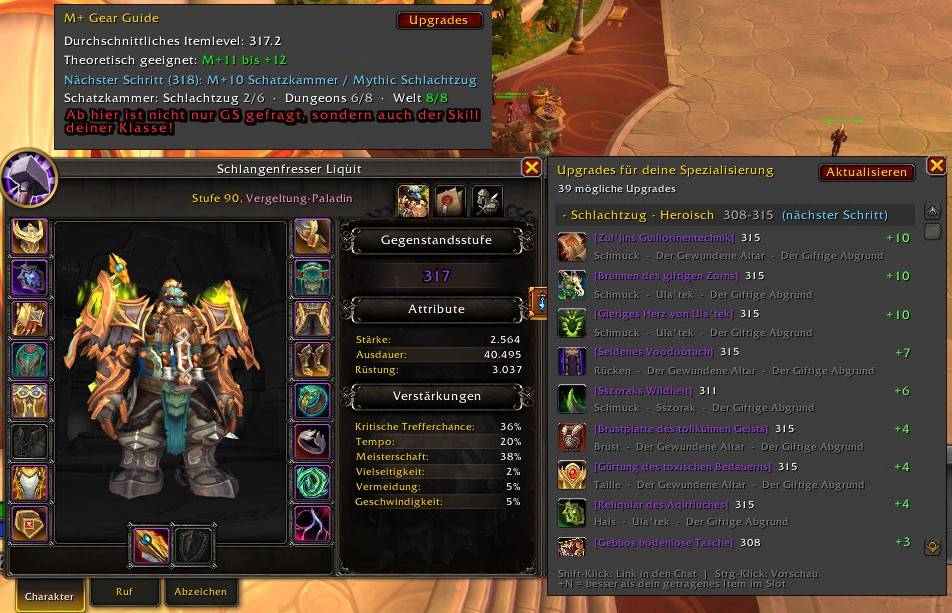
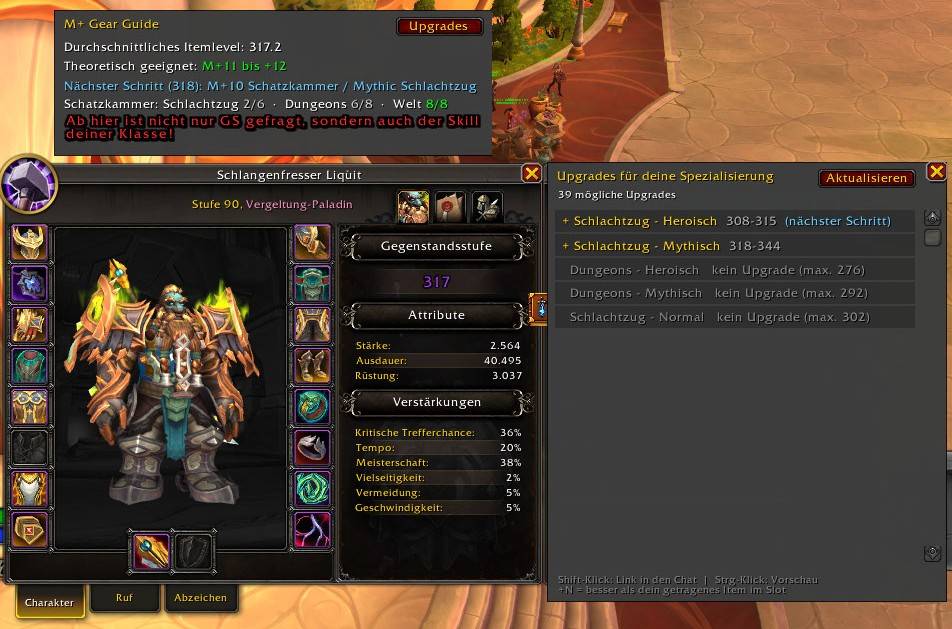
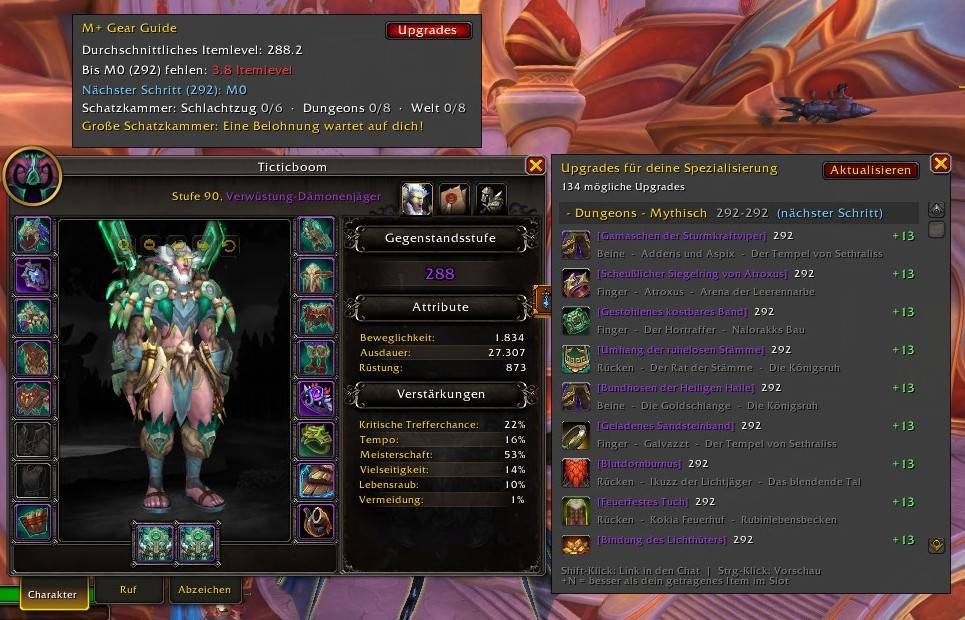
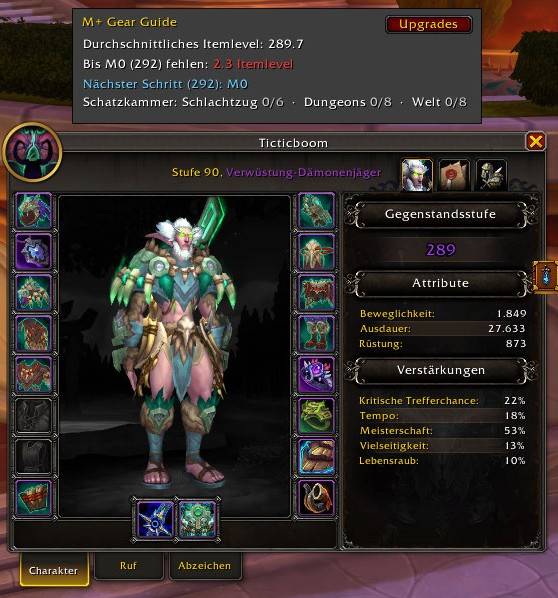
Shows which Mythic+ level your equipped gear fits, what item level is missing, and the next gear step. Adds Great Vault progress and spec-based upgrades from the Adventure Guide. Panel above your character window, 10 languages.
M+Guide screen.jpeg
WoWScrnShot_100626_075102.jpg
WoWScrnShot_100626_075423.jpg
WoWScrnShot_100626_075652.jpg
Description
M+ Gear Guide
See at a glance which Mythic+ keystone level your gear is theoretically ready for.
M+ Gear Guide adds a small panel directly above your character window. It reads your equipped item level and tells you which Mythic+ level fits it. If you are not there yet, it shows exactly how much item level is still missing.
Features
- Equipped gear only: Only what you are actually wearing counts, not the items in your bags. Switch from DPS to tank gear and the panel updates right away.
- Starts at M0: From item level 292 the panel shows M0, then climbs step by step up to M+18+ at item level 331.
- Next step hint: Shows the next gear source above your current item level, for example
Next step (305): Delve 8 + Bounty / M+7. - Skill reminder from M+10: From the M+10 range on, a red warning reminds you that gear alone is not enough and your class skill matters too.
- Upgrades panel: A button on the panel opens a list next to the character window with upgrades for your class and specialization, read from the Adventure Guide. Items count as upgrades if they beat what you wear in that slot. They are grouped by source (raid and dungeon difficulty), lowest step first, so you can climb step by step. Hover for the tooltip, Shift-click to link in chat, Ctrl-click for the preview.
- Great Vault progress: Shows your weekly progress for the Raid, Dungeons and World rows.
- Great Vault hint: If a Great Vault reward is waiting for you, the panel tells you.
- Shows what is missing: Below 292 the panel shows the remaining item level to reach M0, in red.
- Updates automatically: On equipment changes, specialization changes, login and zoning.
- Attached to the character window: Opens and closes with it. It is a separate frame, so it does not conflict with other addons that attach to the character window.
- Auto-sizing panel: The width adapts to the text, so nothing gets cut off.
- Fully localized: Follows your WoW client language automatically.
- Lightweight: One small file, no libraries, no dependencies.
What you will see
| Equipped item level | Panel shows |
|---|---|
| Below 292 | Missing until M0 (292): 12.5 item level (red) |
| 292 - 294 | M0 |
| 295 - 297 | M+2 to +3 |
| 298 - 301 | M+4 |
| 302 - 304 | M+5 |
| 305 - 307 | M+6 to +7 |
| 308 - 310 | M+8 to +9 |
| 311 - 314 | M+10 to +11 |
| 315 - 317 | M+11 to +12 |
| 318 - 320 | M+12 to +13 |
| 321 - 323 | M+13 to +14 |
| 324 - 326 | M+15 |
| 327 - 330 | M+16 to +17 |
| 331+ | M+18+ |
These values are a rough guideline, not a guarantee. Skill, group composition, affixes and the dungeon itself matter at least as much as item level.
Slash commands
| Command | What it does |
|---|---|
/mpgg |
Refreshes the panel |
/mpgg update |
Refreshes the panel |
/mpgg show |
Refreshes the panel and opens the character window |
/mpgg hide |
Closes the character window |
/mpgg loot |
Opens the Upgrades panel next to the character window (same as the Upgrades button) |
/mpgg loot debug |
Same, plus a per-instance summary in chat (useful for bug reports) |
/mpgg move on / off / reset |
Optional: makes the character window draggable and remembers its position (off by default). Do not use it together with another addon that moves the same window |
/mpgg debug |
Prints addon version, client info, panel state and your current equipped item level (useful for bug reports) |
/mplusgear |
Alias for /mpgg, accepts the same options |
Installation
- Download the latest file.
- Extract the
MPlusGearGuidefolder intoWorld of Warcraft/_retail_/Interface/AddOns/. - Restart the game or type
/reload. - Open your character window (default key: C). The panel appears above it.
Supported languages
English, Deutsch, Français, Español (ES/MX), Italiano, Português (BR), Русский, 한국어, 简体中文, 繁體中文.
Missing translations fall back to English. Found a wording that sounds off? Please let me know in the comments.
FAQ
The panel shows the wrong item level after swapping gear. The game sometimes updates the average a moment late. The panel refreshes again after one second. If it still looks wrong, type /mpgg debug and post the output.
Does it work on Classic? No. It is built for Retail (Midnight).
Can I change the thresholds? Yes. Open MPlusGearGuide.lua and edit the TIERS table at the top. Each line is one step: the item level it starts at and the keystone levels it shows.
Will it conflict with other character window addons? It is its own frame and is not a child of the character window, so it should not.
Feedback
Bug reports and suggestions are welcome in the comments. Please include the output of /mpgg debug.
Made by Dave "Liquit".
M+GearGuide Team

